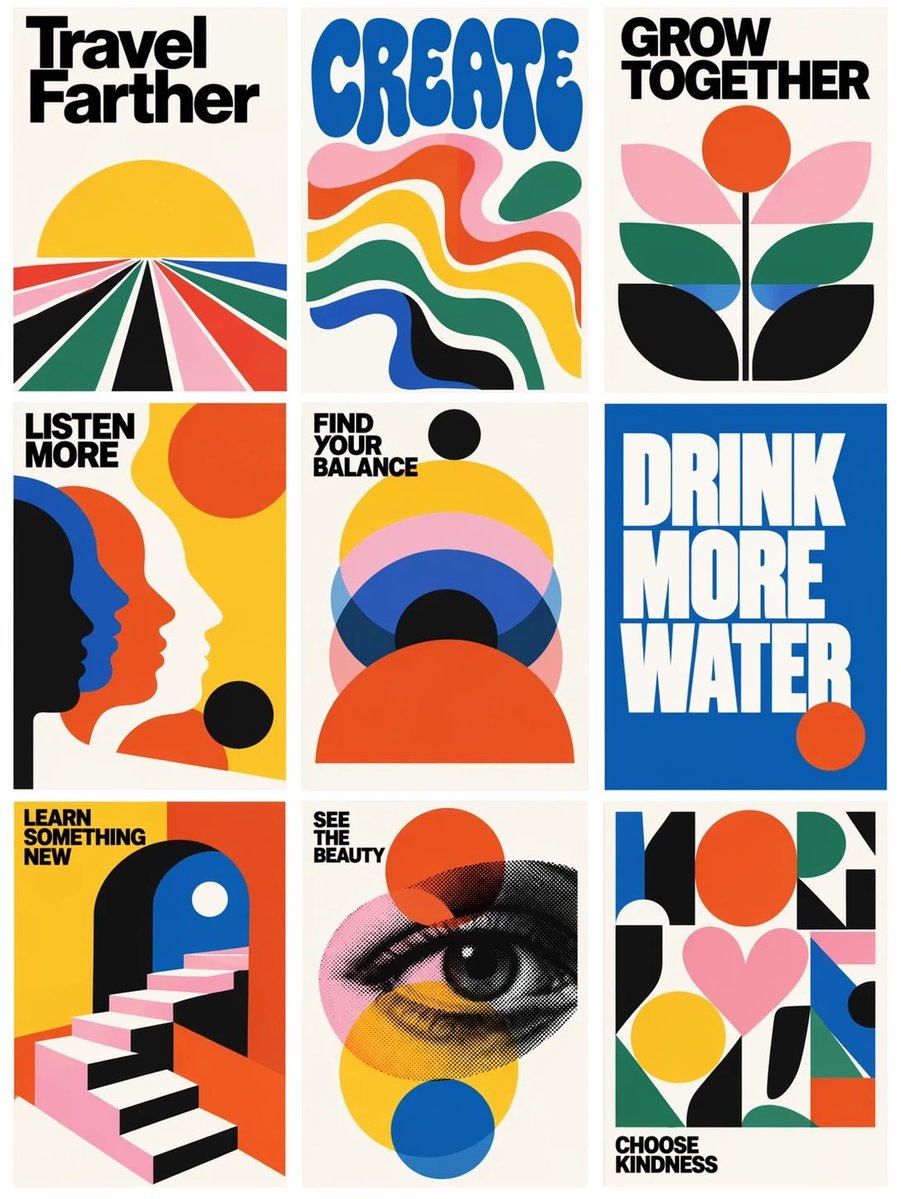
Retro Motivational Poster Grid
Generates a 3x3 gallery of bold vintage-style motivational posters from a reference grid layout.
Это пример использования шаблона GPT Image 2 для Графика и плакаты . Используйте приведенный ниже шаблон, готовый к копированию, чтобы создать аналогичные визуальные элементы, и перед повторным использованием проверьте указание авторства Awesome GPT Image 2 Prompts и права на коммерческое использование.
Free 1K preview
Generate one preview image instantly, no sign-up required.
Free text preview doesn’t preserve reference-image consistency.
Промпт
Подсказка для копирования
Using the provided reference image as a loose layout reference, replace the prompt-library interface with a clean 3-column by 3-row gallery of exactly 9 vertical retro graphic posters. Remove all website UI elements, author names, buttons, borders, Korean interface text, and card metadata. Keep only the idea of a tiled poster grid with narrow gutters on an off-white background.

Style: Bold 1960s–1970s modernist poster design, flat vector shapes, cream paper backgrounds, high-contrast black typography, saturated primary colors, simple geometric compositions, minimal texture, crisp print-poster look.

Create exactly 9 posters, arranged left to right, top to bottom:
1. Poster text: “Travel Farther” — radiating perspective road/fields leading to a yellow sun.
2. Poster text: “CREATE” — large rounded blue psychedelic type above flowing wavy color bands.
3. Poster text: “GROW TOGETHER” — abstract flower with orange sun/circle and layered leaves.
4. Poster text: “LISTEN MORE” — overlapping side-profile silhouettes in black, blue, orange, and cream.
5. Poster text: “FIND YOUR BALANCE” — stacked semicircles and circles in yellow, pink, blue, black, and orange.
6. Poster text: “DRINK MORE WATER” — oversized white block type on a solid blue field with a small orange circle.
7. Poster text: “LEARN SOMETHING NEW” — geometric staircase entering an archway.
8. Poster text: “SEE THE BEAUTY” — halftone illustrated eye over transparent colored circles.
9. Poster text: “CHOOSE KINDNESS” — abstract geometric collage with a pink heart and colorful blocks.

Typography: Use bold condensed sans-serif headline lettering; make the text large, readable, and integrated into each poster. Use the headline set {argument name="poster message theme" default="uplifting lifestyle reminders"} while preserving the exact 9-poster count and grid structure. Use a palette based on {argument name="color palette" default="cream, black, yellow, orange-red, cobalt blue, forest green, and pink"}. Overall composition should feel like {argument name="poster era" default="1970s modernist motivational print posters"}.
Переменные подсказки
Редактируемые заполнители аргументов, найденные в подсказке, с их значениями по умолчанию.
Best for
- - Графика и плакаты visual exploration
- - Image generation and reference-image edits
- - Reusable briefs that keep source attribution visible
Change these parts
- - Subject, product, character, or scene
- - Aspect ratio, camera, lighting, and background
- - Brand, text, color, and output constraints
Recommended model and settings
- - Model: gpt-image-2
- - Input mode: Изображение в изображение
- - Aspect ratio: source
- - Commercial status: review original source
How to use this prompt
- 1. Copy the prompt and preserve its structure for the first test.
- 2. Replace the subject, context, and publishing channel.
- 3. Change one camera, lighting, or style variable per iteration.
- 4. Inspect the output, source, text, and rights before reuse.
Limitations, source, and reuse cautions
- - Generated output is an editable draft, not factual, legal, or rights evidence.
- - Review the linked source, people, brands, logos, text, and third-party media before commercial use.
Больше случаев в этой категории
Приоритет отдается категориям, совместимости с режимами ввода, качеству и низкому уровню риска.






Примечания по повторному использованию и источникам
Используйте это подсказку безопасно после предварительного просмотра дела.
- 1.Скопируйте подсказку или откройте ее непосредственно в Dovoo с помощью кнопки генерации.
- 2.Настройте переменные, соотношение сторон и эталонные изображения в соответствии с вашими потребностями.
- 3.Перед публикацией или платным использованием проверьте права на источник, требования к указанию авторства, а также риски, связанные с использованием товарного знака или изображения.