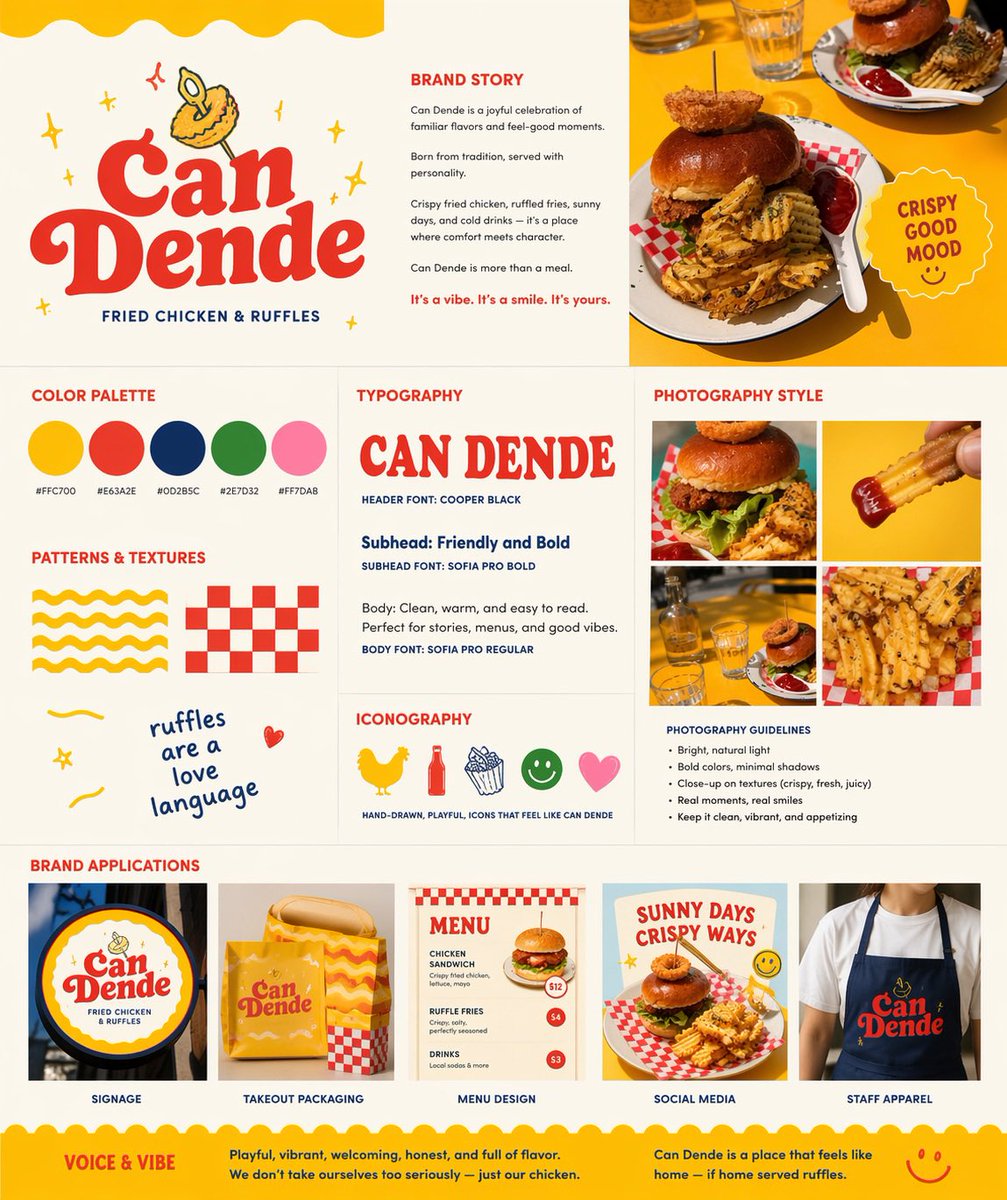
Ретро-вывеска бренда фаст-фуда
Этот проект превращает эталонную фотографию блюда в полноценную презентацию по брендингу ресторана, демонстрирующую логотип, цветовую палитру, типографику, стиль фотографии и применение фирменного стиля.
Это пример использования шаблона GPT Image 2 для Графика и плакаты . Используйте приведенный ниже шаблон, готовый к копированию, чтобы создать аналогичные визуальные элементы, и перед повторным использованием проверьте указание авторства Awesome GPT Image 2 Prompts и права на коммерческое использование.
Free 1K preview
Generate one preview image instantly, no sign-up required.
Free text preview doesn’t preserve reference-image consistency.
Промпт
Подсказка для копирования
Using REFERENCE_0 as the hero food photo, transform it into a polished one-page restaurant branding board for a fried chicken and waffle-fries concept named {argument name="brand name" default="Can Dende"}. Keep the yellow-table food photography as the visual anchor, but redesign the output as a clean square brand guideline sheet on a warm off-white background with a cheerful, retro, hand-drawn fast-casual identity. Add a large logo area in the upper left with bold vintage red lettering, a small illustrated fried-food mascot above it, and the tagline “FRIED CHICKEN & RUFFLES”. Build the page as a structured multi-panel layout with 9 sections: 1) logo/hero area, 2) brand story text block, 3) top-right hero photo crop from the reference, 4) color palette showing exactly 5 swatches with hex labels, 5) typography section with a large display sample of the brand name plus 3 text styles labeled header, subhead, and body, 6) patterns and textures section with exactly 4 playful assets: a yellow wavy stripe pattern, a red checker pattern, a handwritten phrase, and a small doodle heart, 7) iconography section with exactly 5 simple icons: chicken, bottle, fries, smiley face, and heart, 8) photography style section with a 2x2 grid of exactly 4 food-photo crops derived from the reference and matching close-up shots, plus a short bullet list of photography guidelines, and 9) brand applications section with exactly 5 mockups labeled signage, takeout packaging, menu design, social media, and staff apparel. Include a circular badge near the hero photo that says {argument name="badge text" default="CRISPY GOOD MOOD"}. Use the palette {argument name="primary palette" default="yellow, tomato red, deep navy, leaf green, soft pink"}. Add a bottom banner with 2 sections titled “VOICE & VIBE” and a short brand summary paragraph. Overall feel: modern branding presentation, vibrant, appetizing, playful, sunny, editorial, highly legible, premium-but-fun.Переменные подсказки
Редактируемые заполнители аргументов, найденные в подсказке, с их значениями по умолчанию.
Best for
- - Графика и плакаты visual exploration
- - Image generation and reference-image edits
- - Reusable briefs that keep source attribution visible
Change these parts
- - Subject, product, character, or scene
- - Aspect ratio, camera, lighting, and background
- - Brand, text, color, and output constraints
Recommended model and settings
- - Model: gpt-image-2
- - Input mode: Изображение в изображение
- - Aspect ratio: source
- - Commercial status: review original source
How to use this prompt
- 1. Copy the prompt and preserve its structure for the first test.
- 2. Replace the subject, context, and publishing channel.
- 3. Change one camera, lighting, or style variable per iteration.
- 4. Inspect the output, source, text, and rights before reuse.
Limitations, source, and reuse cautions
- - Generated output is an editable draft, not factual, legal, or rights evidence.
- - Review the linked source, people, brands, logos, text, and third-party media before commercial use.
Больше случаев в этой категории
Приоритет отдается категориям, совместимости с режимами ввода, качеству и низкому уровню риска.






Примечания по повторному использованию и источникам
Используйте это подсказку безопасно после предварительного просмотра дела.
- 1.Скопируйте подсказку или откройте ее непосредственно в Dovoo с помощью кнопки генерации.
- 2.Настройте переменные, соотношение сторон и эталонные изображения в соответствии с вашими потребностями.
- 3.Перед публикацией или платным использованием проверьте права на источник, требования к указанию авторства, а также риски, связанные с использованием товарного знака или изображения.