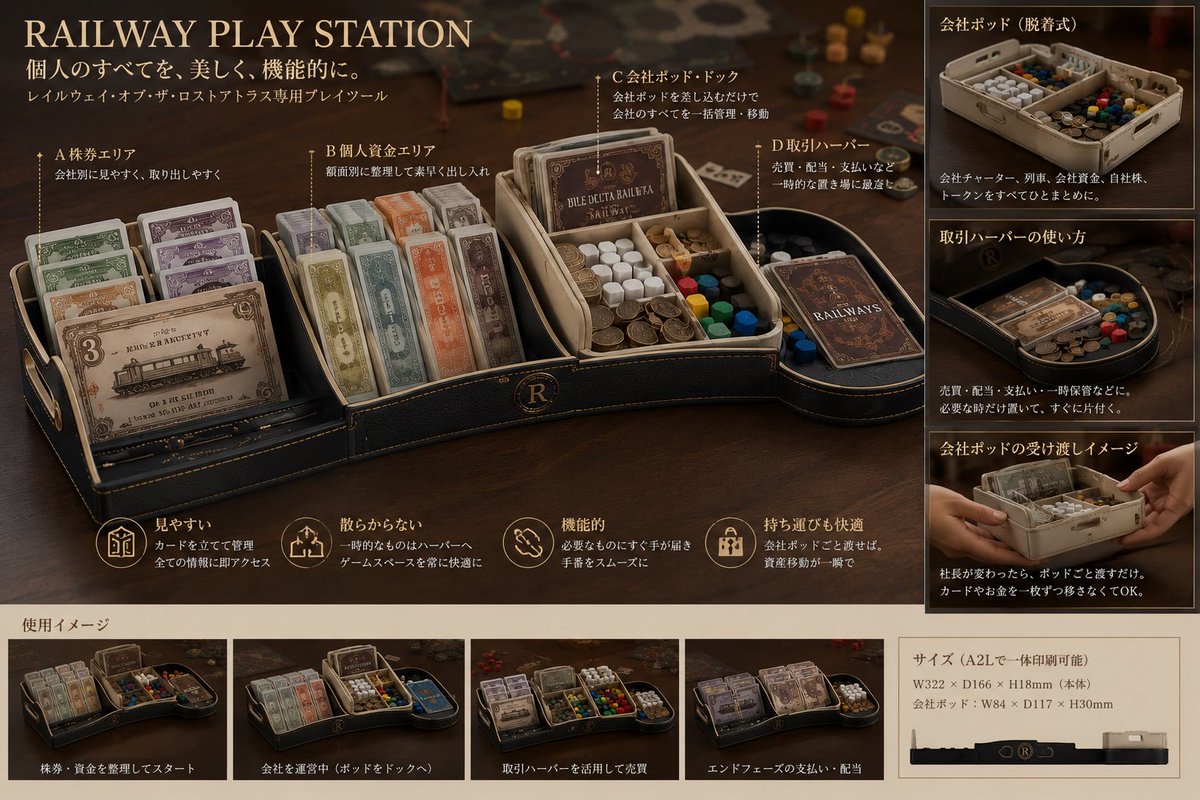
Luxury Railway Board Game Organizer Poster
Creates a premium product-presentation poster for a modular railway board-game organizer based on prototype reference photos.
Это пример использования шаблона GPT Image 2 для Продукт и коммерция . Используйте приведенный ниже шаблон, готовый к копированию, чтобы создать аналогичные визуальные элементы, и перед повторным использованием проверьте указание авторства Awesome GPT Image 2 Prompts и права на коммерческое использование.
Free 1K preview
Generate one preview image instantly, no sign-up required.
Free text preview doesn’t preserve reference-image consistency.
Промпт
Подсказка для копирования
Using REFERENCE_0 and REFERENCE_1 as the physical product reference, transform the modular white 3D-printed board-game organizer into a premium crowdfunding-style product presentation poster for {argument name="product name" default="RAILWAY PLAY STATION"}. Keep the same core concept: removable modular trays for separating personal money, company assets, cards, tokens, and train-related components, but redesign the visual style as a luxury dark leather-and-brass tabletop accessory rather than a plain white prototype.

Canvas and style: Create a horizontal 16:9 product board on a warm dark tabletop, cinematic shallow depth of field, antique railway / executive desk atmosphere, black leather texture, gold trim, sepia lighting, high-end catalog design. Use elegant serif English headline typography and small Japanese explanatory copy.

Main layout: Put a large hero render of the organizer across the left and center. Show it divided into exactly 4 labeled functional areas with thin callout lines:
1. A stock certificate area — cards standing upright and easy to see.
2. B personal funds area — neatly sorted paper money / securities.
3. C company pod dock — removable company tray holding company cards, money, colored cubes, and tokens.
4. D transaction harbor — a side holding area for temporary sales, distribution, payments, or transaction handling.

Right column: Add exactly 3 stacked explanatory image panels with Japanese headings:
1. Company pod, detachable style — show the removable pod full of cards, money, and tokens.
2. How to use the transaction harbor — show temporary components placed in the curved side tray.
3. Company pod handoff image — show hands passing the removable company pod.

Bottom strip: Add a section titled in Japanese as a usage image area, containing exactly 4 small scenario thumbnails with captions:
1. Start by organizing stocks and funds.
2. Operate a company by docking the pod.
3. Use the transaction harbor for sales.
4. End-phase payments and distribution.

Feature row: Beneath the hero product, include exactly 4 circular gold line icons with short Japanese benefits: easy to see, does not scatter, functional, comfortable to carry.

Size panel: Add a beige specification box at lower right showing printable size information for {argument name="printer size" default="A2L"}, including approximate dimensions {argument name="main body dimensions" default="W322 × D166 × H18mm"} and company pod dimensions {argument name="company pod dimensions" default="W84 × D117 × H30mm"}. Include a simple side-profile silhouette of the organizer.

Text: Use headline {argument name="headline text" default="RAILWAY PLAY STATION"}. Add Japanese subtitle copy meaning “Everything personal, beautifully and functionally,” and a small line indicating it is a dedicated tray tool for a railway board game. Keep the poster polished and realistic, with legible labels, no watermark, and no unrelated extra components.
Переменные подсказки
Редактируемые заполнители аргументов, найденные в подсказке, с их значениями по умолчанию.
Best for
- - Продукт и коммерция visual exploration
- - Image generation and reference-image edits
- - Reusable briefs that keep source attribution visible
Change these parts
- - Subject, product, character, or scene
- - Aspect ratio, camera, lighting, and background
- - Brand, text, color, and output constraints
Recommended model and settings
- - Model: gpt-image-2
- - Input mode: Изображение в изображение
- - Aspect ratio: source
- - Commercial status: review original source
How to use this prompt
- 1. Copy the prompt and preserve its structure for the first test.
- 2. Replace the subject, context, and publishing channel.
- 3. Change one camera, lighting, or style variable per iteration.
- 4. Inspect the output, source, text, and rights before reuse.
Limitations, source, and reuse cautions
- - Generated output is an editable draft, not factual, legal, or rights evidence.
- - Review the linked source, people, brands, logos, text, and third-party media before commercial use.
Больше случаев в этой категории
Приоритет отдается категориям, совместимости с режимами ввода, качеству и низкому уровню риска.





Примечания по повторному использованию и источникам
Используйте это подсказку безопасно после предварительного просмотра дела.
- 1.Скопируйте подсказку или откройте ее непосредственно в Dovoo с помощью кнопки генерации.
- 2.Настройте переменные, соотношение сторон и эталонные изображения в соответствии с вашими потребностями.
- 3.Перед публикацией или платным использованием проверьте права на источник, требования к указанию авторства, а также риски, связанные с использованием товарного знака или изображения.