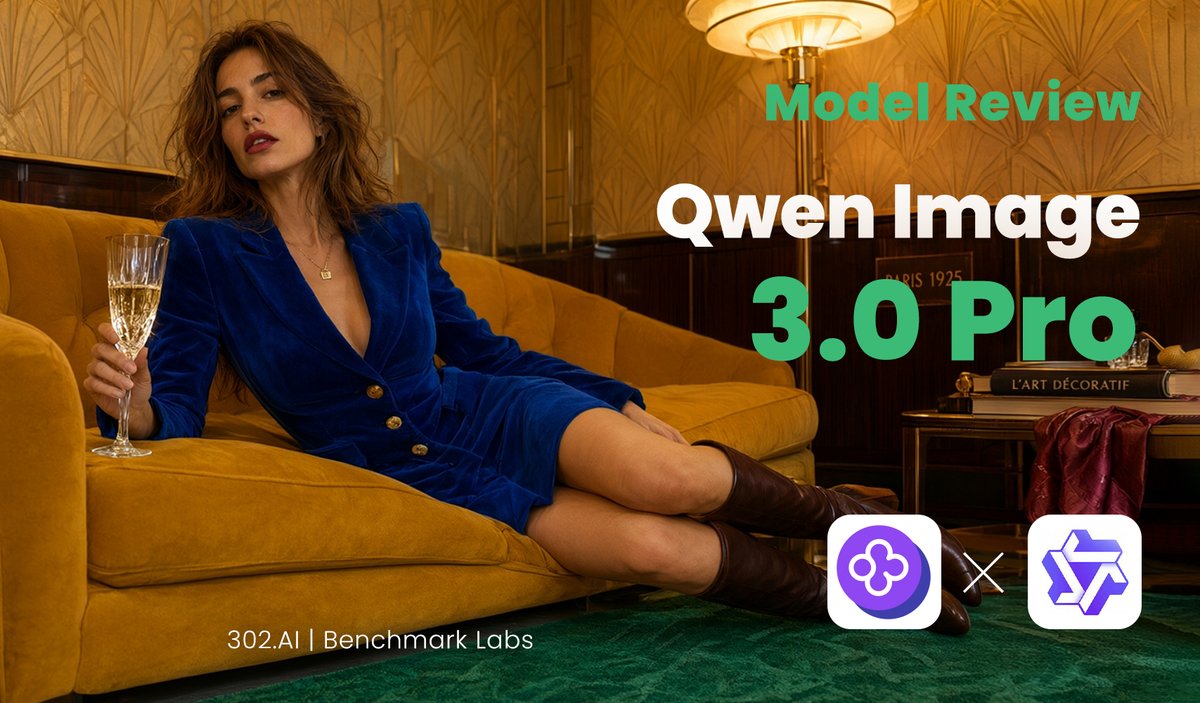
Qwen Image Model Review Banner
A luxury editorial social media banner template for promoting an AI image model review or benchmark comparison.
Это пример использования шаблона GPT Image 2 для Графика и плакаты . Используйте приведенный ниже шаблон, готовый к копированию, чтобы создать аналогичные визуальные элементы, и перед повторным использованием проверьте указание авторства Awesome GPT Image 2 Prompts и права на коммерческое использование.
Нужен полный набор подсказок? Воспользуйтесь Графика и плакаты Для получения дополнительных примеров по теме, или откройте раздел "Обзор тем" GPT Image 2 быстрый каталог Полный список примеров, многократно используемых структур и указание источников см. здесь.
Free 1K preview
Generate one preview image instantly, no sign-up required.
2501/4000
Промпт
Подсказка для копирования
Goal: Create a cinematic editorial social media banner for an AI model review of {argument name="model name" default="Qwen Image 3.0 Pro"}, combining a luxury lounge fashion photograph with bold tech-review typography.

Canvas: Wide landscape 16:9 banner, about 1200×675 px, optimized for X/Twitter link preview. Use a warm golden color grade with high contrast and shallow cinematic lighting.

Main image: A fashionable adult woman lounges diagonally across a mustard-yellow velvet sofa in an art deco interior. She has loose wavy brown hair, red lipstick, and a confident relaxed expression, wearing a deep royal-blue velvet blazer dress with gold buttons, bare legs, and dark brown knee-high boots. Her left side is toward the viewer; she holds a champagne flute in one hand near the left edge while reclining with legs extended toward the lower right. The room has patterned gold wallpaper, dark wood wall paneling, a green carpet, and a glowing vintage floor lamp near the upper center-right. Include a small side table on the right with stacked art/design books and a draped burgundy fabric, creating a 1920s Parisian hotel lounge mood.

Text layout: Place large review text on the right half, leaving the woman mostly unobstructed on the left. Use exactly 3 main text elements: top label “Model Review” in bold teal-green sans serif, main title “Qwen Image” in very large bold white sans serif, and version line “3.0 Pro” in extra-large bold teal-green sans serif. Add a small footer credit near the bottom left-center reading “{argument name="footer credit" default="302.AI | Benchmark Labs"}” in thin white sans serif.

Logo area: At the bottom right, show exactly 3 discrete logo/comparison elements: a rounded white square containing a purple circular clover-like AI icon on the left, a white “×” multiplication sign in the middle, and a rounded white square containing a purple geometric star/cube-like logo on the right.

Visual style: Luxury editorial photography blended with clean SaaS benchmark branding; crisp typography, warm amber highlights, teal accent text, deep green floor, mustard sofa, royal-blue outfit. Make the composition look like a polished review thumbnail for {argument name="review topic" default="Qwen Image 3.0 Pro versus GPT-Image-2"}.

Constraints: Keep all visible text legible and spelled exactly as specified. Do not add extra captions, watermarks, interface chrome, or additional logos. Preserve the wide banner layout and the three-logo comparison cluster.
Переменные подсказки
Редактируемые заполнители аргументов, найденные в подсказке, с их значениями по умолчанию.
Переменная
model name
По умолчанию
Qwen Image 3.0 Pro
Переменная
footer credit
По умолчанию
302.AI | Benchmark Labs
Переменная
review topic
По умолчанию
Qwen Image 3.0 Pro versus GPT-Image-2
Best for
- - Графика и плакаты visual exploration
- - Image generation and reference-image edits
- - Reusable briefs that keep source attribution visible
Change these parts
- - Subject, product, character, or scene
- - Aspect ratio, camera, lighting, and background
- - Brand, text, color, and output constraints
Recommended model and settings
- - Model: gpt-image-2
- - Input mode: Текст в изображение
- - Aspect ratio: source
- - Commercial status: review original source
How to use this prompt
- 1. Copy the prompt and preserve its structure for the first test.
- 2. Replace the subject, context, and publishing channel.
- 3. Change one camera, lighting, or style variable per iteration.
- 4. Inspect the output, source, text, and rights before reuse.
Limitations, source, and reuse cautions
- - Generated output is an editable draft, not factual, legal, or rights evidence.
- - Review the linked source, people, brands, logos, text, and third-party media before commercial use.
Импортировано из Awesome GPT Image 2 Prompts . Требуется указание авторства. Статус коммерческого использования: allowed ; перед платным использованием ознакомьтесь с правами на источник.
Больше случаев в этой категории
Приоритет отдается категориям, совместимости с режимами ввода, качеству и низкому уровню риска.

GPT Image 2 Real-Life Character Street Snap
Текст в изображение

Matte Black B.AI Keyboard Keycap
Текст в изображение

MotoGP POV Cornering Shot
Текст в изображение

Orange Rooftop Fashion Photo Prompt
Текст в изображение

Luxury Travel Fashion Portrait Prompt
Текст в изображение

Cute Focus Desk Flat Lay and Kawaii Illustration
Текст в изображение
Примечания по повторному использованию и источникам
Используйте это подсказку безопасно после предварительного просмотра дела.
- 1.Скопируйте подсказку или откройте ее непосредственно в Dovoo с помощью кнопки генерации.
- 2.Настройте переменные, соотношение сторон и эталонные изображения в соответствии с вашими потребностями.
- 3.Перед публикацией или платным использованием проверьте права на источник, требования к указанию авторства, а также риски, связанные с использованием товарного знака или изображения.