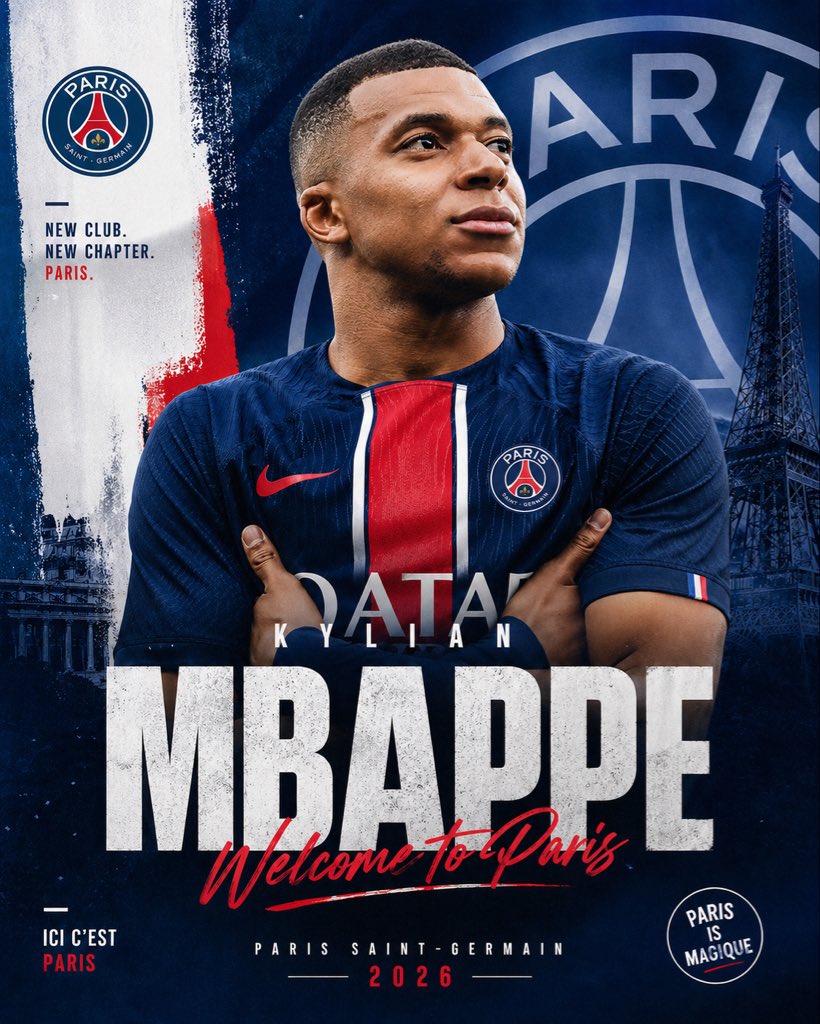
Постер с объявлением о трансфере ПСЖ
Яркий, профессиональный футбольный плакат для объявления о переходе игрока в «Пари Сен-Жермен» в социальных сетях или в рекламных материалах для спорта.
Это пример использования шаблона GPT Image 2 для Графика и плакаты . Используйте приведенный ниже шаблон, готовый к копированию, чтобы создать аналогичные визуальные элементы, и перед повторным использованием проверьте указание авторства Awesome GPT Image 2 Prompts и права на коммерческое использование.
Free 1K preview
Generate one preview image instantly, no sign-up required.
Промпт
Подсказка для копирования
Create a dramatic football transfer announcement poster in a vertical social-media format, centered on a photorealistic adult male soccer player wearing a modern Paris Saint-Germain home jersey, arms crossed, chest-up framing, strong athletic build, face mostly obscured by a soft rectangular blur block for anonymity, short close-cropped hair visible around the edges. Use a deep navy blue PSG-themed color palette with bold red and white accents. The jersey should feature a central red vertical stripe bordered by white, a red swoosh-style sports logo on the left side from the viewer's perspective, the PSG crest on the opposite chest, and faint sponsor lettering across the torso. Place the player in front of a layered graphic background featuring an oversized faded PSG crest filling most of the upper-right background, a dark Eiffel Tower silhouette on the right side, painterly brush-stroke textures, subtle grunge, and a white vertical paint strip on the left with a rough red brush accent near the middle. Include the PSG club badge near the upper left. Add left-side stacked slogan text in bold uppercase sans serif reading: "NEW CLUB. NEW CHAPTER. PARIS." with the last word in red. Add a huge distressed white block headline across the lower middle reading "{argument name="player surname" default="MBAPPE"}", with smaller spaced uppercase first name above it reading "{argument name="player first name" default="KYLIAN"}". Overlay a red handwritten script across the big surname saying "{argument name="welcome text" default="Welcome To Paris"}". At the bottom center, add small uppercase text "PARIS SAINT-GERMAIN" and beneath it the year "{argument name="year" default="2026"}" in red with thin divider lines on each side. In the lower left, include small stacked text "ICI C'EST PARIS" with "PARIS" in red. In the lower right, add a circular stamp-style badge reading "PARIS IS MAGIQUE". Use cinematic lighting, high contrast, premium sports-brand poster design, sharp fabric texture, moody shadows, gritty editorial finish, and polished transfer-window announcement aesthetics.Переменные подсказки
Редактируемые заполнители аргументов, найденные в подсказке, с их значениями по умолчанию.
Best for
- - Графика и плакаты visual exploration
- - Image generation and reference-image edits
- - Reusable briefs that keep source attribution visible
Change these parts
- - Subject, product, character, or scene
- - Aspect ratio, camera, lighting, and background
- - Brand, text, color, and output constraints
Recommended model and settings
- - Model: gpt-image-2
- - Input mode: Текст в изображение
- - Aspect ratio: source
- - Commercial status: review original source
How to use this prompt
- 1. Copy the prompt and preserve its structure for the first test.
- 2. Replace the subject, context, and publishing channel.
- 3. Change one camera, lighting, or style variable per iteration.
- 4. Inspect the output, source, text, and rights before reuse.
Limitations, source, and reuse cautions
- - Generated output is an editable draft, not factual, legal, or rights evidence.
- - Review the linked source, people, brands, logos, text, and third-party media before commercial use.
Больше случаев в этой категории
Приоритет отдается категориям, совместимости с режимами ввода, качеству и низкому уровню риска.






Примечания по повторному использованию и источникам
Используйте это подсказку безопасно после предварительного просмотра дела.
- 1.Скопируйте подсказку или откройте ее непосредственно в Dovoo с помощью кнопки генерации.
- 2.Настройте переменные, соотношение сторон и эталонные изображения в соответствии с вашими потребностями.
- 3.Перед публикацией или платным использованием проверьте права на источник, требования к указанию авторства, а также риски, связанные с использованием товарного знака или изображения.