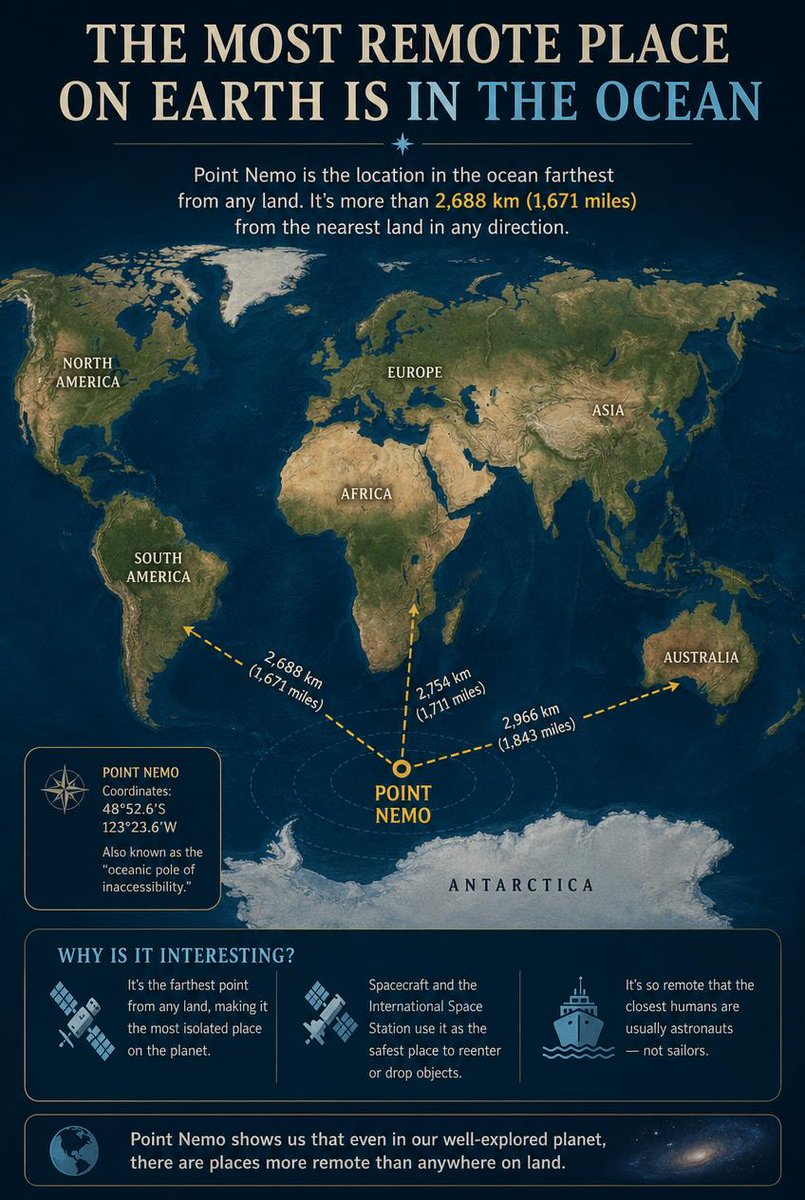
Point Nemo Infographic
An educational infographic detailing Point Nemo, the oceanic pole of inaccessibility, showing its location relative to continents and interesting facts about its remoteness.
Это пример использования шаблона GPT Image 2 для Графика и плакаты . Используйте приведенный ниже шаблон, готовый к копированию, чтобы создать аналогичные визуальные элементы, и перед повторным использованием проверьте указание авторства Awesome GPT Image 2 Prompts и права на коммерческое использование.
Free 1K preview
Generate one preview image instantly, no sign-up required.
Промпт
Подсказка для копирования
Goal: Create an educational infographic explaining {argument name="topic" default="Point Nemo, the most remote place on Earth located in the ocean"}.

Canvas: Vertical portrait layout with a deep navy blue background and a subtle starry night sky texture at the top. The style is clean, modern, and informative, using gold and white text for high contrast.

Layout:
1. **Header:** Large serif title "THE MOST REMOTE PLACE ON EARTH IS IN THE OCEAN" (with "IN THE OCEAN" highlighted in light blue). Below it, a small introductory paragraph defining Point Nemo as the location farthest from land, mentioning the distance of 2,688 km (1,671 miles).
2. **Central Map:** A stylized world map centered on the South Pacific Ocean. Continents are rendered in muted earth tones (greens, browns) against dark blue oceans. Labels include NORTH AMERICA, SOUTH AMERICA, EUROPE, ASIA, AFRICA, AUSTRALIA, and ANTARCTICA.
3. **Data Visualization:** A bright yellow dot marks "POINT NEMO" in the ocean south of Easter Island. Three dashed yellow arrows radiate from this point to the nearest landmasses, labeled with distances: "2,688 km (1,671 miles)" to Antarctica, "2,754 km (1,711 miles)" to South America, and "2,966 km (1,843 miles)" to Australia.
4. **Info Box (Left):** A rectangular box with a compass icon containing the coordinates "48°52.6'S 123°23.6'W" and the nickname "oceanic pole of inaccessibility."
5. **Bottom Section:** A section titled "WHY IS IT INTERESTING?" with three columns featuring icons and text:
   - Icon: Satellite dish. Text: "It's the farthest point from any land, making it the most isolated place on the planet."
   - Icon: Space station/satellite. Text: "Spacecraft and the International Space Station use it as the safest place to reenter or drop objects."
   - Icon: Ship. Text: "It's so remote that the closest humans are usually astronauts — not sailors."
6. **Footer:** A concluding statement next to a globe icon: "Point Nemo shows us that even in our well-explored planet, there are places more remote than anywhere on land."

Visual Style: Professional infographic design. Use clear sans-serif fonts for body text and serif fonts for headings. Ensure the map projection clearly highlights the isolation of the central point.
Переменные подсказки
Редактируемые заполнители аргументов, найденные в подсказке, с их значениями по умолчанию.
Best for
- - Графика и плакаты visual exploration
- - Image generation and reference-image edits
- - Reusable briefs that keep source attribution visible
Change these parts
- - Subject, product, character, or scene
- - Aspect ratio, camera, lighting, and background
- - Brand, text, color, and output constraints
Recommended model and settings
- - Model: gpt-image-2
- - Input mode: Текст в изображение
- - Aspect ratio: source
- - Commercial status: review original source
How to use this prompt
- 1. Copy the prompt and preserve its structure for the first test.
- 2. Replace the subject, context, and publishing channel.
- 3. Change one camera, lighting, or style variable per iteration.
- 4. Inspect the output, source, text, and rights before reuse.
Limitations, source, and reuse cautions
- - Generated output is an editable draft, not factual, legal, or rights evidence.
- - Review the linked source, people, brands, logos, text, and third-party media before commercial use.
Больше случаев в этой категории
Приоритет отдается категориям, совместимости с режимами ввода, качеству и низкому уровню риска.


Примечания по повторному использованию и источникам
Используйте это подсказку безопасно после предварительного просмотра дела.
- 1.Скопируйте подсказку или откройте ее непосредственно в Dovoo с помощью кнопки генерации.
- 2.Настройте переменные, соотношение сторон и эталонные изображения в соответствии с вашими потребностями.
- 3.Перед публикацией или платным использованием проверьте права на источник, требования к указанию авторства, а также риски, связанные с использованием товарного знака или изображения.