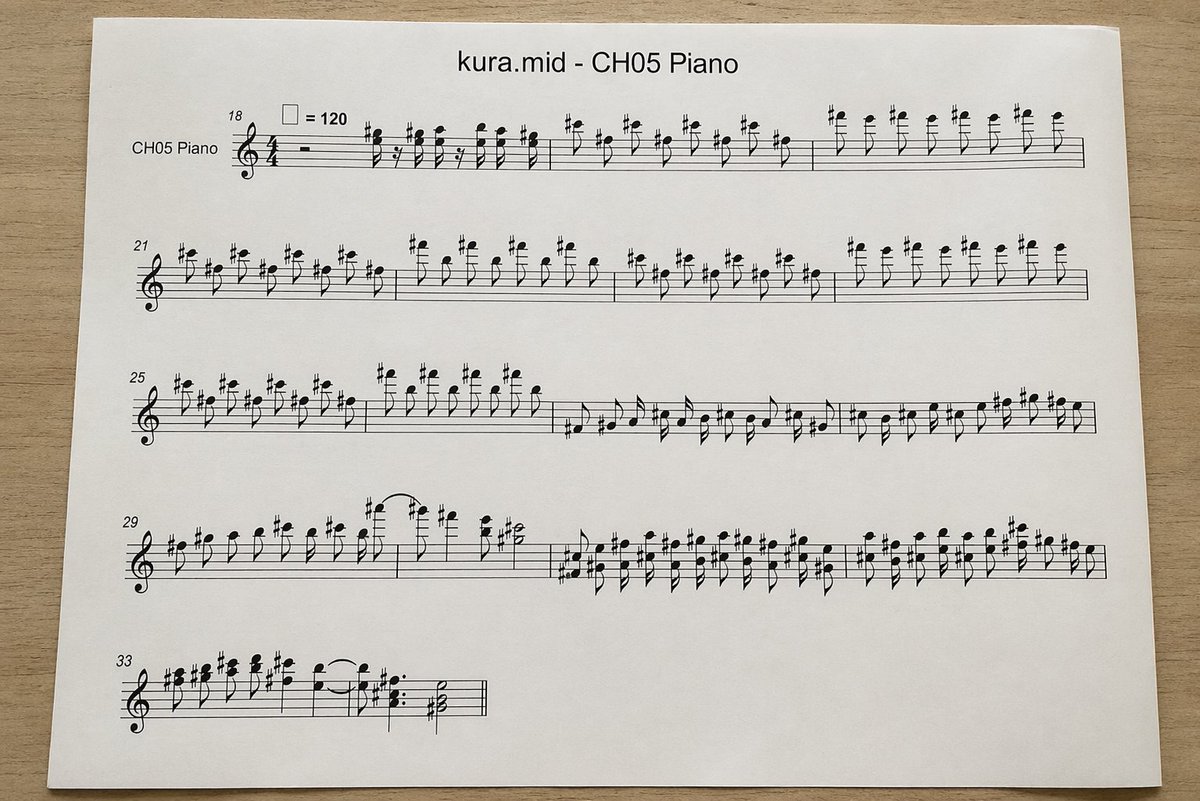
Сфотографированная партитура для MIDI-фортепиано
Эта программа создает реалистичное изображение страницы печатных нот для фортепиано, полученное сверху и преобразованное из MIDI-файла. Она полезна для макетов, визуализаций в области музыкальной техники или иллюстраций в формате документов.
Это пример использования шаблона GPT Image 2 для Продукт и коммерция . Используйте приведенный ниже шаблон, готовый к копированию, чтобы создать аналогичные визуальные элементы, и перед повторным использованием проверьте указание авторства Awesome GPT Image 2 Prompts и права на коммерческое использование.
Free 1K preview
Generate one preview image instantly, no sign-up required.
Промпт
Подсказка для копирования
A top-down realistic photograph of a single white sheet of printer paper placed on a light wood desk, showing a computer-generated music score. The page is centered horizontally with slight perspective and soft natural indoor lighting, minimal shadows, and a clean document-print look. At the top center, print the title "{argument name="file name" default="kura.mid"} - {argument name="track name" default="CH05 Piano"}" in a plain sans-serif font. Below it is a piano staff system rendered in standard black music notation with a treble clef and 4/4 time signature, designed to look like an automatically converted MIDI excerpt rather than carefully engraved sheet music. On the far left of the first system, include the instrument label "CH05 Piano". Show exactly 5 horizontal systems of notation on the page, beginning with measure numbers 18, 21, 25, 29, and 33 at the left edges of the systems. Near the first system, include a tempo marking with a quarter-note symbol equals 120. Fill the staves with dense, slightly awkward but plausible black notes, accidentals, stems, slurs, and rests, with many sharp signs and repeated short-note figures in the upper register, visually resembling piano transcription from MIDI. The first 3 systems should be long and nearly full width; the 4th system should also be long; the 5th system should be short, occupying only the left portion of the page. Keep the notation legible but somewhat mechanically spaced. Use a clean white page with wide margins and no handwritten marks, no colored elements, no extra graphics, just the printed score sheet photographed on a desk.Переменные подсказки
Редактируемые заполнители аргументов, найденные в подсказке, с их значениями по умолчанию.
Best for
- - Продукт и коммерция visual exploration
- - Image generation and reference-image edits
- - Reusable briefs that keep source attribution visible
Change these parts
- - Subject, product, character, or scene
- - Aspect ratio, camera, lighting, and background
- - Brand, text, color, and output constraints
Recommended model and settings
- - Model: gpt-image-2
- - Input mode: Текст в изображение
- - Aspect ratio: source
- - Commercial status: review original source
How to use this prompt
- 1. Copy the prompt and preserve its structure for the first test.
- 2. Replace the subject, context, and publishing channel.
- 3. Change one camera, lighting, or style variable per iteration.
- 4. Inspect the output, source, text, and rights before reuse.
Limitations, source, and reuse cautions
- - Generated output is an editable draft, not factual, legal, or rights evidence.
- - Review the linked source, people, brands, logos, text, and third-party media before commercial use.
Больше случаев в этой категории
Приоритет отдается категориям, совместимости с режимами ввода, качеству и низкому уровню риска.






Примечания по повторному использованию и источникам
Используйте это подсказку безопасно после предварительного просмотра дела.
- 1.Скопируйте подсказку или откройте ее непосредственно в Dovoo с помощью кнопки генерации.
- 2.Настройте переменные, соотношение сторон и эталонные изображения в соответствии с вашими потребностями.
- 3.Перед публикацией или платным использованием проверьте права на источник, требования к указанию авторства, а также риски, связанные с использованием товарного знака или изображения.