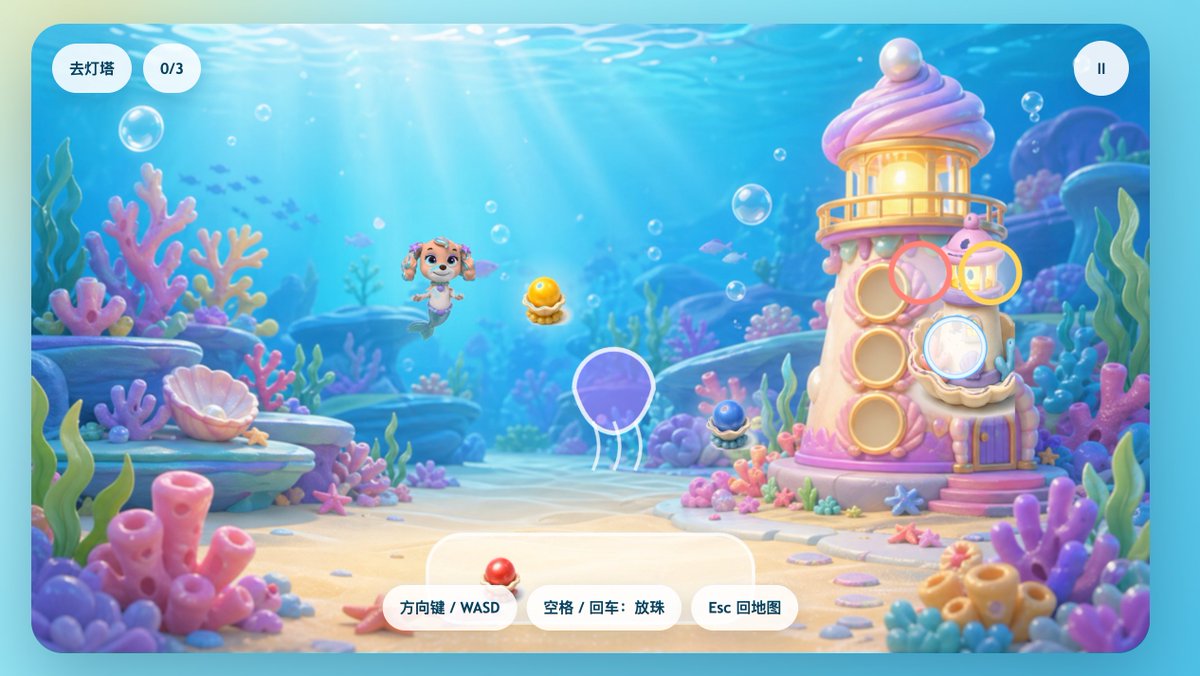
Интерфейс игры Pastel Underwater Mermaid Puppy Game
Причудливый игровой экран в подводном стиле с изображением щенка-русалки, кораллового маяка и игривых элементов китайского интерфейса, подходящий для заставок или сцен уровней детских казуальных игр.
Это пример использования шаблона GPT Image 2 для Аниме и игры . Используйте приведенный ниже шаблон, готовый к копированию, чтобы создать аналогичные визуальные элементы, и перед повторным использованием проверьте указание авторства Awesome GPT Image 2 Prompts и права на коммерческое использование.
Нужен полный набор подсказок? Воспользуйтесь Аниме и игры Для получения дополнительных примеров по теме, или откройте раздел "Обзор тем" GPT Image 2 быстрый каталог Полный список примеров, многократно используемых структур и указание источников см. здесь.
Free 1K preview
Generate one preview image instantly, no sign-up required.
2287/4000
Промпт
Подсказка для копирования
A charming side-view underwater casual game start screen, rendered in a soft 3D cartoon style, designed like a refined children's web game interface. The scene depicts a bright seabed, with sunlight streaming through clear blue water, accompanied by floating bubbles, distant silhouettes of small fish, and a dreamy coral reef environment filled with rounded pink, purple, blue, and mint green corals, seagrass, shells, rocks, and sand. In the center-left of the image, a mermaid puppy character inspired by rescue dog cartoons floats happily underwater, with a dog face, sparkling large eyes, drooping ears, a small crown-shaped ornament on her head, and a fish tail instead of hind legs, facing forward with a cheerful expression. To the right stands a quirky candy-colored coral lighthouse, shaped like a pink and white shell tower, with a glowing lantern room on top, a pearl embedded in the roof, round shell windows, a small balcony, a purple door, and coral details at the base. Game UI elements are directly overlaid on the scene: two rounded white capsule buttons in the upper left corner, the first reading “Go to Lighthouse,” the second displaying “0/3”; and a circular white pause button with a pause icon in the upper right corner. Near the lighthouse, display 4 floating semi-transparent colored target rings around interaction points: a pink ring near the upper-middle window, a yellow ring near the upper-right lantern area, a light blue ring covering the lower-right shell window, and a ring with a white outline around a purple jellyfish in the lower-left center. 3 collectible shell pearl items are visible in the scene: a glowing golden pearl in an open shell in the center, a dark blue small pearl shell at the base of the lighthouse, and a red pearl shell placed on the UI panel at the bottom center. At the bottom center, place 3 rounded white operation prompt buttons, with the text: “Arrow Keys / WASD,” “Space / Enter: Drop Pearls,” and “Esc to Map.” Add a large semi-transparent rounded white panel behind the bottom operation buttons. The overall image should evoke a happy, safe, colorful, and magical feeling, with a high degree of refinement, soft depth of field, soft lighting, glossy toy texture, and a mobile or web game aesthetic suitable for children.
Best for
- - Аниме и игры visual exploration
- - Image generation and reference-image edits
- - Reusable briefs that keep source attribution visible
Change these parts
- - Subject, product, character, or scene
- - Aspect ratio, camera, lighting, and background
- - Brand, text, color, and output constraints
Recommended model and settings
- - Model: gpt-image-2
- - Input mode: Текст в изображение
- - Aspect ratio: source
- - Commercial status: review original source
How to use this prompt
- 1. Copy the prompt and preserve its structure for the first test.
- 2. Replace the subject, context, and publishing channel.
- 3. Change one camera, lighting, or style variable per iteration.
- 4. Inspect the output, source, text, and rights before reuse.
Limitations, source, and reuse cautions
- - Generated output is an editable draft, not factual, legal, or rights evidence.
- - Review the linked source, people, brands, logos, text, and third-party media before commercial use.
Импортировано из Awesome GPT Image 2 Prompts . Требуется указание авторства. Статус коммерческого использования: allowed ; перед платным использованием ознакомьтесь с правами на источник.
Больше случаев в этой категории
Приоритет отдается категориям, совместимости с режимами ввода, качеству и низкому уровню риска.

GPT Image 2 Real-Life Character Street Snap
Текст в изображение

Matte Black B.AI Keyboard Keycap
Текст в изображение

MotoGP POV Cornering Shot
Текст в изображение

Orange Rooftop Fashion Photo Prompt
Текст в изображение

Luxury Travel Fashion Portrait Prompt
Текст в изображение

Cute Focus Desk Flat Lay and Kawaii Illustration
Текст в изображение
Примечания по повторному использованию и источникам
Используйте это подсказку безопасно после предварительного просмотра дела.
- 1.Скопируйте подсказку или откройте ее непосредственно в Dovoo с помощью кнопки генерации.
- 2.Настройте переменные, соотношение сторон и эталонные изображения в соответствии с вашими потребностями.
- 3.Перед публикацией или платным использованием проверьте права на источник, требования к указанию авторства, а также риски, связанные с использованием товарного знака или изображения.