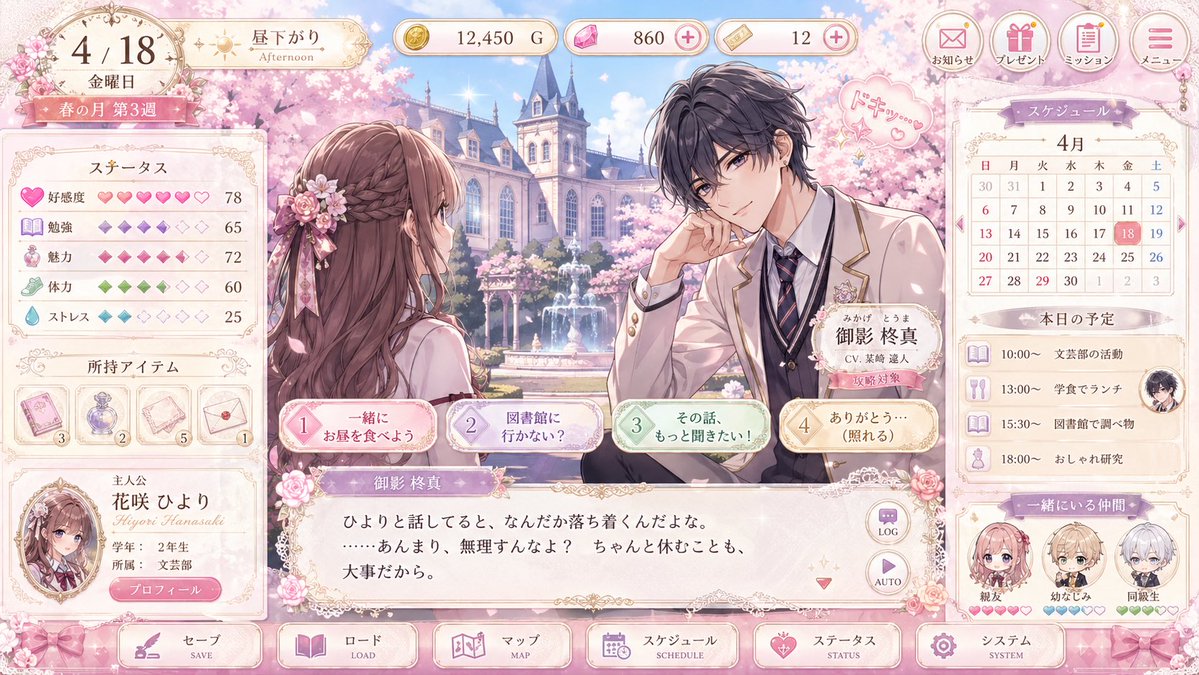
Макет пользовательского интерфейса пастельной отомэ-игры
Продуманный макет интерфейса аниме-романтической игры, демонстрирующий сцену во дворе весенней школы с диалогами персонажей, статистикой, расписанием и изысканным пастельным дизайном интерфейса для концепции визуальной новеллы или симулятора свиданий.
Это пример использования шаблона GPT Image 2 для Аниме и игры . Используйте приведенный ниже шаблон, готовый к копированию, чтобы создать аналогичные визуальные элементы, и перед повторным использованием проверьте указание авторства Awesome GPT Image 2 Prompts и права на коммерческое использование.
Free 1K preview
Generate one preview image instantly, no sign-up required.
Промпт
Подсказка для копирования
{
  "type": "romance visual novel game UI mockup",
  "platform": "desktop game screen",
  "style": "elegant pastel otome game interface, highly polished anime illustration, ornate gold filigree, soft pink cherry blossom theme, glossy buttons, lace and ribbon decorations, dreamy spring lighting",
  "scene": {
    "setting": "a prestigious academy courtyard in spring with a European-style school building, blooming cherry trees, a central fountain, drifting petals, and bright blue sky",
    "time": "afternoon",
    "season": "spring",
    "mood": "sweet, delicate, romantic"
  },
  "characters": {
    "count": 2,
    "main pair": [
      {
        "role": "player heroine seen from behind in three-quarter view",
        "appearance": "long wavy chestnut-brown hair with a braided half-up style, pink floral hair ornament with ribbons, cream and pink school uniform, slim build"
      },
      {
        "role": "male love interest on the right",
        "name": "{argument name=\"character name\" default=\"Mikage Shūma\"}",
        "appearance": "messy dark charcoal hair, handsome anime features, cream school blazer with gold trim, white shirt, striped navy tie, dark vest, flower pin on lapel, relaxed pose with elbow resting and hand near face",
        "expression": "gentle and attentive",
        "speech bubble": "small pink heart doodle with Japanese sound effect"
      }
    ]
  },
  "layout": {
    "top bar": {
      "count": 8,
      "components": [
        "date plaque showing 4/18 and Friday",
        "time-of-day badge showing afternoon",
        "gold currency counter",
        "pink gem counter with plus icon",
        "ticket counter with plus icon",
        "notice button",
        "present button",
        "mission button",
        "menu button"
      ]
    },
    "left sidebar": {
      "count": 3,
      "sections": [
        {
          "title": "ステータス",
          "count": 5,
          "labels": [
            "Affinity",
            "Study",
            "Charm",
            "Stamina",
            "ストレス"
          ]
        },
        {
          "title": "所持アイテム",
          "count": 4,
          "labels": [
            "pink card item",
            "purple perfume bottle",
            "letter or paper item",
            "envelope item"
          ]
        },
        {
          "title": "protagonist",
          "count": 1,
          "labels": [
            "portrait card for {argument name=\"heroine name\" default=\"花咲 ひより\"}"
          ]
        }
      ]
    },
    "center": {
      "count": 4,
      "components": [
        "large illustrated conversation scene",
        "nameplate for male character",
        "4 dialogue choice buttons across the lower middle",
        "main text box with Japanese dialogue"
      ]
    },
    "right sidebar": {
      "count": 3,
      "sections": [
        {
          "title": "スケジュール",
          "count": 1,
          "labels": [
            "April monthly calendar with the 18th highlighted"
          ]
        },
        {
          "title": "本日の予定",
          "count": 4,
          "labels": [
            "10:00 support club activity",
            "13:00 lunch in the cafeteria",
            "15:30 research at the library",
            "18:00 fashion study"
          ]
        },
        {
          "title": "一緒にいる仲間",
          "count": 3,
          "labels": [
            "best friend",
            "幼なじみ",
            "classmate"
          ]
        }
      ]
    },
    "bottom navigation": {
      "count": 6,
      "labels": [
        "セーブ",
        "ロード",
        "マップ",
        "スケジュール",
        "ステータス",
        "システム"
      ]
    }
  },
  "text": {
    "language": "Japanese",
    "dialogue": "soft romantic dialogue in a visual novel textbox",
    "ui_labels": "all major buttons and panels labeled in Japanese"
  },
  "color_palette": {
    "primary": "blush pink",
    "secondary": "cream",
    "accent": "gold",
    "supporting": [
      "lavender",
      "mint green",
      "powder blue"
    ]
  },
  "rendering": {
    "quality": "high-resolution clean game mockup",
    "composition": "full-screen UI capture with balanced left stats panel, central romance scene, and right schedule panel",
    "aspect_ratio": "16:9"
  }
}
Переменные подсказки
Редактируемые заполнители аргументов, найденные в подсказке, с их значениями по умолчанию.
Best for
- - Аниме и игры visual exploration
- - Image generation and reference-image edits
- - Reusable briefs that keep source attribution visible
Change these parts
- - Subject, product, character, or scene
- - Aspect ratio, camera, lighting, and background
- - Brand, text, color, and output constraints
Recommended model and settings
- - Model: gpt-image-2
- - Input mode: Текст в изображение
- - Aspect ratio: source
- - Commercial status: review original source
How to use this prompt
- 1. Copy the prompt and preserve its structure for the first test.
- 2. Replace the subject, context, and publishing channel.
- 3. Change one camera, lighting, or style variable per iteration.
- 4. Inspect the output, source, text, and rights before reuse.
Limitations, source, and reuse cautions
- - Generated output is an editable draft, not factual, legal, or rights evidence.
- - Review the linked source, people, brands, logos, text, and third-party media before commercial use.
Больше случаев в этой категории
Приоритет отдается категориям, совместимости с режимами ввода, качеству и низкому уровню риска.






Примечания по повторному использованию и источникам
Используйте это подсказку безопасно после предварительного просмотра дела.
- 1.Скопируйте подсказку или откройте ее непосредственно в Dovoo с помощью кнопки генерации.
- 2.Настройте переменные, соотношение сторон и эталонные изображения в соответствии с вашими потребностями.
- 3.Перед публикацией или платным использованием проверьте права на источник, требования к указанию авторства, а также риски, связанные с использованием товарного знака или изображения.