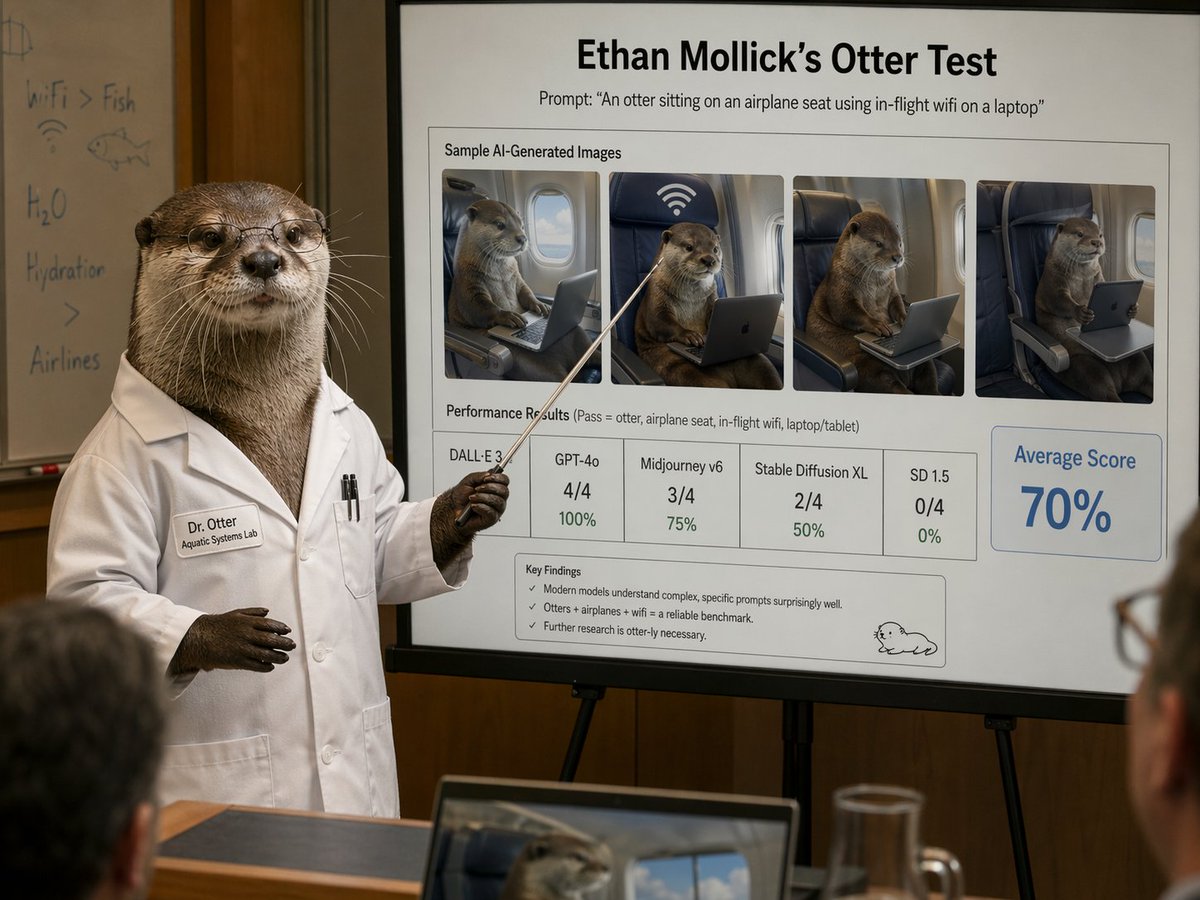
Презентационный слайд учёного-выдролога
Фотореалистичная комическая сцена с конференции, на которой выдра в лабораторном халате демонстрирует отполированный эталонный слайд об изображениях выдр, созданных с помощью ИИ. Идеально подходит для сатиры, публикаций в социальных сетях или демонстраций ИИ в редакционном стиле.
Это пример использования шаблона GPT Image 2 для Графика и плакаты . Используйте приведенный ниже шаблон, готовый к копированию, чтобы создать аналогичные визуальные элементы, и перед повторным использованием проверьте указание авторства Awesome GPT Image 2 Prompts и права на коммерческое использование.
Free 1K preview
Generate one preview image instantly, no sign-up required.
Промпт
Подсказка для копирования
A photorealistic humorous academic presentation in a conference room: an anthropomorphic otter scientist stands at the left side of the frame wearing a crisp white lab coat and holding a thin pointing stick toward a large presentation board on an easel. The otter is upright like a human, with realistic brown fur, dark paws, and a professional posture. The lab coat has a stitched name tag reading "Dr. Otter" and a smaller line reading "Aquatic Systems Lab," plus two pens in the chest pocket. Show every face clearly with natural, detailed facial features. Behind the otter is a whiteboard with faint handwritten notes and doodles, including "WiFi > Fish," "H2O," "Hydration," a fish sketch, and a wifi symbol. The main focus is a large clean presentation slide with sharp readable text and polished corporate-academic layout. At the top, a bold title reads "{argument name="headline text" default="Ethan Mollick’s Otter Test"}" and beneath it a subtitle reads "Prompt: \"{argument name="prompt text" default="An otter sitting on an airplane seat using in-flight wifi on a laptop"}\"". Below that is a boxed section titled "Sample AI-Generated Images" containing exactly 4 side-by-side sample images of a realistic otter seated in an airplane seat using a laptop or tablet, each framed like model outputs, with one showing a large wifi symbol above the seat. Beneath the images is a section labeled "Performance Results (Pass = otter, airplane seat, in-flight wifi, laptop/tablet)" with exactly 5 score boxes: "DALL·E 3" with no visible numeric score, "GPT-4o" with "4/4" and "100%", "Midjourney v6" with "3/4" and "75%", "Stable Diffusion XL" with "2/4" and "50%", and "SD 1.5" with "0/4" and "0%". On the right side is a large highlighted box reading "Average Score" and "{argument name="average score" default="70%"}" in large blue type. At the bottom of the slide is a "Key Findings" box with exactly 3 bullet points: "Modern models understand complex, specific prompts surprisingly well.", "Otters + airplanes + wifi = a reliable benchmark.", and "Further research is otter-ly necessary." A small simple cartoon otter doodle appears in the lower-right corner of the slide. The room is warmly lit with wood-paneled walls, shallow depth of field, and a few blurred audience members in the foreground, including a laptop at the bottom edge showing an otter image on its screen and a glass pitcher on a table. Style: ultra-realistic editorial photography, deadpan scientific satire, believable conference presentation, high detail, natural indoor lighting, professional lens compression, readable slide typography, polished yet absurd.Переменные подсказки
Редактируемые заполнители аргументов, найденные в подсказке, с их значениями по умолчанию.
Best for
- - Графика и плакаты visual exploration
- - Image generation and reference-image edits
- - Reusable briefs that keep source attribution visible
Change these parts
- - Subject, product, character, or scene
- - Aspect ratio, camera, lighting, and background
- - Brand, text, color, and output constraints
Recommended model and settings
- - Model: gpt-image-2
- - Input mode: Текст в изображение
- - Aspect ratio: source
- - Commercial status: review original source
How to use this prompt
- 1. Copy the prompt and preserve its structure for the first test.
- 2. Replace the subject, context, and publishing channel.
- 3. Change one camera, lighting, or style variable per iteration.
- 4. Inspect the output, source, text, and rights before reuse.
Limitations, source, and reuse cautions
- - Generated output is an editable draft, not factual, legal, or rights evidence.
- - Review the linked source, people, brands, logos, text, and third-party media before commercial use.
Больше случаев в этой категории
Приоритет отдается категориям, совместимости с режимами ввода, качеству и низкому уровню риска.






Примечания по повторному использованию и источникам
Используйте это подсказку безопасно после предварительного просмотра дела.
- 1.Скопируйте подсказку или откройте ее непосредственно в Dovoo с помощью кнопки генерации.
- 2.Настройте переменные, соотношение сторон и эталонные изображения в соответствии с вашими потребностями.
- 3.Перед публикацией или платным использованием проверьте права на источник, требования к указанию авторства, а также риски, связанные с использованием товарного знака или изображения.