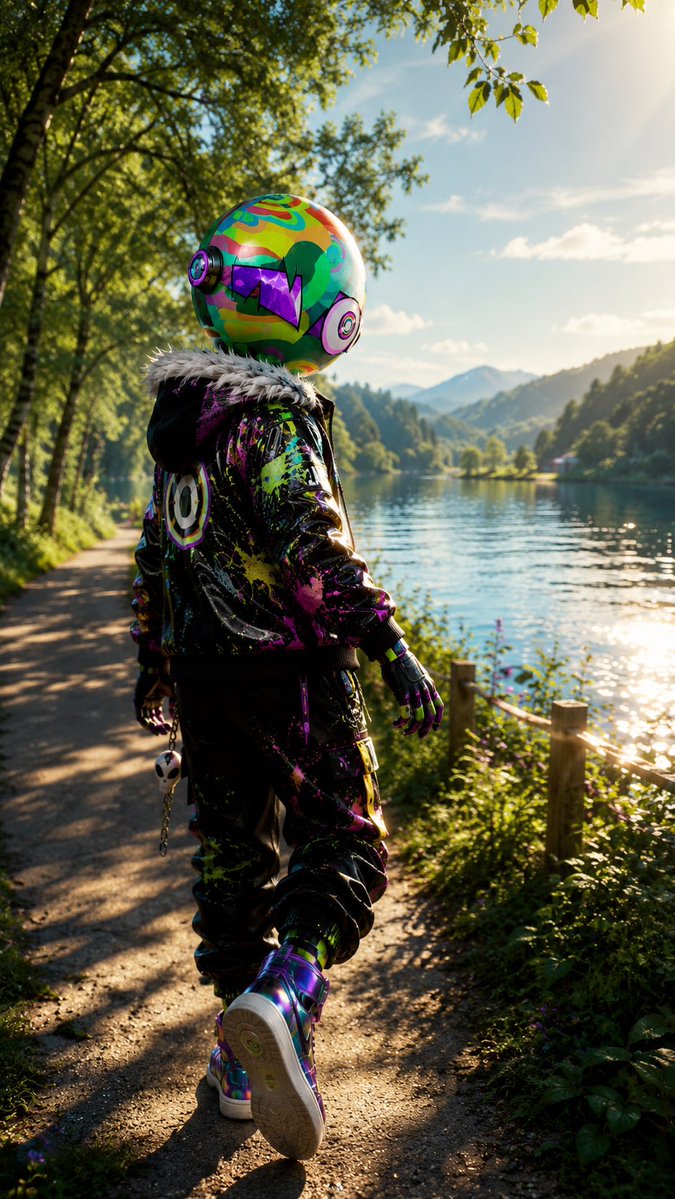
Neon Robot Walker by Mountain Lake
A cinematic vertical prompt for generating a consistent futuristic neon-helmeted streetwear character walking through a golden-hour lakeside forest.
Это пример использования шаблона GPT Image 2 для Портрет и характер . Используйте приведенный ниже шаблон, готовый к копированию, чтобы создать аналогичные визуальные элементы, и перед повторным использованием проверьте указание авторства Awesome GPT Image 2 Prompts и права на коммерческое использование.
Free 1K preview
Generate one preview image instantly, no sign-up required.
Промпт
Подсказка для копирования
Create a vertical cinematic full-body rear-view portrait of a single futuristic streetwear character walking along a lakeside forest path at golden hour. The character is {argument name="character type" default="a humanoid figure with a glossy oversized spherical robot helmet"}, kept exactly consistent in face/helmet design and outfit: a colorful psychedelic helmet covered in neon green, orange, teal, purple and magenta patterns, round headphone-like ear modules on both sides, a black visor shaped like jagged purple angular sunglasses, and a small green hair-like graphic patch on the side. The figure wears a black glossy bomber jacket with a fluffy white faux-fur collar, bright splattered paint in neon pink, lime, yellow, purple and blue, a circular smiley/target emblem on the back, black baggy pants with matching neon paint splatters, black gloves with colorful accents, and iridescent high-top sneakers; one visible accessory is a dangling skull keychain clipped near the hip. Show the character mid-step from behind, slightly turned toward a calm lake on the right, with relaxed arms and one foot lifted, occupying the lower center of the frame. The environment is {argument name="setting" default="a peaceful mountain lake trail bordered by birch trees and wild greenery"}, with a dirt walking path on the left, a rustic wooden fence and plants on the right, shimmering water reflecting sunlight, distant forested hills and blue mountains, leafy branches overhead, and a bright sun flare in the upper right. Use photorealistic 3D rendering with ultra-detailed textures, high dynamic range lighting, shallow depth of field, soft bokeh foliage, long warm shadows, realistic fabric shine, reflective helmet and shoes, vibrant cyberpunk colors contrasted with natural scenery, no text, no watermark, no extra characters. Mood: {argument name="mood" default="adventurous, whimsical, serene, and futuristic"}. Camera: {argument name="camera style" default="low eye-level trailing shot, 9:16 vertical composition, 35mm cinematic lens"}. Color palette: {argument name="color palette" default="neon rainbow streetwear against warm green forest and golden sunlight"}.Переменные подсказки
Редактируемые заполнители аргументов, найденные в подсказке, с их значениями по умолчанию.
Best for
- - Портрет и характер visual exploration
- - Image generation and reference-image edits
- - Reusable briefs that keep source attribution visible
Change these parts
- - Subject, product, character, or scene
- - Aspect ratio, camera, lighting, and background
- - Brand, text, color, and output constraints
Recommended model and settings
- - Model: gpt-image-2
- - Input mode: Текст в изображение
- - Aspect ratio: source
- - Commercial status: review original source
How to use this prompt
- 1. Copy the prompt and preserve its structure for the first test.
- 2. Replace the subject, context, and publishing channel.
- 3. Change one camera, lighting, or style variable per iteration.
- 4. Inspect the output, source, text, and rights before reuse.
Limitations, source, and reuse cautions
- - Generated output is an editable draft, not factual, legal, or rights evidence.
- - Review the linked source, people, brands, logos, text, and third-party media before commercial use.
Больше случаев в этой категории
Приоритет отдается категориям, совместимости с режимами ввода, качеству и низкому уровню риска.






Примечания по повторному использованию и источникам
Используйте это подсказку безопасно после предварительного просмотра дела.
- 1.Скопируйте подсказку или откройте ее непосредственно в Dovoo с помощью кнопки генерации.
- 2.Настройте переменные, соотношение сторон и эталонные изображения в соответствии с вашими потребностями.
- 3.Перед публикацией или платным использованием проверьте права на источник, требования к указанию авторства, а также риски, связанные с использованием товарного знака или изображения.