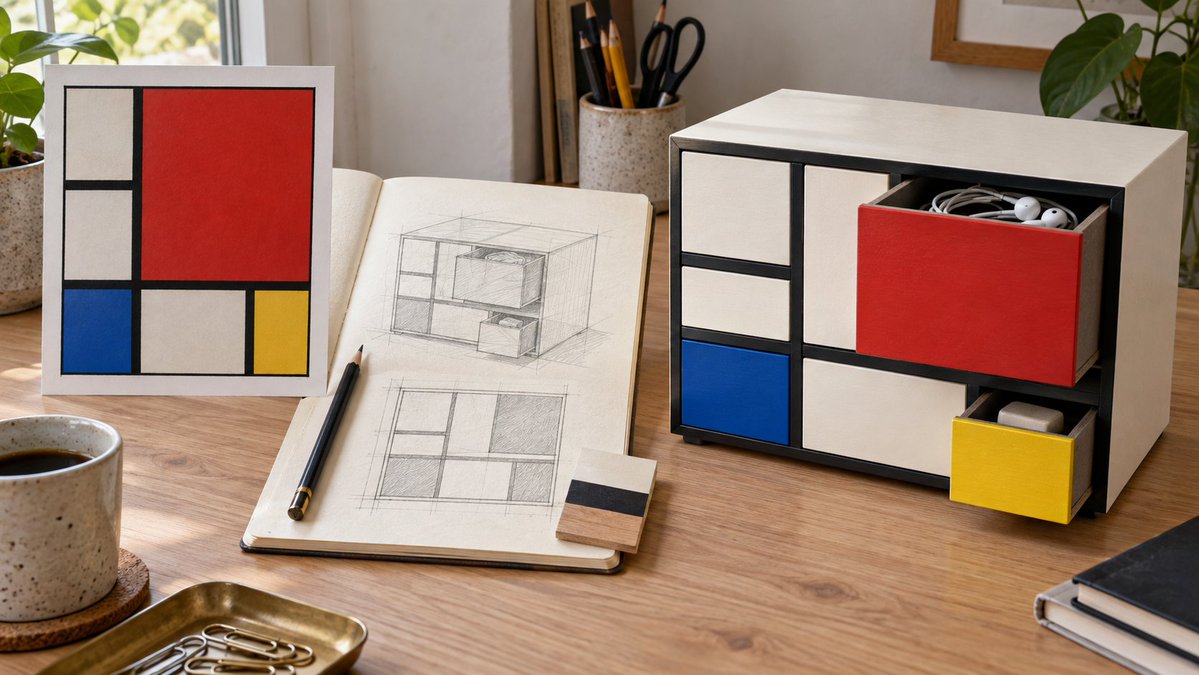
Mondrian Style Storage Cabinet Design
A prompt that transforms Piet Mondrian's famous abstract art into a functional desktop storage cabinet design with 3D depth and realism.
Это пример использования шаблона GPT Image 2 для Продукт и коммерция . Используйте приведенный ниже шаблон, готовый к копированию, чтобы создать аналогичные визуальные элементы, и перед повторным использованием проверьте указание авторства Awesome GPT Image 2 Prompts и права на коммерческое использование.
Нужен полный набор подсказок? Воспользуйтесь Продукт и коммерция Для получения дополнительных примеров по теме, или откройте раздел "Обзор тем" GPT Image 2 быстрый каталог Полный список примеров, многократно используемых структур и указание источников см. здесь.
Free 1K preview
Generate one preview image instantly, no sign-up required.
986/4000
Промпт
Подсказка для копирования
Generate a 16:9 horizontal desktop design presentation. On the left, place a painting reference of {argument name="艺术参考" default="Mondrian's 'Composition with Red, Blue and Yellow'"}. In the middle, show the front grid and perspective pencil sketch of a desktop storage cabinet, and on the right, show the final effect in use. The cabinet is made of ivory-white painted wood, with thick black divider strips forming an asymmetrical rectangular grid. Large red drawers, small blue drawers, small yellow drawers, and white compartments form the front. The red drawer is pulled open, containing {argument name="收纳物品" default="headphones and coiled cables"}; the yellow drawer is slightly pulled out, revealing an eraser. Drawers must have realistic side walls, thickness, and internal space, aligning with their respective openings. Show fine wood grain, contact shadows, and desktop wear, with natural side lighting. The sketch must match the cabinet layout, with no text, logos, or URLs.Переменные подсказки
Редактируемые заполнители аргументов, найденные в подсказке, с их значениями по умолчанию.
Переменная
艺术参考
По умолчанию
Mondrian's 'Composition with Red, Blue and Yellow'
Переменная
收纳物品
По умолчанию
headphones and coiled cables
Best for
- - Продукт и коммерция visual exploration
- - Image generation and reference-image edits
- - Reusable briefs that keep source attribution visible
Change these parts
- - Subject, product, character, or scene
- - Aspect ratio, camera, lighting, and background
- - Brand, text, color, and output constraints
Recommended model and settings
- - Model: gpt-image-2
- - Input mode: Текст в изображение
- - Aspect ratio: source
- - Commercial status: review original source
How to use this prompt
- 1. Copy the prompt and preserve its structure for the first test.
- 2. Replace the subject, context, and publishing channel.
- 3. Change one camera, lighting, or style variable per iteration.
- 4. Inspect the output, source, text, and rights before reuse.
Limitations, source, and reuse cautions
- - Generated output is an editable draft, not factual, legal, or rights evidence.
- - Review the linked source, people, brands, logos, text, and third-party media before commercial use.
Импортировано из Awesome GPT Image 2 Prompts . Требуется указание авторства. Статус коммерческого использования: allowed ; перед платным использованием ознакомьтесь с правами на источник.
Больше случаев в этой категории
Приоритет отдается категориям, совместимости с режимами ввода, качеству и низкому уровню риска.

Matte Black B.AI Keyboard Keycap
Текст в изображение

GPT Image 2 Real-Life Character Street Snap
Текст в изображение

MotoGP POV Cornering Shot
Текст в изображение

Orange Rooftop Fashion Photo Prompt
Текст в изображение

Luxury Travel Fashion Portrait Prompt
Текст в изображение

Cute Focus Desk Flat Lay and Kawaii Illustration
Текст в изображение
Примечания по повторному использованию и источникам
Используйте это подсказку безопасно после предварительного просмотра дела.
- 1.Скопируйте подсказку или откройте ее непосредственно в Dovoo с помощью кнопки генерации.
- 2.Настройте переменные, соотношение сторон и эталонные изображения в соответствии с вашими потребностями.
- 3.Перед публикацией или платным использованием проверьте права на источник, требования к указанию авторства, а также риски, связанные с использованием товарного знака или изображения.