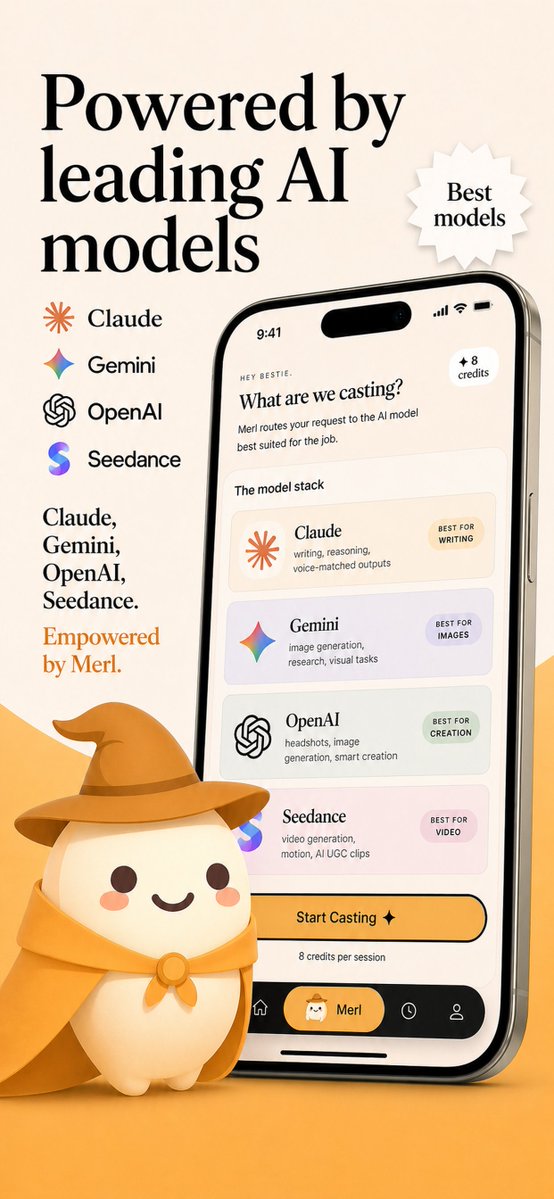
Скриншот приложения AI Model Router из App Store
Премиальный маркетинговый скриншот мобильного приложения, демонстрирующий фирменный интерфейс маршрутизации на основе ИИ с логотипами поставщиков, рекламным текстом и симпатичным талисманом, идеально подходящий для размещения в App Store или визуального оформления запуска стартапа.
Это пример использования шаблона GPT Image 2 для Продукт и коммерция . Используйте приведенный ниже шаблон, готовый к копированию, чтобы создать аналогичные визуальные элементы, и перед повторным использованием проверьте указание авторства Awesome GPT Image 2 Prompts и права на коммерческое использование.
Free 1K preview
Generate one preview image instantly, no sign-up required.
Промпт
Подсказка для копирования
Create a polished App Store promotional screenshot in a warm beige and golden-orange brand palette, portrait orientation, with a premium friendly startup aesthetic. The layout is a single vertically composed marketing graphic with a soft cream background and an orange gradient floor at the bottom. On the left upper side, place a very large elegant black serif headline split across 3 lines reading {argument name="headline text" default="Powered by leading AI models"}. To the right of the headline, add a small white jagged starburst badge with a subtle drop shadow containing 2 lines of serif text: {argument name="badge text" default="Best models"}. Beneath the headline on the left, show a vertical list of exactly 4 AI providers with icon plus name, evenly spaced: Claude with an orange sunburst icon, Gemini with a multicolor four-point sparkle icon, OpenAI with a black knot logo, and Seedance with a purple-blue gradient S icon. Below that, add a left-aligned serif body copy block with 2 parts: first a black text list on 4 lines reading "Claude, Gemini, OpenAI, Seedance.", then a final brand-colored orange line reading {argument name="tagline text" default="Empowered by Merl."}. On the right half, place a large realistic modern smartphone angled slightly left, with a reflective silver frame, black screen border, dynamic-island style top cutout, visible side button, and soft shadow. The phone screen should show a clean cream-colored app UI for an AI model-routing app. At the very top of the phone display, include the status time 9:41 and standard signal, wifi, and battery icons. Inside the app, show a tiny greeting line "HEY BESTIE.", then a bold serif question title {argument name="screen title" default="What are we casting?"}, followed by a short sans-serif subtitle about routing the request to the best AI model for the job. Add a small rounded badge in the upper right of the app content reading "+ 8 credits". Below that, include a section label "The model stack" and a stack of exactly 4 rounded cards, each in a lightly tinted pastel background. Card 1: Claude, with orange sunburst icon, description "writing, reasoning, voice-matched outputs", and a small pill label "BEST FOR WRITING". Card 2: Gemini, with multicolor sparkle icon, description "image generation, research, visual tasks", and pill label "BEST FOR IMAGES". Card 3: OpenAI, with black knot icon, description "headshots, image generation, smart creation", and pill label "BEST FOR CREATION". Card 4: Seedance, with purple-blue gradient S icon, description "video generation, motion, AI UGC clips", and pill label "BEST FOR VIDEO". Under the cards, place a large rounded yellow-orange CTA button reading "Start Casting ✦", with a small line below saying "8 credits per session". At the bottom of the phone UI, create a black tab bar with exactly 4 navigation items: home icon, a selected center pill with a small mascot face and the label {argument name="app name" default="Merl"}, a clock/history icon, and a profile icon. In front of the lower left of the phone, place a cute 3D mascot character: a rounded cream-colored blob with tiny feet, dark brown dot eyes, rosy cheeks, and a smiling mouth, wearing a golden wizard hat and matching cape tied with a round clasp. The mascot should overlap the phone slightly and sit on the orange floor, casting a soft shadow. Overall style: luxury-friendly tech branding, crisp typography, subtle realism, soft shadows, clean app mockup, App Store screenshot quality, consistent visual branding, highly legible, high resolution.Переменные подсказки
Редактируемые заполнители аргументов, найденные в подсказке, с их значениями по умолчанию.
Best for
- - Продукт и коммерция visual exploration
- - Image generation and reference-image edits
- - Reusable briefs that keep source attribution visible
Change these parts
- - Subject, product, character, or scene
- - Aspect ratio, camera, lighting, and background
- - Brand, text, color, and output constraints
Recommended model and settings
- - Model: gpt-image-2
- - Input mode: Текст в изображение
- - Aspect ratio: source
- - Commercial status: review original source
How to use this prompt
- 1. Copy the prompt and preserve its structure for the first test.
- 2. Replace the subject, context, and publishing channel.
- 3. Change one camera, lighting, or style variable per iteration.
- 4. Inspect the output, source, text, and rights before reuse.
Limitations, source, and reuse cautions
- - Generated output is an editable draft, not factual, legal, or rights evidence.
- - Review the linked source, people, brands, logos, text, and third-party media before commercial use.
Больше случаев в этой категории
Приоритет отдается категориям, совместимости с режимами ввода, качеству и низкому уровню риска.






Примечания по повторному использованию и источникам
Используйте это подсказку безопасно после предварительного просмотра дела.
- 1.Скопируйте подсказку или откройте ее непосредственно в Dovoo с помощью кнопки генерации.
- 2.Настройте переменные, соотношение сторон и эталонные изображения в соответствии с вашими потребностями.
- 3.Перед публикацией или платным использованием проверьте права на источник, требования к указанию авторства, а также риски, связанные с использованием товарного знака или изображения.