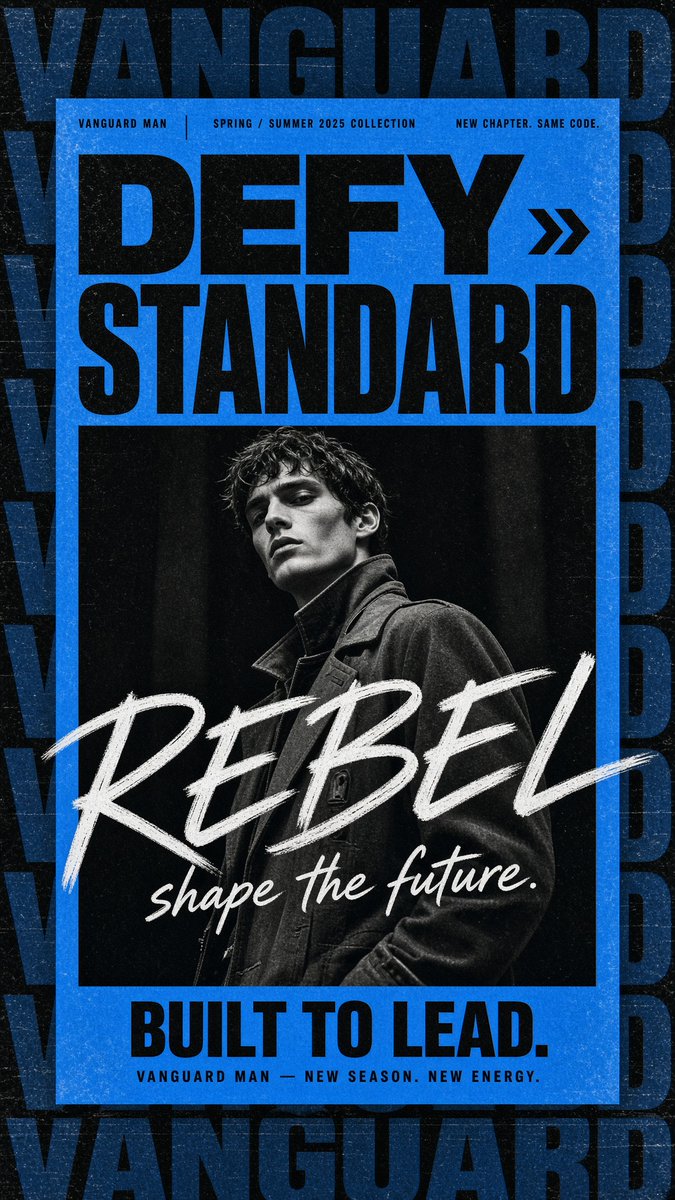
Gritty Vanguard Menswear Poster
Generates a bold blue-and-black streetwear fashion campaign poster with a monochrome male portrait, oversized typography, and distressed print texture.
Это пример использования шаблона GPT Image 2 для Графика и плакаты . Используйте приведенный ниже шаблон, готовый к копированию, чтобы создать аналогичные визуальные элементы, и перед повторным использованием проверьте указание авторства Awesome GPT Image 2 Prompts и права на коммерческое использование.
Free 1K preview
Generate one preview image instantly, no sign-up required.
Промпт
Подсказка для копирования
Create a gritty high-fashion menswear campaign poster for {argument name="brand name" default="VANGUARD MAN"}, vertical 9:16 canvas. Use a black, distressed background with oversized repeated dark navy-blue block lettering spelling “VANGUARD” stacked and cropped along the top, sides, and bottom like a wallpaper pattern. Center a bright electric-blue rectangular poster panel with a thick blue border and worn print texture. At the top of the blue panel, place three small uppercase microtext labels in a thin condensed sans-serif: left “VANGUARD MAN”, center “SPRING / SUMMER 2025 COLLECTION”, right “NEW CHAPTER. SAME CODE.” separated by thin vertical dividers. Below, set the main headline in huge heavy black condensed sans-serif: {argument name="headline text" default="DEFY STANDARD"}, arranged as two lines, with a black double-chevron arrow icon to the right of “DEFY”. Under the headline, insert one large black-and-white editorial fashion portrait: a young male model with wet tousled dark hair, sharp cheekbones, serious expression, looking slightly downward at camera, wearing a dark structured coat with high collar, dramatic low-key studio lighting, high contrast, grainy monochrome. Across the lower half of the portrait, overlay an oversized rough white brush-script word {argument name="brush word" default="REBEL"} diagonally from left to right, with a smaller white handwritten tagline beneath it: {argument name="script tagline" default="shape the future."}. At the bottom of the blue panel, add a bold black condensed sans-serif slogan {argument name="bottom slogan" default="BUILT TO LEAD."}, and beneath it small spaced uppercase text “VANGUARD MAN — NEW SEASON. NEW ENERGY.” Make the whole design look like a worn screen-printed streetwear poster with visible dust, scratches, paper grain, ink speckles, slight scuffs, and strong black/blue/white contrast. Keep exactly one portrait, one double-chevron icon, three top microtext labels, one headline block, one brush-script overlay, one bottom slogan, and one small footer line; no extra logos or watermarks.Переменные подсказки
Редактируемые заполнители аргументов, найденные в подсказке, с их значениями по умолчанию.
Best for
- - Графика и плакаты visual exploration
- - Image generation and reference-image edits
- - Reusable briefs that keep source attribution visible
Change these parts
- - Subject, product, character, or scene
- - Aspect ratio, camera, lighting, and background
- - Brand, text, color, and output constraints
Recommended model and settings
- - Model: gpt-image-2
- - Input mode: Текст в изображение
- - Aspect ratio: source
- - Commercial status: review original source
How to use this prompt
- 1. Copy the prompt and preserve its structure for the first test.
- 2. Replace the subject, context, and publishing channel.
- 3. Change one camera, lighting, or style variable per iteration.
- 4. Inspect the output, source, text, and rights before reuse.
Limitations, source, and reuse cautions
- - Generated output is an editable draft, not factual, legal, or rights evidence.
- - Review the linked source, people, brands, logos, text, and third-party media before commercial use.
Больше случаев в этой категории
Приоритет отдается категориям, совместимости с режимами ввода, качеству и низкому уровню риска.






Примечания по повторному использованию и источникам
Используйте это подсказку безопасно после предварительного просмотра дела.
- 1.Скопируйте подсказку или откройте ее непосредственно в Dovoo с помощью кнопки генерации.
- 2.Настройте переменные, соотношение сторон и эталонные изображения в соответствии с вашими потребностями.
- 3.Перед публикацией или платным использованием проверьте права на источник, требования к указанию авторства, а также риски, связанные с использованием товарного знака или изображения.