Cinematic Martial Artist Character Bible
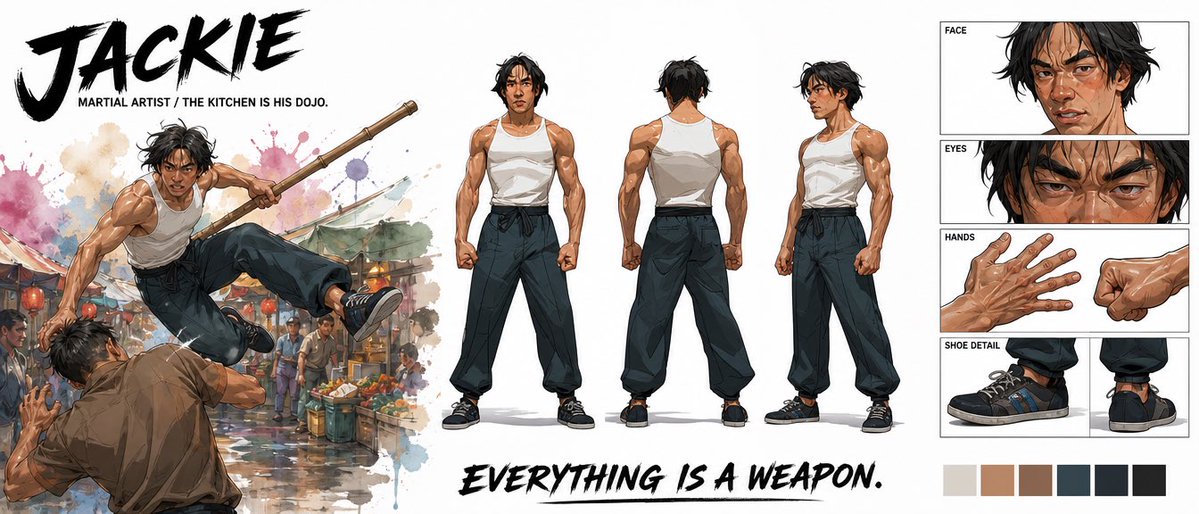
Generates a wide premium character design sheet with action art, turnaround poses, detail panels, typography, and palette swatches for a martial artist hero.
Это пример использования шаблона GPT Image 2 для Аниме и игры . Используйте приведенный ниже шаблон, готовый к копированию, чтобы создать аналогичные визуальные элементы, и перед повторным использованием проверьте указание авторства Awesome GPT Image 2 Prompts и права на коммерческое использование.
Free 1K preview
Generate one preview image instantly, no sign-up required.
Промпт
Подсказка для копирования
Goal: Create a premium cinematic character bible sheet for a martial artist named {argument name="character name" default="JACKIE"}, presented as a wide professional concept-art reference board.

Canvas: Extra-wide horizontal white canvas, roughly 21:9 aspect ratio, clean negative space, polished entertainment-design layout.

Visual style: High-end illustrated character design, semi-realistic anime/comic concept art with painterly shading, crisp ink accents, athletic anatomy, dramatic brush textures, watercolor splashes, and cinematic action energy. Use a mostly neutral palette with warm skin tones, black hair, white tank top, dark loose pants, black sneakers, and subtle market-scene colors.

Top-left text: Huge black dry-brush title reading {argument name="character name" default="JACKIE"}. Beneath it, small uppercase subtitle: {argument name="subtitle text" default="MARTIAL ARTIST / THE KITCHEN IS HIS DOJO."}

Left action illustration: One large dynamic action scene of the same martial artist leaping through the air in a crowded wet street market, holding a long wooden staff with both hands, kicking over an opponent in a brown shirt. Add colorful produce stalls, hanging market lights, blurred bystanders, puddle reflections, and watercolor splashes behind the action. The pose should feel explosive and acrobatic.

Center character turnaround: Show exactly 3 full-body standing reference poses of the martial artist on a white background: 1 front view, 1 back view, and 1 three-quarter side view. He is lean but muscular, with tousled medium-length black hair, tan skin, a serious focused expression, a white sleeveless tank top, dark high-waisted loose martial-arts pants tied with a black sash, and black low-top sneakers. Keep proportions and outfit consistent across all three views.

Right-side detail panels: Create exactly 4 boxed detail sections stacked vertically with thin black borders and small uppercase labels: 1 FACE panel showing a close-up of his head and shoulders with sweat, cuts, messy hair, and intense expression; 1 EYES panel showing an extreme close-up of narrowed eyes and brows; 1 HANDS panel showing two hand studies, one open veiny hand and one clenched fist; 1 SHOE DETAIL panel showing two sneaker studies, one side view and one rear/heel view.

Bottom text: Large black dry-brush slogan across the lower middle reading {argument name="slogan text" default="EVERYTHING IS A WEAPON."}

Color swatches: Add exactly 6 square palette swatches along the bottom right: 1 light warm gray, 1 tan skin tone, 1 medium brown, 1 dark blue-gray, 1 near-black navy, and 1 black.

Constraints: Maintain a clean premium character-sheet composition, no extra characters outside the left action scene, no additional labels beyond the specified title, subtitle, panel labels, slogan, and swatches. Make the image look like a finished studio character bible page.
Переменные подсказки
Редактируемые заполнители аргументов, найденные в подсказке, с их значениями по умолчанию.
Best for
- - Аниме и игры visual exploration
- - Image generation and reference-image edits
- - Reusable briefs that keep source attribution visible
Change these parts
- - Subject, product, character, or scene
- - Aspect ratio, camera, lighting, and background
- - Brand, text, color, and output constraints
Recommended model and settings
- - Model: gpt-image-2
- - Input mode: Текст в изображение
- - Aspect ratio: source
- - Commercial status: review original source
How to use this prompt
- 1. Copy the prompt and preserve its structure for the first test.
- 2. Replace the subject, context, and publishing channel.
- 3. Change one camera, lighting, or style variable per iteration.
- 4. Inspect the output, source, text, and rights before reuse.
Limitations, source, and reuse cautions
- - Generated output is an editable draft, not factual, legal, or rights evidence.
- - Review the linked source, people, brands, logos, text, and third-party media before commercial use.
Больше случаев в этой категории
Приоритет отдается категориям, совместимости с режимами ввода, качеству и низкому уровню риска.






Примечания по повторному использованию и источникам
Используйте это подсказку безопасно после предварительного просмотра дела.
- 1.Скопируйте подсказку или откройте ее непосредственно в Dovoo с помощью кнопки генерации.
- 2.Настройте переменные, соотношение сторон и эталонные изображения в соответствии с вашими потребностями.
- 3.Перед публикацией или платным использованием проверьте права на источник, требования к указанию авторства, а также риски, связанные с использованием товарного знака или изображения.