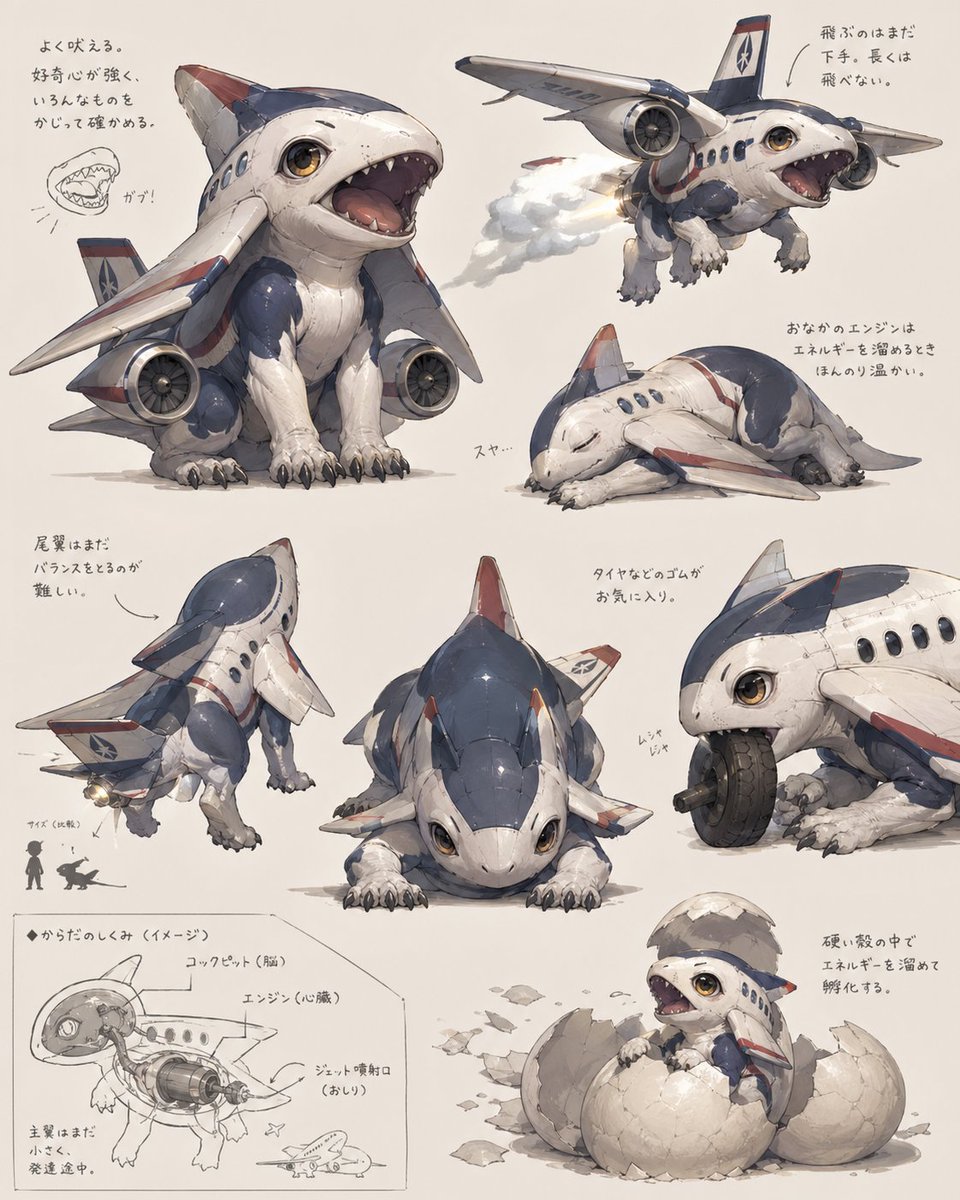
Лист с изображением щенка-реактивного самолета
Проработанный эскизный лист с изображением симпатичного гибрида самолета и животного, представленный в 8 ракурсах и вариантах, идеально подходящий для разработки существ, создания миров или создания оригинальных визуальных образов в жанре индустриальной фэнтези.
Это пример использования шаблона GPT Image 2 для Аниме и игры . Используйте приведенный ниже шаблон, готовый к копированию, чтобы создать аналогичные визуальные элементы, и перед повторным использованием проверьте указание авторства Awesome GPT Image 2 Prompts и права на коммерческое использование.
Free 1K preview
Generate one preview image instantly, no sign-up required.
Промпт
Подсказка для копирования
{
  "type": "concept art creature sheet",
  "subject": {
    "category": "inorganic animal creature hybrid",
    "theme": "a cute baby shark-dog fused with a passenger jet airplane",
    "style": "detailed Japanese concept art on an off-white sketchbook background, painterly industrial design illustration, soft shadows, slightly worn surface textures, believable mechanical-organic fusion, adorable but functional creature design",
    "color_palette": {
      "primary": "white fuselage body",
      "secondary": "navy blue upper panels",
      "accent": "muted red striping and fin tips",
      "details": "warm amber eyes, gray claws, metallic engine parts"
    },
    "design": {
      "head": "rounded shark-like airplane nose with large glossy eyes and a wide open mouth full of small triangular teeth",
      "body": "compact puppy-like quadruped body with soft belly and aircraft fuselage shell",
      "wings": "2 short airplane wings attached as forelimb-side fins",
      "engines": "2 visible jet engines mounted low at the sides of the body",
      "tail": "vertical tail fin and small rear stabilizer surfaces",
      "legs": "4 animal legs with fluffy fur texture and dark claws",
      "surface_details": "panel seams, rivets, passenger windows, airline insignia, weathering scuffs"
    }
  },
  "layout": {
    "background": "plain warm ivory paper",
    "sections": [
      {
        "title": "main pose",
        "position": "upper left",
        "count": 1,
        "labels": [
          "front three-quarter sitting pose with mouth open"
        ]
      },
      {
        "title": "flying pose",
        "position": "upper right",
        "count": 1,
        "labels": [
          "airborne view with engine exhaust"
        ]
      },
      {
        "title": "sleeping pose",
        "position": "right center",
        "count": 1,
        "labels": [
          "curled up asleep"
        ]
      },
      {
        "title": "rear view",
        "position": "lower left",
        "count": 1,
        "labels": [
          "back three-quarter standing pose"
        ]
      },
      {
        "title": "front low pose",
        "position": "lower center",
        "count": 1,
        "labels": [
          "crouched front view"
        ]
      },
      {
        "title": "wheel chewing detail",
        "position": "lower right upper",
        "count": 1,
        "labels": [
          "close-up biting and playing with a tire"
        ]
      },
      {
        "title": "cross-section diagram",
        "position": "bottom left corner",
        "count": 1,
        "labels": [
          "internal anatomy sketch with labeled engine and cockpit"
        ]
      },
      {
        "title": "hatching pose",
        "position": "bottom right",
        "count": 1,
        "labels": [
          "baby creature emerging from a cracked egg"
        ]
      }
    ],
    "total_views": 8,
    "extra_elements": {
      "small_mouth_sketches": 1,
      "size_comparison_icons": 2,
      "handwritten_note_groups": 7
    }
  },
  "text": {
    "language": "Japanese handwritten annotations scattered near each drawing",
    "include_text": true,
    "text_density": "light notes around the poses and technical diagram"
  },
  "composition": "arrange all 8 drawings like a creature design reference sheet with generous spacing, asymmetrical but balanced layout, the largest view in the upper left and smaller supporting studies around it",
  "quality": "highly polished concept illustration for creature ideation, whimsical aerospace biology aesthetic"
}
Best for
- - Аниме и игры visual exploration
- - Image generation and reference-image edits
- - Reusable briefs that keep source attribution visible
Change these parts
- - Subject, product, character, or scene
- - Aspect ratio, camera, lighting, and background
- - Brand, text, color, and output constraints
Recommended model and settings
- - Model: gpt-image-2
- - Input mode: Текст в изображение
- - Aspect ratio: source
- - Commercial status: review original source
How to use this prompt
- 1. Copy the prompt and preserve its structure for the first test.
- 2. Replace the subject, context, and publishing channel.
- 3. Change one camera, lighting, or style variable per iteration.
- 4. Inspect the output, source, text, and rights before reuse.
Limitations, source, and reuse cautions
- - Generated output is an editable draft, not factual, legal, or rights evidence.
- - Review the linked source, people, brands, logos, text, and third-party media before commercial use.
Больше случаев в этой категории
Приоритет отдается категориям, совместимости с режимами ввода, качеству и низкому уровню риска.






Примечания по повторному использованию и источникам
Используйте это подсказку безопасно после предварительного просмотра дела.
- 1.Скопируйте подсказку или откройте ее непосредственно в Dovoo с помощью кнопки генерации.
- 2.Настройте переменные, соотношение сторон и эталонные изображения в соответствии с вашими потребностями.
- 3.Перед публикацией или платным использованием проверьте права на источник, требования к указанию авторства, а также риски, связанные с использованием товарного знака или изображения.