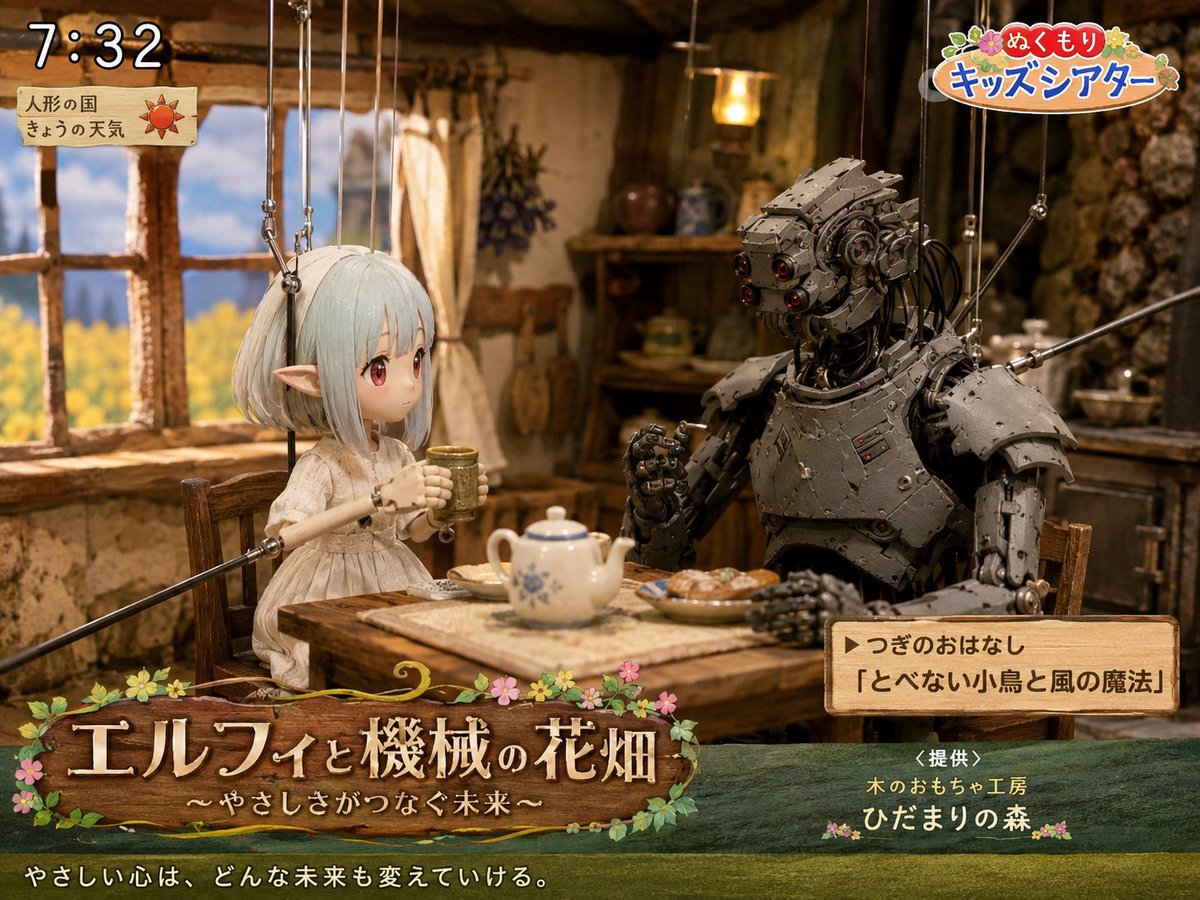
Elf and Robot Puppet Theater Still
A detailed prompt for generating a nostalgic Japanese children's TV puppet-theater still with an elf, a robot, cozy cottage set, and broadcast overlays.
Это пример использования шаблона GPT Image 2 для Иллюстрация и искусство . Используйте приведенный ниже шаблон, готовый к копированию, чтобы создать аналогичные визуальные элементы, и перед повторным использованием проверьте указание авторства Awesome GPT Image 2 Prompts и права на коммерческое использование.
Free 1K preview
Generate one preview image instantly, no sign-up required.
Промпт
Подсказка для копирования
Goal: Create a cozy Japanese children's TV theater still showing a puppet-style fantasy scene titled {argument name="show title" default="エルフィと機械の花畑"}, with a gentle storybook atmosphere and visible broadcast graphics.

Canvas: 4:3 landscape frame, warm cinematic lighting, shallow depth of field, detailed handcrafted miniature set.

Main scene: Inside a rustic cottage kitchen with clay-plaster walls, exposed wood beams, a wooden window on the left looking out to a bright yellow flower field and blue sky, shelves and hanging herbs in the background, and a small wooden table in the foreground. Two marionette characters sit at the table drinking tea: 1) a delicate elf girl puppet on the left with pale mint-white bobbed hair, long pointed ears, a simple cream linen dress, slim wooden puppet arms, and visible suspension strings attached above; her face area is softly blurred/obscured as if anonymized, 2) a large humanoid robot puppet on the right made of dark riveted metal plates, exposed cables, red lens eyes, bulky shoulder armor, articulated hands, and visible marionette rods/strings. The elf holds a small cup with both hands; the robot raises one hand as if speaking. On the table include exactly 4 visible food and tea items: a white teapot with blue floral pattern, one small cup in the elf's hands, one plate of pastries, and a rectangular cloth or tray under the teapot.

Broadcast overlay layout: Add exactly 5 graphic/text areas: 1) top-left digital clock reading {argument name="broadcast time" default="7:32"} in large white outlined numerals, 2) below it a small parchment weather card with Japanese text 「人形の国」 and 「きょうの天気」 plus a red sun icon, 3) top-right colorful logo reading {argument name="program logo" default="ぬくもり キッズシアター"} with flowers and rounded playful lettering, 4) bottom-left large wooden signboard title with flowers and vines reading 「エルフィと機械の花畑」 and subtitle 「〜やさしさがつなぐ未来〜」, 5) lower-right wooden next-story box reading 「▶つぎのおはなし」 and 「『とべない小鳥と風の魔法』」.

Additional bottom text: Across the very bottom, add the white Japanese tagline {argument name="tagline" default="やさしい心は、どんな未来も変えていける。"}. Near the lower-right above the bottom edge, add sponsor text 「<提供>」, 「木のおもちゃ工房」, and 「ひだまりの森」 with small flower decorations.

Visual style: Hyper-detailed stop-motion puppetry mixed with fantasy miniature photography, warm amber interior light, nostalgic NHK-style children's morning program, polished gpt-image-2 realism, tactile wood, cloth, metal, and paper textures. Keep all marionette strings visible and delicate. Use soft bloom around the window and cozy shadows in the cottage.

Constraints: Use exactly 2 seated characters, exactly 5 broadcast graphic/text areas, and exactly 4 table items as listed. Keep the scene wholesome and gentle, no extra logos beyond the described fake TV graphics, no modern appliances, no watermark.
Переменные подсказки
Редактируемые заполнители аргументов, найденные в подсказке, с их значениями по умолчанию.
Best for
- - Иллюстрация и искусство visual exploration
- - Image generation and reference-image edits
- - Reusable briefs that keep source attribution visible
Change these parts
- - Subject, product, character, or scene
- - Aspect ratio, camera, lighting, and background
- - Brand, text, color, and output constraints
Recommended model and settings
- - Model: gpt-image-2
- - Input mode: Текст в изображение
- - Aspect ratio: source
- - Commercial status: review original source
How to use this prompt
- 1. Copy the prompt and preserve its structure for the first test.
- 2. Replace the subject, context, and publishing channel.
- 3. Change one camera, lighting, or style variable per iteration.
- 4. Inspect the output, source, text, and rights before reuse.
Limitations, source, and reuse cautions
- - Generated output is an editable draft, not factual, legal, or rights evidence.
- - Review the linked source, people, brands, logos, text, and third-party media before commercial use.
Больше случаев в этой категории
Приоритет отдается категориям, совместимости с режимами ввода, качеству и низкому уровню риска.






Примечания по повторному использованию и источникам
Используйте это подсказку безопасно после предварительного просмотра дела.
- 1.Скопируйте подсказку или откройте ее непосредственно в Dovoo с помощью кнопки генерации.
- 2.Настройте переменные, соотношение сторон и эталонные изображения в соответствии с вашими потребностями.
- 3.Перед публикацией или платным использованием проверьте права на источник, требования к указанию авторства, а также риски, связанные с использованием товарного знака или изображения.