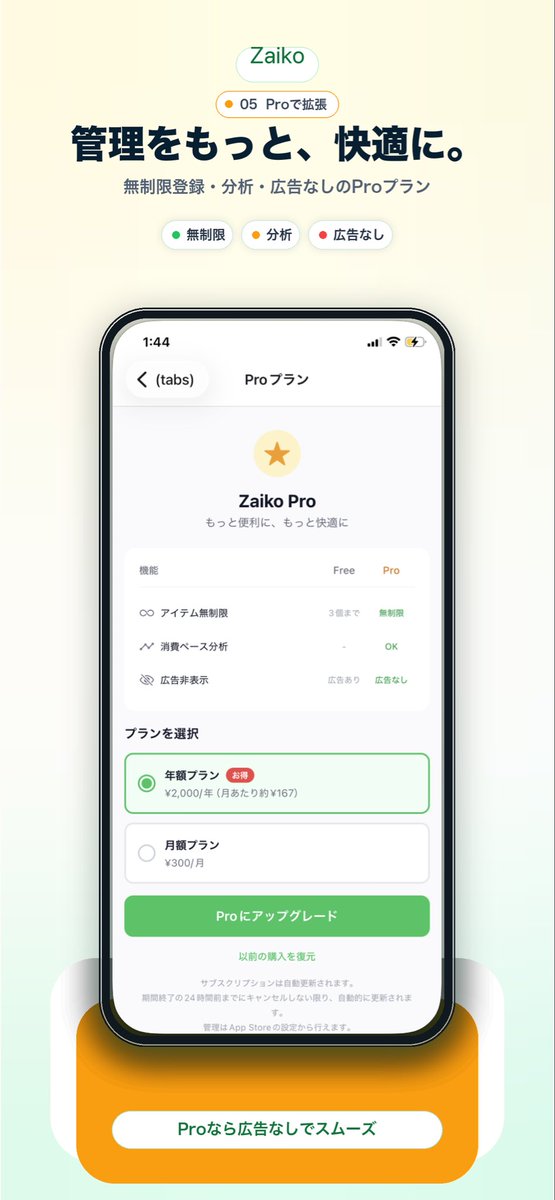
Промо-акция японского приложения Pro Plan
Это позволяет создать качественный скриншот для японского рынка мобильных приложений, демонстрирующий экран подписки Pro, который можно использовать на целевых страницах, в визуальных материалах магазинов приложений или для продвижения в социальных сетях.
Это пример использования шаблона GPT Image 2 для Продукт и коммерция . Используйте приведенный ниже шаблон, готовый к копированию, чтобы создать аналогичные визуальные элементы, и перед повторным использованием проверьте указание авторства Awesome GPT Image 2 Prompts и права на коммерческое использование.
Free 1K preview
Generate one preview image instantly, no sign-up required.
Промпт
Подсказка для копирования
Create a clean modern promotional hero image for a Japanese inventory management app landing page on a soft warm off-white background with a subtle pale mint gradient rising from the bottom. Center the composition vertically. At the top, place a rounded white pill logo with the text "Zaiko" in green. Directly below it, add a small rounded badge with a tiny yellow dot and the text "05 Proで拡張". Then add a large bold Japanese headline in dark navy reading "管理をもっと、快適に。" and a smaller gray subheadline reading "無制限登録・分析・広告なしのProプラン". Under that, show exactly 3 small rounded feature chips in one row: a white chip with a green dot and the label "無制限", a white chip with a yellow dot and the label "分析", and a white chip with a red dot and the label "広告なし". In the center, display a large realistic iPhone front view with thin black bezel, rounded corners, subtle reflections, and a soft shadow. On the phone screen, show an app subscription page in Japanese with the top bar time 1:44, back chevron, a left tab label "(tabs)", and the centered title "Proプラン". The page content should feature a pale gold circular icon with a gold star, the title "Zaiko Pro", and the subtitle "もっと便利に、もっと快適に". Below that, include a rounded white comparison card with 3 feature rows and 3 column headers "機能", "Free", "Pro". The 3 rows should be: "アイテム無制限" with "3個まで" under Free and "無制限" in green under Pro; "消費ベース分析" with "-" under Free and "OK" in green under Pro; "広告非表示" with "広告あり" under Free and "広告なし" in green under Pro. Beneath the card, add a section title "プランを選択" and exactly 2 stacked plan options: a selected annual plan outlined in green with a green radio button, the label "年額プラン", a small red badge "お得", and the price line "¥2,000/年 (月あたり約¥167)"; then an unselected monthly plan with a gray radio button, the label "月額プラン", and the price "¥300/月". Under the plans, place a large rounded green call-to-action button reading "Proにアップグレード". Below it, add a centered text link "以前の購入を復元" and several lines of tiny gray subscription disclaimer text. At the very bottom behind the phone, add a large rounded orange pedestal card with a white pill label containing the text "Proなら広告なしでスムーズ" in green. Use a polished startup-app marketing style, soft shadows, airy spacing, rounded UI, crisp Japanese typography, and a premium minimal aesthetic.
Best for
- - Продукт и коммерция visual exploration
- - Image generation and reference-image edits
- - Reusable briefs that keep source attribution visible
Change these parts
- - Subject, product, character, or scene
- - Aspect ratio, camera, lighting, and background
- - Brand, text, color, and output constraints
Recommended model and settings
- - Model: gpt-image-2
- - Input mode: Текст в изображение
- - Aspect ratio: source
- - Commercial status: review original source
How to use this prompt
- 1. Copy the prompt and preserve its structure for the first test.
- 2. Replace the subject, context, and publishing channel.
- 3. Change one camera, lighting, or style variable per iteration.
- 4. Inspect the output, source, text, and rights before reuse.
Limitations, source, and reuse cautions
- - Generated output is an editable draft, not factual, legal, or rights evidence.
- - Review the linked source, people, brands, logos, text, and third-party media before commercial use.
Больше случаев в этой категории
Приоритет отдается категориям, совместимости с режимами ввода, качеству и низкому уровню риска.






Примечания по повторному использованию и источникам
Используйте это подсказку безопасно после предварительного просмотра дела.
- 1.Скопируйте подсказку или откройте ее непосредственно в Dovoo с помощью кнопки генерации.
- 2.Настройте переменные, соотношение сторон и эталонные изображения в соответствии с вашими потребностями.
- 3.Перед публикацией или платным использованием проверьте права на источник, требования к указанию авторства, а также риски, связанные с использованием товарного знака или изображения.