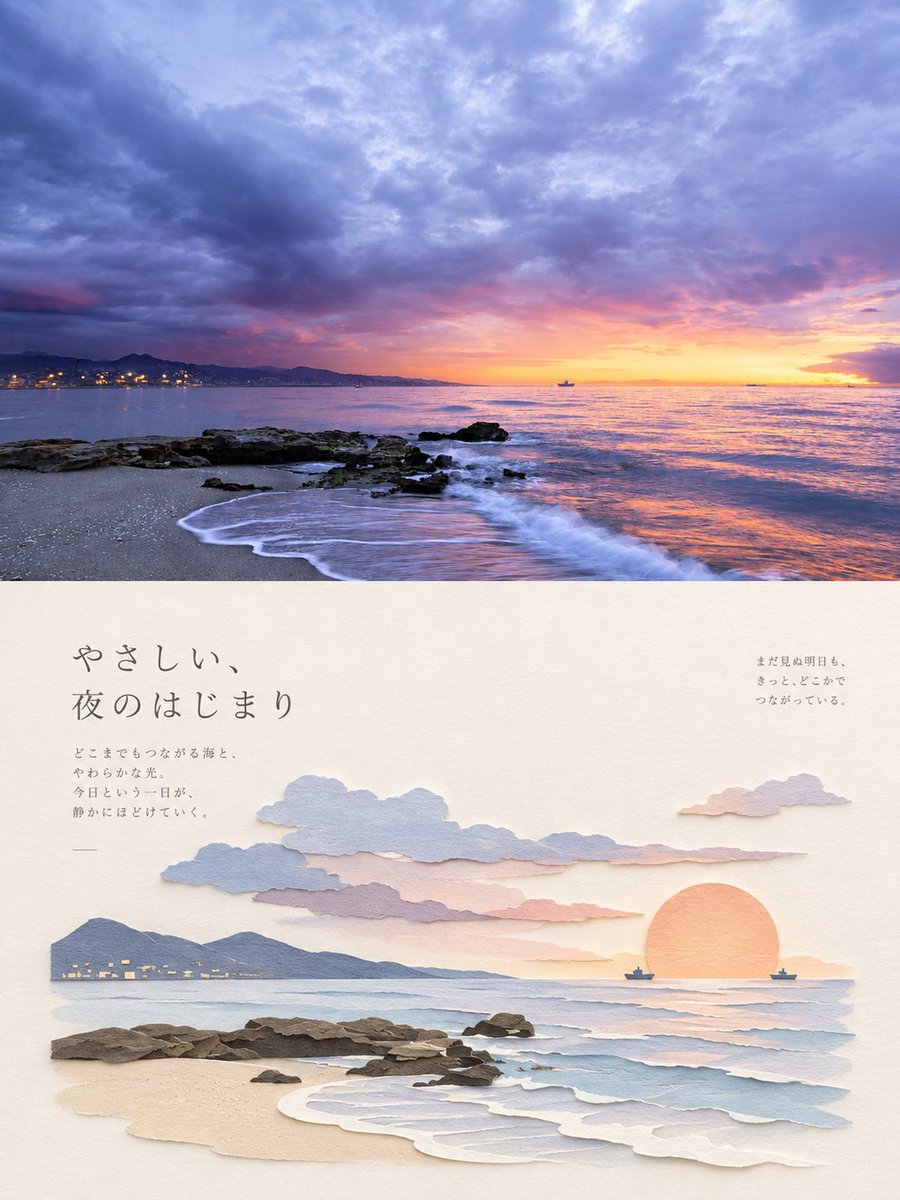
Japanese Paper-Cut Sunset Collage
A vertical collage combining a real coastal sunset photograph with Japanese paper-cut art illustrations and elegant typography, perfect for travel memories or artistic compositions.
Это пример использования шаблона GPT Image 2 для Иллюстрация и искусство . Используйте приведенный ниже шаблон, готовый к копированию, чтобы создать аналогичные визуальные элементы, и перед повторным использованием проверьте указание авторства Awesome GPT Image 2 Prompts и права на коммерческое использование.
Нужен полный набор подсказок? Воспользуйтесь Иллюстрация и искусство Для получения дополнительных примеров по теме, или откройте раздел "Обзор тем" GPT Image 2 быстрый каталог Полный список примеров, многократно используемых структур и указание источников см. здесь.
Free 1K preview
Generate one preview image instantly, no sign-up required.
1184/4000
Промпт
Подсказка для копирования
Create a vertical collage-style image combining a realistic photograph and a paper-cut illustration. The top half is a high-resolution photograph of a coastal sunset scene: dramatic purple and pink clouds fill the sky, with a golden sun setting over the ocean horizon. A rocky shoreline extends into the water on the left, with gentle waves lapping against sandy beach. Distant city lights twinkle along the coastline, and a small boat is visible on the water. The bottom half features a Japanese paper-cut art style (kirigami) illustration on cream-colored textured paper background. This section includes layered paper clouds in soft blue and pink tones, a circular orange sun made from textured paper, dark brown torn-paper rocks along the shore, and delicate white paper waves. Include elegant Japanese typography: large text reading "やさしい、夜のはじまり" (Gentle beginning of night) in the upper left, smaller poetic text below it describing the sea and light, and additional text in the upper right corner about tomorrow's connections. Use subtle drop shadows to create depth between paper layers, maintaining an aesthetic balance between photographic realism and handcrafted paper art.
Best for
- - Иллюстрация и искусство visual exploration
- - Image generation and reference-image edits
- - Reusable briefs that keep source attribution visible
Change these parts
- - Subject, product, character, or scene
- - Aspect ratio, camera, lighting, and background
- - Brand, text, color, and output constraints
Recommended model and settings
- - Model: gpt-image-2
- - Input mode: Текст в изображение
- - Aspect ratio: source
- - Commercial status: review original source
How to use this prompt
- 1. Copy the prompt and preserve its structure for the first test.
- 2. Replace the subject, context, and publishing channel.
- 3. Change one camera, lighting, or style variable per iteration.
- 4. Inspect the output, source, text, and rights before reuse.
Limitations, source, and reuse cautions
- - Generated output is an editable draft, not factual, legal, or rights evidence.
- - Review the linked source, people, brands, logos, text, and third-party media before commercial use.
Импортировано из Awesome GPT Image 2 Prompts . Требуется указание авторства. Статус коммерческого использования: allowed ; перед платным использованием ознакомьтесь с правами на источник.
Больше случаев в этой категории
Приоритет отдается категориям, совместимости с режимами ввода, качеству и низкому уровню риска.

Cute Focus Desk Flat Lay and Kawaii Illustration
Текст в изображение

Tuxedo Cat Photo and Line Art Diptych
Текст в изображение

GPT Image 2 Real-Life Character Street Snap
Текст в изображение

Matte Black B.AI Keyboard Keycap
Текст в изображение

MotoGP POV Cornering Shot
Текст в изображение

Boisterous Shrimpers Entering Pub
Текст в изображение
Примечания по повторному использованию и источникам
Используйте это подсказку безопасно после предварительного просмотра дела.
- 1.Скопируйте подсказку или откройте ее непосредственно в Dovoo с помощью кнопки генерации.
- 2.Настройте переменные, соотношение сторон и эталонные изображения в соответствии с вашими потребностями.
- 3.Перед публикацией или платным использованием проверьте права на источник, требования к указанию авторства, а также риски, связанные с использованием товарного знака или изображения.