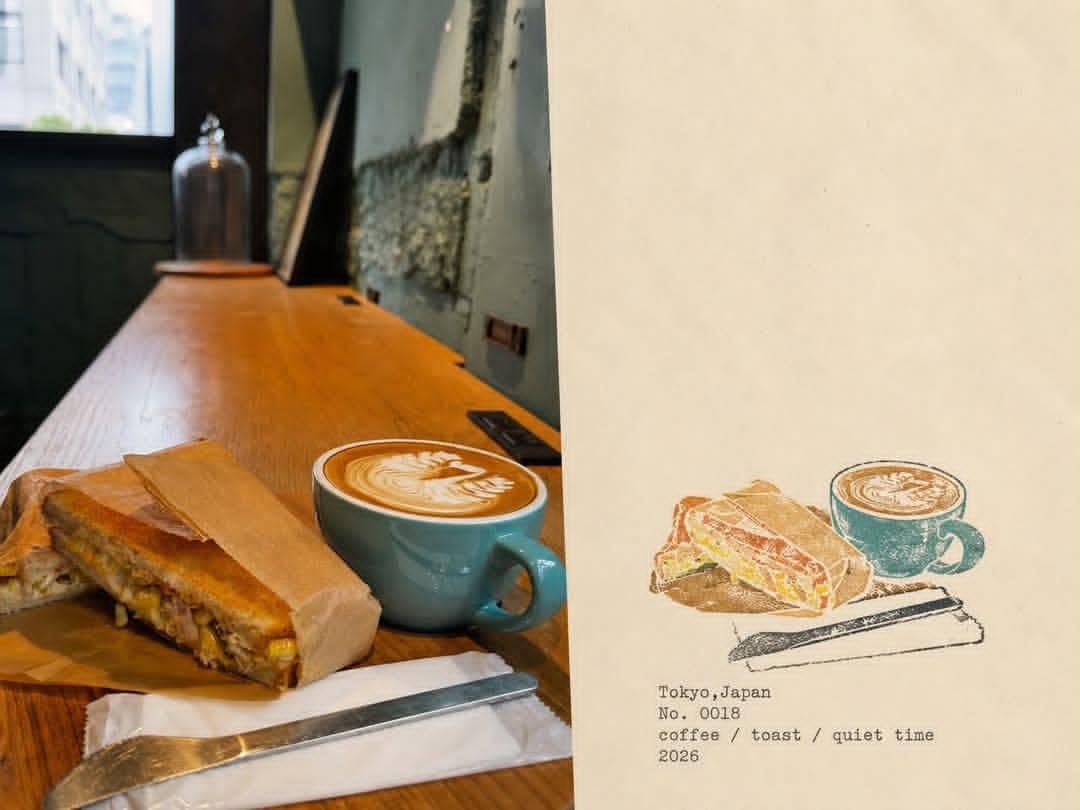
Japanese Cafe Memory Journal Page
A creative prompt to generate an editorial diary layout combining a realistic cafe photograph with a watercolor illustration of the same scene.
Это пример использования шаблона GPT Image 2 для Иллюстрация и искусство . Используйте приведенный ниже шаблон, готовый к копированию, чтобы создать аналогичные визуальные элементы, и перед повторным использованием проверьте указание авторства Awesome GPT Image 2 Prompts и права на коммерческое использование.
Free 1K preview
Generate one preview image instantly, no sign-up required.
Промпт
Подсказка для копирования
Create a premium editorial “memory journal” page combining a real lifestyle photograph with a hand-drawn illustrated interpretation of the same moment. Use a vertical 4:5 composition divided diagonally/vertically into two complementary sections: the left side is a warm, natural, slightly film-grainy photograph of a {argument name="scene" default="Japanese café scene"}, showing beautifully plated food or dessert and coffee on a wooden table, with realistic ambient café details, soft window light, shallow depth of field, and subtle nostalgic tones; the right side is a minimalist {argument name="art style" default="hand-painted watercolor/colored-pencil illustration"} recreating the same food and drink with delicate imperfect ink outlines, muted earthy colors, visible paper texture, and an artistic handmade feel. Keep the right side mostly warm ivory textured paper with generous negative space. Beneath the illustration, add small typewriter-style archival text containing the {argument name="location and date" default="Tokyo, Japan / No. 0018 / coffee / toast / quiet time / 2026"}. The design should feel like a curated Japanese travel diary, café memory archive, contemporary scrapbook, and vintage lifestyle magazine, with sophisticated editorial composition, warm cream paper, muted teal, brown, beige and dusty colors, subtle grain, imperfect printing, understated typography, authentic tactile paper texture, elegant minimalism, photorealistic photography seamlessly paired with handmade illustration, high detail, cohesive visual storytelling, no logos, no watermark.Переменные подсказки
Редактируемые заполнители аргументов, найденные в подсказке, с их значениями по умолчанию.
Best for
- - Иллюстрация и искусство visual exploration
- - Image generation and reference-image edits
- - Reusable briefs that keep source attribution visible
Change these parts
- - Subject, product, character, or scene
- - Aspect ratio, camera, lighting, and background
- - Brand, text, color, and output constraints
Recommended model and settings
- - Model: gpt-image-2
- - Input mode: Текст в изображение
- - Aspect ratio: source
- - Commercial status: review original source
How to use this prompt
- 1. Copy the prompt and preserve its structure for the first test.
- 2. Replace the subject, context, and publishing channel.
- 3. Change one camera, lighting, or style variable per iteration.
- 4. Inspect the output, source, text, and rights before reuse.
Limitations, source, and reuse cautions
- - Generated output is an editable draft, not factual, legal, or rights evidence.
- - Review the linked source, people, brands, logos, text, and third-party media before commercial use.
Больше случаев в этой категории
Приоритет отдается категориям, совместимости с режимами ввода, качеству и низкому уровню риска.



Примечания по повторному использованию и источникам
Используйте это подсказку безопасно после предварительного просмотра дела.
- 1.Скопируйте подсказку или откройте ее непосредственно в Dovoo с помощью кнопки генерации.
- 2.Настройте переменные, соотношение сторон и эталонные изображения в соответствии с вашими потребностями.
- 3.Перед публикацией или платным использованием проверьте права на источник, требования к указанию авторства, а также риски, связанные с использованием товарного знака или изображения.