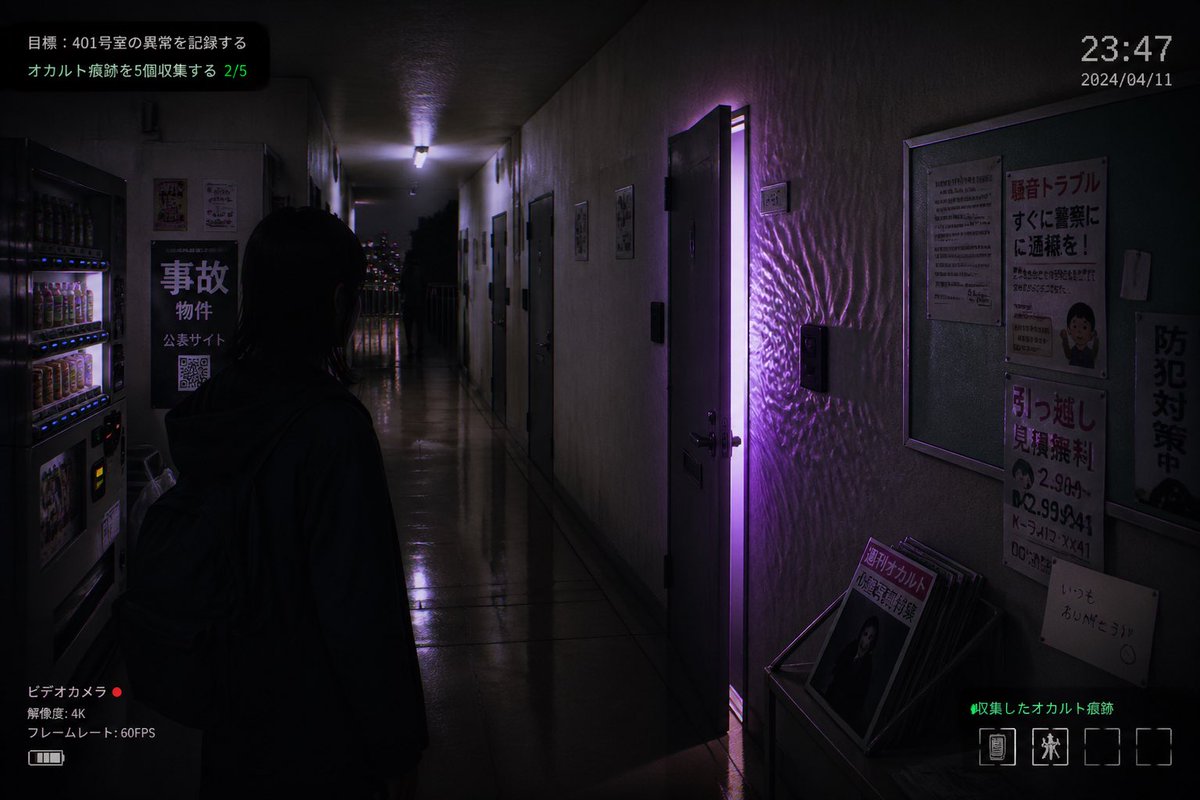
Скриншот японской игры ужасов про квартиры
Этот запрос генерирует фотореалистичный скриншот в стиле инди-хоррор-игры, изображающий коридор заброшенной японской квартиры с дверью, подсвеченной фиолетовым светом, и полным наложением пользовательского интерфейса. Он идеально подходит для создания визуальных эффектов для игр или жутких рекламных материалов.
Это пример использования шаблона GPT Image 2 для Аниме и игры . Используйте приведенный ниже шаблон, готовый к копированию, чтобы создать аналогичные визуальные элементы, и перед повторным использованием проверьте указание авторства Awesome GPT Image 2 Prompts и права на коммерческое использование.
Free 1K preview
Generate one preview image instantly, no sign-up required.
Промпт
Подсказка для копирования
A realistic first-person horror game screenshot set in a narrow, dimly lit Japanese apartment corridor at night, viewed from slightly behind a lone human figure standing in the hallway. The figure is a young woman with straight dark shoulder-length hair, seen mostly in silhouette from the back, wearing a dark hoodie and a backpack, facing forward toward the end of the corridor. The setting is an older concrete apartment building interior with glossy reflective floor tiles, stained off-white walls, multiple apartment doors on both sides, and a cold fluorescent ceiling light receding into the distance. One apartment door on the right side is slightly open, emitting a vivid supernatural purple glow that spills into the hallway and creates rippling light patterns across the wall and floor. On the left foreground, include 2 beverage vending machines with illuminated rows of drinks. Also on the left wall, place a black sign with large Japanese text reading "事故物件", smaller text beneath, and a visible QR code. On the right wall, include a bulletin board and 4 posted notices: a warning-style poster with large red Japanese text, a dense text notice, a moving-service flyer with bold red text and phone numbers, and a vertical anti-crime sign. At the lower right, place a small magazine rack or stand holding several pamphlets, with the front magazine showing Japanese text including "月刊オカルト". Through the far end of the corridor, show a balcony railing and distant city lights. Add an in-game HUD overlay to make it look like a captured indie horror game screen: top left mission text in Japanese with 2 lines, including a green progress counter "2/5"; top right a digital time display "23:47" and date "2024/04/11"; bottom left a camcorder interface with Japanese text, a red recording dot, "4K", and "60FPS"; bottom right green Japanese collection text and a row of 4 inventory slots with only 2 occupied icons. Cinematic composition, moody shadows, photorealistic textures, subtle film grain, surveillance-camera and found-footage atmosphere, ominous supernatural tension, purple and blue-black color palette, realistic Japanese typography, ultra-detailed indie survival horror aesthetic.
Best for
- - Аниме и игры visual exploration
- - Image generation and reference-image edits
- - Reusable briefs that keep source attribution visible
Change these parts
- - Subject, product, character, or scene
- - Aspect ratio, camera, lighting, and background
- - Brand, text, color, and output constraints
Recommended model and settings
- - Model: gpt-image-2
- - Input mode: Текст в изображение
- - Aspect ratio: source
- - Commercial status: review original source
How to use this prompt
- 1. Copy the prompt and preserve its structure for the first test.
- 2. Replace the subject, context, and publishing channel.
- 3. Change one camera, lighting, or style variable per iteration.
- 4. Inspect the output, source, text, and rights before reuse.
Limitations, source, and reuse cautions
- - Generated output is an editable draft, not factual, legal, or rights evidence.
- - Review the linked source, people, brands, logos, text, and third-party media before commercial use.
Больше случаев в этой категории
Приоритет отдается категориям, совместимости с режимами ввода, качеству и низкому уровню риска.






Примечания по повторному использованию и источникам
Используйте это подсказку безопасно после предварительного просмотра дела.
- 1.Скопируйте подсказку или откройте ее непосредственно в Dovoo с помощью кнопки генерации.
- 2.Настройте переменные, соотношение сторон и эталонные изображения в соответствии с вашими потребностями.
- 3.Перед публикацией или платным использованием проверьте права на источник, требования к указанию авторства, а также риски, связанные с использованием товарного знака или изображения.