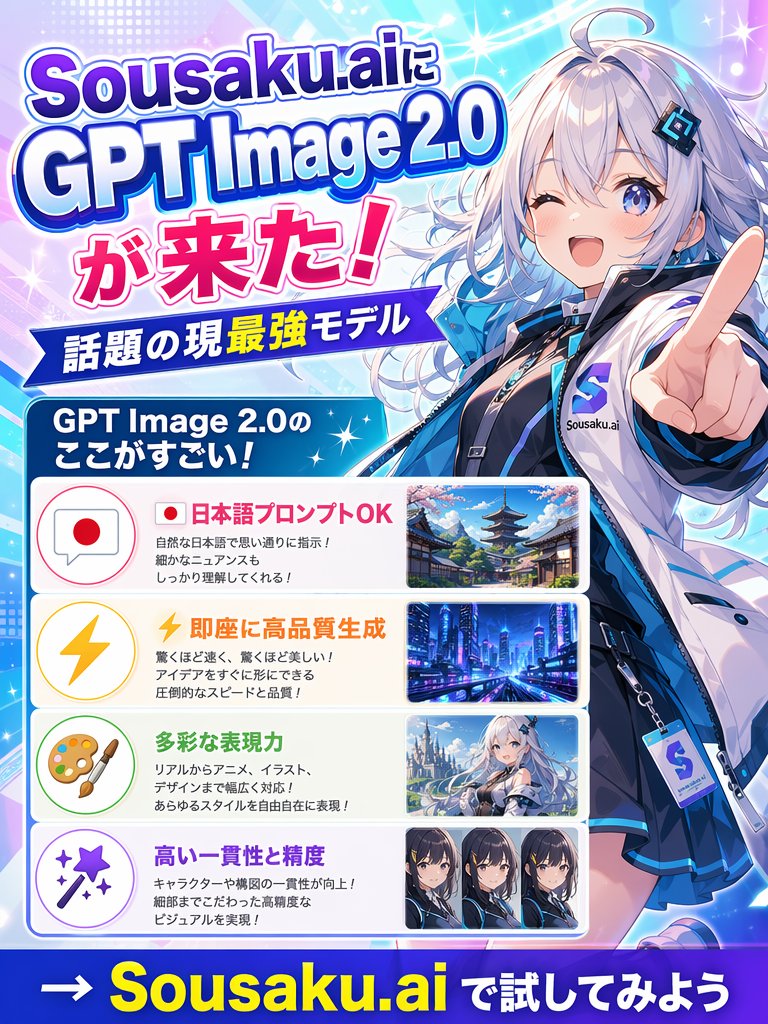
Японский аниме-постер к запуску ИИ
Яркий рекламный постер в японском стиле, выполненный в аниме-стиле, для запуска модели искусственного интеллекта, подходящий для публикаций в социальных сетях, рекламы и графического оформления анонсов.
Это пример использования шаблона GPT Image 2 для Графика и плакаты . Используйте приведенный ниже шаблон, готовый к копированию, чтобы создать аналогичные визуальные элементы, и перед повторным использованием проверьте указание авторства Awesome GPT Image 2 Prompts и права на коммерческое использование.
Free 1K preview
Generate one preview image instantly, no sign-up required.
Промпт
Подсказка для копирования
Create a vibrant Japanese promotional poster for {argument name="brand name" default="Sousaku.ai"} announcing {argument name="product name" default="GPT Image 2.0"}. Use a vertical 3:4 layout with a flashy anime-tech advertising style, bright cyan, blue, purple, pink, and white gradients, glowing sparkles, lens flares, halftone dots, and dynamic diagonal light streaks. On the right side, feature a large half-body anime girl mascot in a futuristic streetwear outfit, silver-white long wavy hair with cool blue highlights, pale skin, blue eyes, a confident smile, and one hand thrust toward the viewer with an extended pointing finger in strong foreshortened perspective. She wears a glossy white and blue jacket over a dark inner outfit, a black choker, layered accessories, and a visible badge or tag with an S logo and the text Sousaku.ai. Her face area is covered by a plain square censor block. On the left, place a large stacked headline in bold Japanese display typography with thick outlines and drop shadows reading exactly: "Sousaku.aiに", "GPT Image 2.0", "が来た!". Below it, add a blue ribbon banner with white text reading "話題の現最強モデル". Under that, add a rounded blue header box with white text reading "GPT Image 2.0のここがすごい!". Beneath the header, create 4 rounded rectangular feature panels stacked vertically, each with a pastel icon circle on the left, Japanese text in the center, and a sample image thumbnail on the right. Panel 1: icon is a speech bubble with a Japanese flag, headline text in pink-red "日本語プロンプトOK", smaller black explanatory text in 3 lines, and a thumbnail of a traditional Japanese street with a pagoda and cherry blossoms. Panel 2: icon is a yellow lightning bolt, headline text in orange "即座に高品質生成", smaller black explanatory text in 3 lines, and a thumbnail of a futuristic neon city at night. Panel 3: icon is an artist palette and brush, headline text in green "多彩な表現力", smaller black explanatory text in 3 lines, and a thumbnail of an anime fantasy girl in a snowy or bright scenic setting, with the face lightly obscured. Panel 4: icon is a magic wand with sparkles, headline text in purple "高い一貫性と精度", smaller black explanatory text in 2 lines, and a thumbnail row containing exactly 3 close-up anime character portrait variants side by side, Show every face clearly with natural, detailed facial features. At the very bottom, add a bold call-to-action on a dark blue strip reading exactly "→ {argument name="call to action" default="Sousaku.ai で試してみよう"}" with the brand name in large yellow letters and the remaining text in white. Make the overall composition dense, polished, glossy, and eye-catching like a social media announcement poster for a new AI image model.Переменные подсказки
Редактируемые заполнители аргументов, найденные в подсказке, с их значениями по умолчанию.
Best for
- - Графика и плакаты visual exploration
- - Image generation and reference-image edits
- - Reusable briefs that keep source attribution visible
Change these parts
- - Subject, product, character, or scene
- - Aspect ratio, camera, lighting, and background
- - Brand, text, color, and output constraints
Recommended model and settings
- - Model: gpt-image-2
- - Input mode: Текст в изображение
- - Aspect ratio: source
- - Commercial status: review original source
How to use this prompt
- 1. Copy the prompt and preserve its structure for the first test.
- 2. Replace the subject, context, and publishing channel.
- 3. Change one camera, lighting, or style variable per iteration.
- 4. Inspect the output, source, text, and rights before reuse.
Limitations, source, and reuse cautions
- - Generated output is an editable draft, not factual, legal, or rights evidence.
- - Review the linked source, people, brands, logos, text, and third-party media before commercial use.
Больше случаев в этой категории
Приоритет отдается категориям, совместимости с режимами ввода, качеству и низкому уровню риска.






Примечания по повторному использованию и источникам
Используйте это подсказку безопасно после предварительного просмотра дела.
- 1.Скопируйте подсказку или откройте ее непосредственно в Dovoo с помощью кнопки генерации.
- 2.Настройте переменные, соотношение сторон и эталонные изображения в соответствии с вашими потребностями.
- 3.Перед публикацией или платным использованием проверьте права на источник, требования к указанию авторства, а также риски, связанные с использованием товарного знака или изображения.