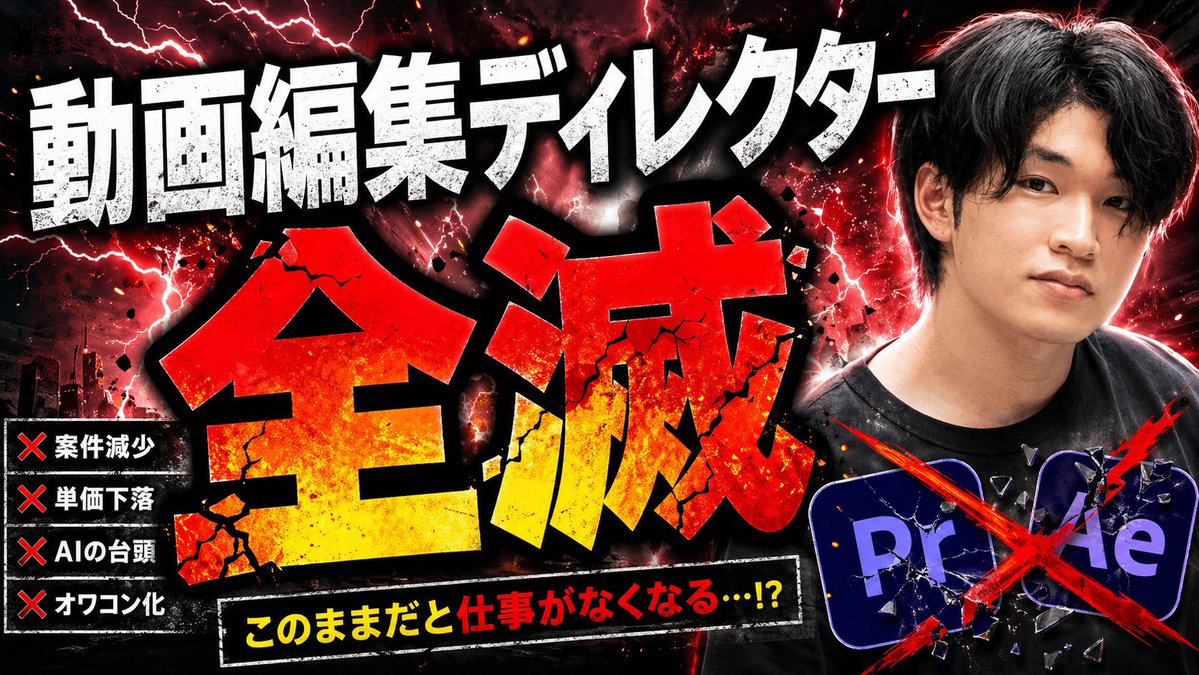
Взрывоопасная японская угроза искусственному интеллекту (миниатюра)
Это позволяет создать эффектную японскую миниатюру для YouTube, посвященную тому, как искусственный интеллект уничтожает профессии видеомонтажера, которая полезна для создания спорного контента, комментариев или анализа трендов.
Это пример использования шаблона GPT Image 2 для Графика и плакаты . Используйте приведенный ниже шаблон, готовый к копированию, чтобы создать аналогичные визуальные элементы, и перед повторным использованием проверьте указание авторства Awesome GPT Image 2 Prompts и права на коммерческое использование.
Free 1K preview
Generate one preview image instantly, no sign-up required.
Free text preview doesn’t preserve reference-image consistency.
Промпт
Подсказка для копирования
Create a dramatic Japanese YouTube thumbnail in a hyper-aggressive clickbait style, 16:9 landscape, with a dark black-and-crimson background filled with red lightning, smoky clouds, glowing sparks, ink splatter, and explosive energy. The composition has 4 main text areas and 2 graphic icon elements. Across the top, place huge distressed white Japanese headline text reading {argument name="top headline text" default="動画編集ディレクター"}, using an extra-bold block font with rough grunge texture, black outline, and heavy shadow. In the center, place the dominant oversized kanji {argument name="main title text" default="Extinction"} in a massive shattered font, red at the top fading to yellow at the bottom, with cracked stone texture, black border, debris fragments, and impact glow, occupying most of the frame. At the lower center, add a black slanted banner with a white border containing bright yellow and red Japanese text reading {argument name="warning text" default="このままだと仕事がなくなる…!?"}, bold and urgent. On the left side, add a vertical black panel listing exactly 4 warning items, each preceded by a red X mark: 「案件減少」, 「単価下落」, 「AIの台頭」, 「オワコン化」. On the right side, show a cropped photo-real Japanese man from chest up, facing slightly left, wearing a black T-shirt, with short dark hair and a strong red rim light around his silhouette; Show every face clearly with natural, detailed facial features. At the lower right, include exactly 2 Adobe-style app icons, 「Pr」 and 「Ae」, dark blue-purple rounded squares, partially overlapping, both cracked like broken glass and crossed out with one large diagonal red paint slash X spanning the icons. Add a subtle dark city skyline silhouette in the lower left background. Overall look: sensational, destructive, high contrast, gritty, overloaded with texture, with intense red/black color grading, thick shadows, dramatic glow, and polished viral-thumbnail composition.Переменные подсказки
Редактируемые заполнители аргументов, найденные в подсказке, с их значениями по умолчанию.
Best for
- - Графика и плакаты visual exploration
- - Image generation and reference-image edits
- - Reusable briefs that keep source attribution visible
Change these parts
- - Subject, product, character, or scene
- - Aspect ratio, camera, lighting, and background
- - Brand, text, color, and output constraints
Recommended model and settings
- - Model: gpt-image-2
- - Input mode: Изображение в изображение
- - Aspect ratio: source
- - Commercial status: review original source
How to use this prompt
- 1. Copy the prompt and preserve its structure for the first test.
- 2. Replace the subject, context, and publishing channel.
- 3. Change one camera, lighting, or style variable per iteration.
- 4. Inspect the output, source, text, and rights before reuse.
Limitations, source, and reuse cautions
- - Generated output is an editable draft, not factual, legal, or rights evidence.
- - Review the linked source, people, brands, logos, text, and third-party media before commercial use.
Больше случаев в этой категории
Приоритет отдается категориям, совместимости с режимами ввода, качеству и низкому уровню риска.






Примечания по повторному использованию и источникам
Используйте это подсказку безопасно после предварительного просмотра дела.
- 1.Скопируйте подсказку или откройте ее непосредственно в Dovoo с помощью кнопки генерации.
- 2.Настройте переменные, соотношение сторон и эталонные изображения в соответствии с вашими потребностями.
- 3.Перед публикацией или платным использованием проверьте права на источник, требования к указанию авторства, а также риски, связанные с использованием товарного знака или изображения.