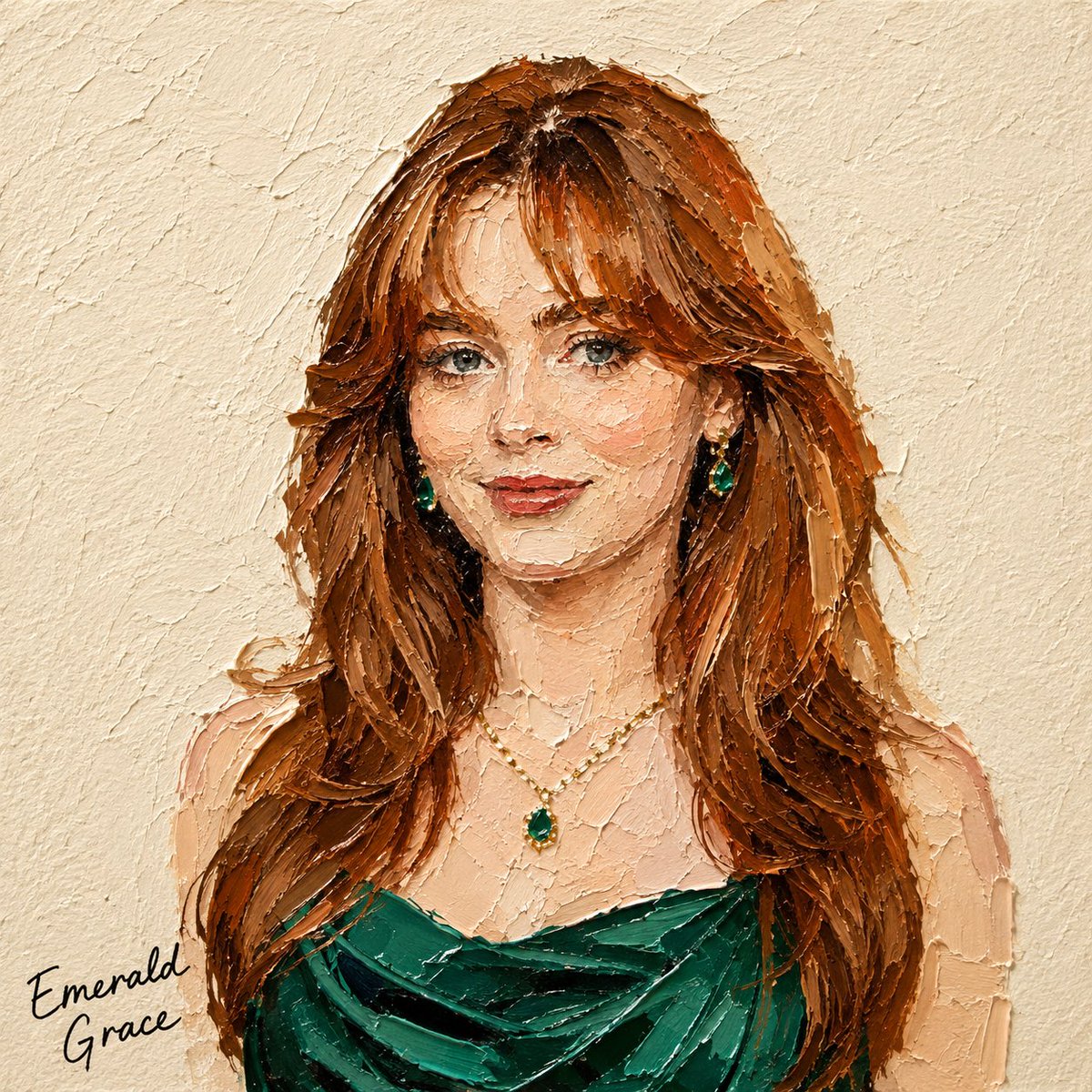
Impasto Oil Miniature Painting Style
Transforms photos into 3D-textured miniature oil paintings using a thick palette-knife impasto technique with realistic lighting.
Это пример использования шаблона GPT Image 2 для Иллюстрация и искусство . Используйте приведенный ниже шаблон, готовый к копированию, чтобы создать аналогичные визуальные элементы, и перед повторным использованием проверьте указание авторства Awesome GPT Image 2 Prompts и права на коммерческое использование.
Free 1K preview
Generate one preview image instantly, no sign-up required.
Free text preview doesn’t preserve reference-image consistency.
Промпт
Подсказка для копирования
Transform the subject in the attached photo into a square miniature painting in a {argument name="painting style" default="palette-knife impasto oil-painting style"}.

[Style — Emphasize 3D Texture]

Use bold, thick impasto paint applied with a palette knife, raised approximately 3–5 mm from the surface.

Each paint mass should show clear directional knife marks, including visible grooves and ridges.

Assume lighting from the upper left. Add bright highlights to raised paint and distinct shadows to recessed or overlapping areas, creating strong light-and-shadow contrast like a real oil-paint surface.

Add subtle shadows along paint edges so each color mass appears layered and built up at different depths, rather than flat.

Preserve the subject’s silhouette, colors, and composition from the original photo, but avoid realistic rendering. Simplify the form using thick masses of paint.

Keep the texture controlled and not overly detailed. The subject should remain recognizable through a limited number of bold, dimensional palette-knife strokes.

[Background]

Use a fixed {argument name="background color" default="warm ivory/cream watercolor-paper background"} with a subtle, slightly bumpy texture.

Keep the background flat to contrast with the dimensional subject.

[Text]

Add a black handwritten caption in a corner along the bottom or wherever there is the most empty space.

Automatically determine the caption based on the subject:

Food/drink → menu name (e.g., “Pancake,” “Earl Grey Cake”)

Product → product name or category

Person → a short descriptive phrase or name-like text

Animal → animal name or species

Landscape → place name or a short word describing the scene

The handwriting should look naturally imperfect, slightly uneven, and tactile—not like a clean digital font.

Text color must remain black.

[Composition]

Aspect ratio: 1:1

Place the subject in the center with generous negative space.

Show only the main subject, with no additional props or distracting elements.
Переменные подсказки
Редактируемые заполнители аргументов, найденные в подсказке, с их значениями по умолчанию.
Best for
- - Иллюстрация и искусство visual exploration
- - Image generation and reference-image edits
- - Reusable briefs that keep source attribution visible
Change these parts
- - Subject, product, character, or scene
- - Aspect ratio, camera, lighting, and background
- - Brand, text, color, and output constraints
Recommended model and settings
- - Model: gpt-image-2
- - Input mode: Изображение в изображение
- - Aspect ratio: source
- - Commercial status: review original source
How to use this prompt
- 1. Copy the prompt and preserve its structure for the first test.
- 2. Replace the subject, context, and publishing channel.
- 3. Change one camera, lighting, or style variable per iteration.
- 4. Inspect the output, source, text, and rights before reuse.
Limitations, source, and reuse cautions
- - Generated output is an editable draft, not factual, legal, or rights evidence.
- - Review the linked source, people, brands, logos, text, and third-party media before commercial use.
Больше случаев в этой категории
Приоритет отдается категориям, совместимости с режимами ввода, качеству и низкому уровню риска.






Примечания по повторному использованию и источникам
Используйте это подсказку безопасно после предварительного просмотра дела.
- 1.Скопируйте подсказку или откройте ее непосредственно в Dovoo с помощью кнопки генерации.
- 2.Настройте переменные, соотношение сторон и эталонные изображения в соответствии с вашими потребностями.
- 3.Перед публикацией или платным использованием проверьте права на источник, требования к указанию авторства, а также риски, связанные с использованием товарного знака или изображения.