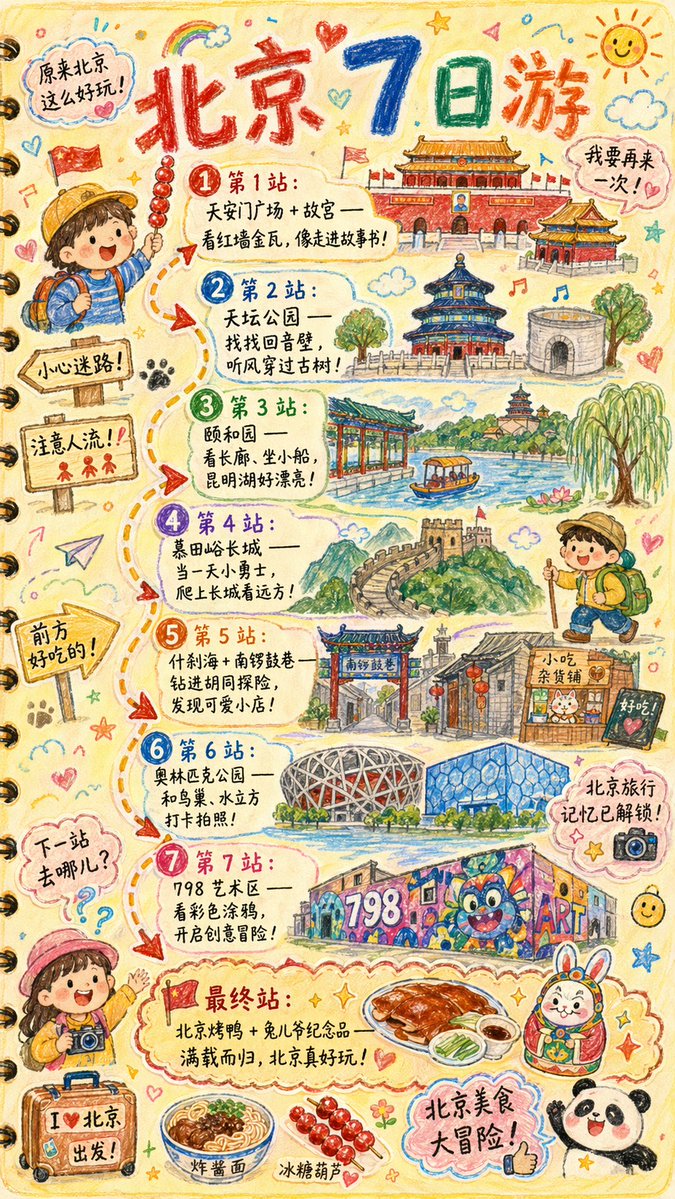
Иллюстрация из путевого дневника, нарисованная от руки.
Подробное задание для создания иллюстрации в стиле детского рисованного от руки дневника путешествий с возможностью выбора названий городов, достопримечательностей и маршрутов.
Это пример использования шаблона GPT Image 2 для Графика и плакаты . Используйте приведенный ниже шаблон, готовый к копированию, чтобы создать аналогичные визуальные элементы, и перед повторным использованием проверьте указание авторства Awesome GPT Image 2 Prompts и права на коммерческое использование.
Free 1K preview
Generate one preview image instantly, no sign-up required.
Промпт
Подсказка для копирования
Please draw a brightly colored, vertical (9:16) hand-drawn style "{argument name="city name" default="Beijing"} Travel Journal Illustration." The style should look as if it were created with crayons by a curious child. Use a soft and warm light-colored background (such as light yellow), paired with bright tones like red, blue, and green, to create a cozy, child-like, and travel-inspired atmosphere.

I. Main Image: Journal-style Travel Route

Draw a "winding travel route" in the center of the illustration, connecting multiple locations with arrows and dashed lines. Recommended attractions will be automatically generated based on a {argument name="number of days" default="1"}-day itinerary:

Example format (automatically replaced with {argument name="city name" default="Beijing"} related content):

- "Stop 1: {Attraction 1 recommendation + short fun description}"
- "Stop 2: {Attraction 2 recommendation + short fun description}"
- "Stop 3: {Attraction 3 recommendation + short fun description}"
- ...
- "Final Stop: {Local signature food/souvenir + warm closing statement}"

> The number of travel stops is automatically generated based on the number of days. If no days are input, a 1-day/highlights route will be generated by default.

II. Fun Surrounding Elements (Automatically replaced based on the city)

Add plenty of child-like elements around the route, such as:

- Cute travel characters: "A child holding local snacks," "An adventurous kid wearing a backpack," etc.
- Child-like Q-version hand-drawings of local landmarks: such as "{landmark 1}," "{landmark 2}," "{landmark 3}."
- Fun signboards: "Watch out for getting lost!", "Mind the crowds!", "Good food ahead!" (Adjusted according to city context).
- Sticker-style slogans: "{argument name="city name" default="Beijing"} Travel Memories Unlocked!", "{argument name="city name" default="Beijing"} Food Adventure!", "Where to next?"
- Cute small icons of local delicacies: such as "{food 1}," "{food 2}," "{food 3}."
- Exclamations (maintaining a child-like tone): "{argument name="city name" default="Beijing"} is so much fun!", "I want to go again!"

III. Overall Style Requirements

- Hand-drawn crayon style / children's travel log style
- Bright colors, full but warm composition
- Emphasis on the joy and exploration of travel
- All text uses cute handwritten fonts
- Make the entire image look like a travel journal page full of child-like wonder.
Переменные подсказки
Редактируемые заполнители аргументов, найденные в подсказке, с их значениями по умолчанию.
Best for
- - Графика и плакаты visual exploration
- - Image generation and reference-image edits
- - Reusable briefs that keep source attribution visible
Change these parts
- - Subject, product, character, or scene
- - Aspect ratio, camera, lighting, and background
- - Brand, text, color, and output constraints
Recommended model and settings
- - Model: gpt-image-2
- - Input mode: Текст в изображение
- - Aspect ratio: source
- - Commercial status: review original source
How to use this prompt
- 1. Copy the prompt and preserve its structure for the first test.
- 2. Replace the subject, context, and publishing channel.
- 3. Change one camera, lighting, or style variable per iteration.
- 4. Inspect the output, source, text, and rights before reuse.
Limitations, source, and reuse cautions
- - Generated output is an editable draft, not factual, legal, or rights evidence.
- - Review the linked source, people, brands, logos, text, and third-party media before commercial use.
Больше случаев в этой категории
Приоритет отдается категориям, совместимости с режимами ввода, качеству и низкому уровню риска.






Примечания по повторному использованию и источникам
Используйте это подсказку безопасно после предварительного просмотра дела.
- 1.Скопируйте подсказку или откройте ее непосредственно в Dovoo с помощью кнопки генерации.
- 2.Настройте переменные, соотношение сторон и эталонные изображения в соответствии с вашими потребностями.
- 3.Перед публикацией или платным использованием проверьте права на источник, требования к указанию авторства, а также риски, связанные с использованием товарного знака или изображения.