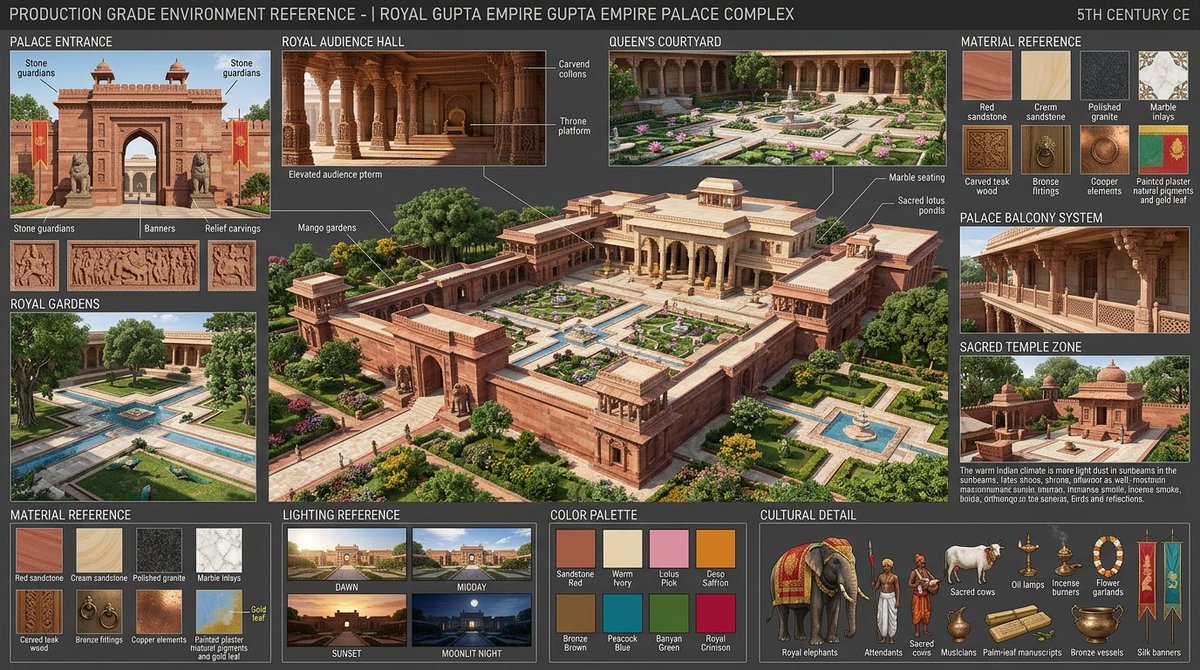
Gupta Palace Environment Reference Sheet
A detailed production reference board for generating a historically inspired Gupta-era royal palace complex with architecture, materials, lighting, palette, and cultural detail callouts.
Это пример использования шаблона GPT Image 2 для Интерьер и архитектура . Используйте приведенный ниже шаблон, готовый к копированию, чтобы создать аналогичные визуальные элементы, и перед повторным использованием проверьте указание авторства Awesome GPT Image 2 Prompts и права на коммерческое использование.
Free 1K preview
Generate one preview image instantly, no sign-up required.
Промпт
Подсказка для копирования
Goal: Create a production-grade environment reference sheet for a {argument name="historical setting" default="Royal Gupta Empire palace complex, 5th century CE"}, designed as a cinematic storyboard and worldbuilding asset for GPT-image generation.

Canvas: Wide 16:9 reference-board layout on a dark charcoal background, dense but clean, with thin white divider lines, uppercase white technical labels, small annotation callouts, and a realistic architectural concept-art style. The overall title across the top reads: “PRODUCTION GRADE ENVIRONMENT REFERENCE - | ROYAL GUPTA EMPIRE GUPTA EMPIRE PALACE COMPLEX”, with “5TH CENTURY CE” aligned at the top right.

Main composition: Place a large central aerial three-quarter view of a grand Gupta-era palace complex occupying the middle of the sheet. The complex is made of red sandstone and cream stone, with symmetrical courtyards, high enclosing walls, arched gateways, colonnaded halls, carved balconies, flat terraces, small domed pavilions, lotus pools, geometric garden paths, fountains, mango trees, flowering shrubs, and warm golden-hour sunlight. Add fine white callout lines labeling architectural and landscape details such as carved columns, throne platform, mango gardens, marble seating, and sacred lotus ponds.

Left column sections: Include exactly 3 sections. Section 1 is “PALACE ENTRANCE”, showing a frontal red sandstone gate with two tower-like chhatri pavilions, a central pointed arch, two stone guardian statues, red-and-gold hanging banners, and relief carvings beneath it. Label exactly 3 entrance detail thumbnails below it: “Stone guardians”, “Banners”, and “Relief carvings”. Section 2 is “ROYAL GARDENS”, showing a formal garden with rectangular water channels, fountains, clipped lawns, trees, peacocks, and palace colonnades in the background. Section 3 is “MATERIAL REFERENCE”, showing exactly 8 material swatches labeled: Red sandstone, Cream sandstone, Polished granite, Marble inlays, Carved teak wood, Bronze fittings, Copper elements, and Painted plaster mural pigments and gold leaf.

Top and right sections: Include exactly 5 smaller architectural reference panels around the central image. Panel 1: “ROYAL AUDIENCE HALL”, an interior hall with carved stone columns, warm shadows, elevated audience platform, carved columns, and throne platform labels. Panel 2: “QUEEN’S COURTYARD”, a garden courtyard with colonnaded palace walls, flower beds, central fountain, marble paths, and lotus ponds. Panel 3: “MATERIAL REFERENCE”, another grid of exactly 8 swatches with the same labels: Red sandstone, Cream sandstone, Polished granite, Marble inlays, Carved teak wood, Bronze fittings, Copper elements, and Painted plaster mural pigments and gold leaf. Panel 4: “PALACE BALCONY SYSTEM”, showing carved projecting balconies with stone railings and ornate supports. Panel 5: “SACRED TEMPLE ZONE”, showing small Gupta-style shrines with domes, red stone, trees, and a courtyard.

Bottom row sections: Include exactly 3 sections. Section 1: “LIGHTING REFERENCE”, with exactly 4 cinematic lighting thumbnails labeled Dawn, Midday, Sunset, and Moonlit Night. Dawn should be pale and misty, midday bright and clear, sunset orange and dramatic, moonlit night blue with palace silhouettes. Section 2: “COLOR PALETTE”, with exactly 8 color chips labeled Sandstone Red, Warm Ivory, Lotus Pink, Deep Saffron, Bronze Brown, Peacock Blue, Banyan Green, and Royal Crimson. Section 3: “CULTURAL DETAIL”, with exactly 9 illustrated cultural elements labeled Royal elephants, Attendants, Sacred cows, Oil lamps, Incense burners, Flower garlands, Palm-leaf manuscripts, Bronze vessels, and Silk banners.

Atmosphere note: Add a small paragraph near the sacred temple panel describing warm Indian climate lighting, visible sunbeams in shaded courtyards, lotus pools, shisham/rosewood and neem trees, monsoon-season atmosphere, incense smoke, buffalo or sacred animals, rich bronze and gold ornamentation, birds, and subtle reflections.

Visual style: Ultra-detailed realistic environment design sheet, authentic ancient Indian Gupta architecture, red sandstone carvings, cream sandstone highlights, polished stone, carved teak, bronze and copper details, painted plaster with gold leaf, volumetric god rays, warm golden-hour ambience, crisp labels, cinematic consistency across camera angles.

Constraints: Keep the sheet information-dense but readable, with exactly the counted panels, material swatches, lighting thumbnails, color chips, cultural detail objects, and entrance detail thumbnails listed above. Avoid modern buildings, modern people, plastic materials, neon colors, sci-fi elements, watermarking, or random extra labels. Use the custom palette emphasis of {argument name="dominant material color" default="red sandstone"}, {argument name="secondary material color" default="warm ivory cream sandstone"}, {argument name="lighting mood" default="golden-hour volumetric sunlight"}, and {argument name="main environment feature" default="symmetrical palace courtyards with lotus pools"}.
Переменные подсказки
Редактируемые заполнители аргументов, найденные в подсказке, с их значениями по умолчанию.
Best for
- - Интерьер и архитектура visual exploration
- - Image generation and reference-image edits
- - Reusable briefs that keep source attribution visible
Change these parts
- - Subject, product, character, or scene
- - Aspect ratio, camera, lighting, and background
- - Brand, text, color, and output constraints
Recommended model and settings
- - Model: gpt-image-2
- - Input mode: Текст в изображение
- - Aspect ratio: source
- - Commercial status: review original source
How to use this prompt
- 1. Copy the prompt and preserve its structure for the first test.
- 2. Replace the subject, context, and publishing channel.
- 3. Change one camera, lighting, or style variable per iteration.
- 4. Inspect the output, source, text, and rights before reuse.
Limitations, source, and reuse cautions
- - Generated output is an editable draft, not factual, legal, or rights evidence.
- - Review the linked source, people, brands, logos, text, and third-party media before commercial use.
Больше случаев в этой категории
Приоритет отдается категориям, совместимости с режимами ввода, качеству и низкому уровню риска.






Примечания по повторному использованию и источникам
Используйте это подсказку безопасно после предварительного просмотра дела.
- 1.Скопируйте подсказку или откройте ее непосредственно в Dovoo с помощью кнопки генерации.
- 2.Настройте переменные, соотношение сторон и эталонные изображения в соответствии с вашими потребностями.
- 3.Перед публикацией или платным использованием проверьте права на источник, требования к указанию авторства, а также риски, связанные с использованием товарного знака или изображения.