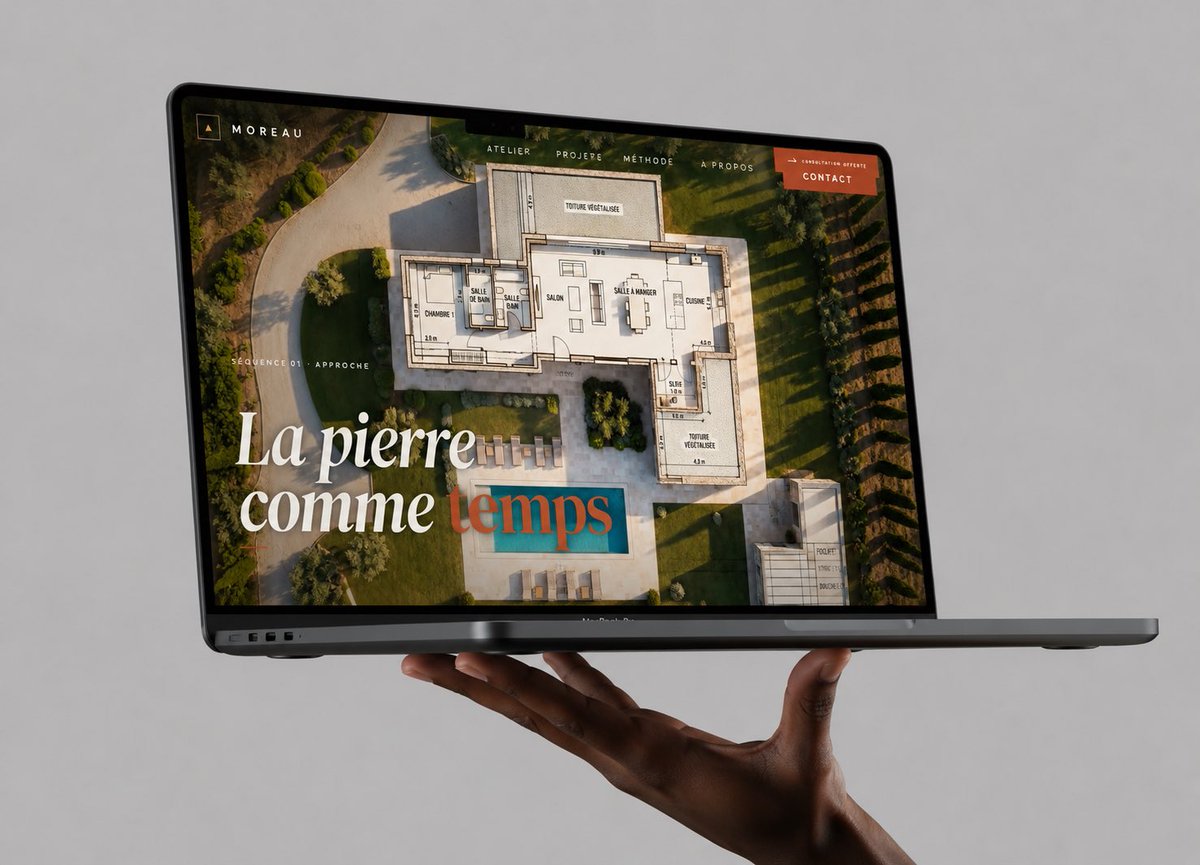
Плавающий макет веб-сайта с ноутбуком
Высококачественный фотореалистичный макет MacBook, демонстрирующий веб-сайт-портфолио архитектора, полезный для показа работ по веб-дизайну в стильной публикации в социальных сетях.
Это пример использования шаблона GPT Image 2 для Продукт и коммерция . Используйте приведенный ниже шаблон, готовый к копированию, чтобы создать аналогичные визуальные элементы, и перед повторным использованием проверьте указание авторства Awesome GPT Image 2 Prompts и права на коммерческое использование.
Free 1K preview
Generate one preview image instantly, no sign-up required.
Промпт
Подсказка для копирования
Create a high-end photorealistic studio mockup of a dark gray MacBook Pro laptop floating horizontally in front of a seamless light gray background, supported from below by one realistic dark-skinned hand with the palm up and fingers gently curled under the laptop. The laptop is open at a shallow angle, viewed from the front-left in three-quarter perspective, with the thin black bezel, webcam notch, ports on the left edge, and slim base visible. On the screen, show a luxury architecture/stonework portfolio website for {argument name="brand name" default="MOREAU"}: a full-bleed aerial photograph of a modern villa garden with a swimming pool, overlaid with a semi-transparent architectural floor plan drawing. Add a minimalist top navigation bar with exactly 5 visible items: “ATELIER”, “PROJERE”, “MÉTHODE”, “À PROPOS”, and an orange button labeled {argument name="button text" default="CONTACT"}. In the upper-left screen corner place a small square monogram icon and the word “MOREAU”. On the left side of the screen add small uppercase text “SÉQUENCE 01 · APPROCHE”. Add a large elegant serif headline in the lower-left reading {argument name="headline text" default="La pierre comme temps"}, with the first words in white and the final word in muted teal/terracotta overlay styling. Use warm golden-hour lighting inside the website image, refined editorial typography, premium agency branding, realistic reflections on the glass screen, subtle shadows beneath the laptop and hand, crisp focus, no watermark, no extra devices, no clutter.Переменные подсказки
Редактируемые заполнители аргументов, найденные в подсказке, с их значениями по умолчанию.
Best for
- - Продукт и коммерция visual exploration
- - Image generation and reference-image edits
- - Reusable briefs that keep source attribution visible
Change these parts
- - Subject, product, character, or scene
- - Aspect ratio, camera, lighting, and background
- - Brand, text, color, and output constraints
Recommended model and settings
- - Model: gpt-image-2
- - Input mode: Текст в изображение
- - Aspect ratio: source
- - Commercial status: review original source
How to use this prompt
- 1. Copy the prompt and preserve its structure for the first test.
- 2. Replace the subject, context, and publishing channel.
- 3. Change one camera, lighting, or style variable per iteration.
- 4. Inspect the output, source, text, and rights before reuse.
Limitations, source, and reuse cautions
- - Generated output is an editable draft, not factual, legal, or rights evidence.
- - Review the linked source, people, brands, logos, text, and third-party media before commercial use.
Больше случаев в этой категории
Приоритет отдается категориям, совместимости с режимами ввода, качеству и низкому уровню риска.






Примечания по повторному использованию и источникам
Используйте это подсказку безопасно после предварительного просмотра дела.
- 1.Скопируйте подсказку или откройте ее непосредственно в Dovoo с помощью кнопки генерации.
- 2.Настройте переменные, соотношение сторон и эталонные изображения в соответствии с вашими потребностями.
- 3.Перед публикацией или платным использованием проверьте права на источник, требования к указанию авторства, а также риски, связанные с использованием товарного знака или изображения.