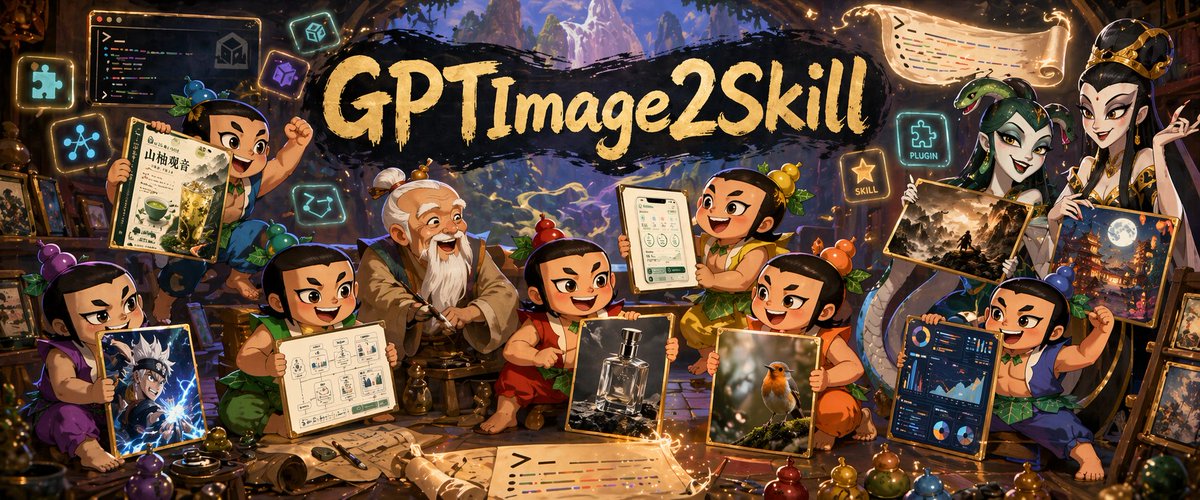
Баннер с навыками изображения Fantasy GPT
Широкий баннер мастерской в стиле фэнтези, изображающий учеников в стиле чиби, демонстрирующих различные стили изображений, сгенерированные ИИ, вокруг мастера. Идеально подходит для заголовков в социальных сетях или рекламных материалов, демонстрирующих навыки создания креативных изображений.
Это пример использования шаблона GPT Image 2 для Иллюстрация и искусство . Используйте приведенный ниже шаблон, готовый к копированию, чтобы создать аналогичные визуальные элементы, и перед повторным использованием проверьте указание авторства Awesome GPT Image 2 Prompts и права на коммерческое использование.
Free 1K preview
Generate one preview image instantly, no sign-up required.
Промпт
Подсказка для копирования
A richly detailed fantasy workshop illustration in a wide cinematic banner format, crowded with playful young apprentice characters gathered around an elderly master in the center. The scene has a magical artisan studio atmosphere with warm amber lighting, glowing runes, floating icons, scrolls, framed artworks, and shelves full of tools and curios. At the top center, a dramatic black brushstroke banner carries large hand-painted gold lettering reading {argument name="headline text" default="GPTImage2Skill"}. In the middle sits an old sage-like teacher with white hair in a topknot and a long white beard, wearing layered tan and gray robes, seated calmly on a low stool as if mentoring the group. Around him are 8 chibi-style apprentices with exaggerated expressive faces, black hair tied in small topknots, colorful traditional outfits in purple, green, red, orange, yellow, blue, and teal, each proudly presenting a different creation. Count and show exactly 8 apprentices plus the central master. On the far left, one purple-clad child kneels and holds a framed anime-style action portrait with electric blue effects. Above left, one green-clad child raises a drink poster featuring a matcha beverage and East Asian typography. Near lower left-center, one apprentice in green presents a clean schematic page with small UI-like boxes and diagrams. Near center-right, one orange-red-clad child holds a realistic luxury perfume bottle product shot. To the right of that, one yellow-orange child presents a realistic bird photograph with soft bokeh. Upper center-right, one cheerful child lifts a tablet or framed mobile app screen showing a clean interface. Far right lower side, one blue-clad child displays a dark-themed analytics dashboard full of charts and graphs. On the upper right, a tall regal figure in ornate white-and-gold robes and crown-like headpiece stands holding 2 framed fantasy artworks: one darker landscape scene and one moonlit city or temple scene. Include exactly 2 artworks in this upper-right display. Scatter glowing floating UI-style icons around the room; include exactly 6 floating icon/sign elements: a puzzle-piece icon, a network-node icon, a code window, a cube icon, a glowing sign reading "PLUGIN" beside a puzzle icon, and a glowing star sign reading "SKILL". Also add 2 magical scroll banners with glowing edges, one near the top right and one across the bottom foreground, both covered in stylized code-like colored lines. The environment should feel like a blend of ancient atelier, fantasy library, and creative AI studio, with stone arches, wooden beams, distant mountainous scenery visible through openings, and golden magical particles swirling through the air. Highly polished digital illustration, dense composition, whimsical epic tone, saturated jewel colors, dramatic rim lighting, crisp detail, painterly textures, fantasy promotional poster quality.Переменные подсказки
Редактируемые заполнители аргументов, найденные в подсказке, с их значениями по умолчанию.
Best for
- - Иллюстрация и искусство visual exploration
- - Image generation and reference-image edits
- - Reusable briefs that keep source attribution visible
Change these parts
- - Subject, product, character, or scene
- - Aspect ratio, camera, lighting, and background
- - Brand, text, color, and output constraints
Recommended model and settings
- - Model: gpt-image-2
- - Input mode: Текст в изображение
- - Aspect ratio: source
- - Commercial status: review original source
How to use this prompt
- 1. Copy the prompt and preserve its structure for the first test.
- 2. Replace the subject, context, and publishing channel.
- 3. Change one camera, lighting, or style variable per iteration.
- 4. Inspect the output, source, text, and rights before reuse.
Limitations, source, and reuse cautions
- - Generated output is an editable draft, not factual, legal, or rights evidence.
- - Review the linked source, people, brands, logos, text, and third-party media before commercial use.
Больше случаев в этой категории
Приоритет отдается категориям, совместимости с режимами ввода, качеству и низкому уровню риска.






Примечания по повторному использованию и источникам
Используйте это подсказку безопасно после предварительного просмотра дела.
- 1.Скопируйте подсказку или откройте ее непосредственно в Dovoo с помощью кнопки генерации.
- 2.Настройте переменные, соотношение сторон и эталонные изображения в соответствии с вашими потребностями.
- 3.Перед публикацией или платным использованием проверьте права на источник, требования к указанию авторства, а также риски, связанные с использованием товарного знака или изображения.