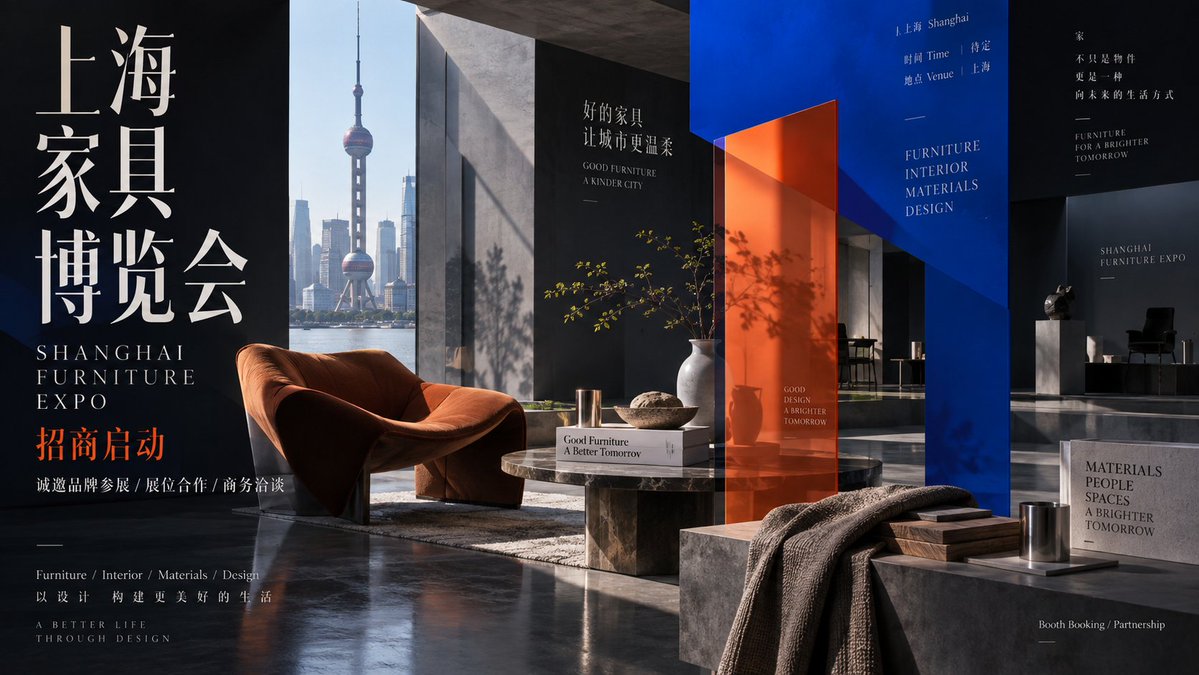
Editorial Aesthetic Poster Layout
A sophisticated prompt for creating editorial visual posters that blend photography with geometric plane composition for a museum-like display feel.
Это пример использования шаблона GPT Image 2 для Графика и плакаты . Используйте приведенный ниже шаблон, готовый к копированию, чтобы создать аналогичные визуальные элементы, и перед повторным использованием проверьте указание авторства Awesome GPT Image 2 Prompts и права на коммерческое использование.
Free 1K preview
Generate one preview image instantly, no sign-up required.
Промпт
Подсказка для копирования
Create an editorial visual piece with a clear theme as the narrative core, blending photography and graphic composition. Use real, tactile objects or scenes as emotional anchors, maintaining volume, reflection, occlusion, and subtle asymmetry under natural light as if placed in a quiet exhibition site. Cut into the frame with two to three strongly directional solid color geometric planes that can fold, shield, extend, and cross the boundaries of the subject, acting like transparent architecture or a stage frame to re-layer the foreground, middle ground, and background while leaving large dark spaces. Extract key outlines, symbols, or actions from the photography to form clear visual events between geometric planes, preserving minor details for realism. Use a narrow, elongated typeface or iconic logotype as a structural beam with sculptural height and restrained whitespace; other information is distributed as small, tidy editorial text on edges or blanks. Extract primary colors from the subject or cultural imagery: a deep structural color for stability, a bright opening color for planes, and a high-recognition focal color for the subject or text. Surfaces should show textures of glass, ceramic, metal, or fabric, with geometric planes having clean, thick edges and transitions using transparency and shadows. The final result should feel like a temporary building with a calm, mysterious, and ceremonial viewing experience.

Subject: {argument name="subject" default="International Conference on English and American Studies"}
Purpose: {argument name="purpose" default="Promotional Poster"}
Text: {argument name="language" default="English"}
Ratio 9:16
Переменные подсказки
Редактируемые заполнители аргументов, найденные в подсказке, с их значениями по умолчанию.
Best for
- - Графика и плакаты visual exploration
- - Image generation and reference-image edits
- - Reusable briefs that keep source attribution visible
Change these parts
- - Subject, product, character, or scene
- - Aspect ratio, camera, lighting, and background
- - Brand, text, color, and output constraints
Recommended model and settings
- - Model: gpt-image-2
- - Input mode: Текст в изображение
- - Aspect ratio: source
- - Commercial status: review original source
How to use this prompt
- 1. Copy the prompt and preserve its structure for the first test.
- 2. Replace the subject, context, and publishing channel.
- 3. Change one camera, lighting, or style variable per iteration.
- 4. Inspect the output, source, text, and rights before reuse.
Limitations, source, and reuse cautions
- - Generated output is an editable draft, not factual, legal, or rights evidence.
- - Review the linked source, people, brands, logos, text, and third-party media before commercial use.
Больше случаев в этой категории
Приоритет отдается категориям, совместимости с режимами ввода, качеству и низкому уровню риска.






Примечания по повторному использованию и источникам
Используйте это подсказку безопасно после предварительного просмотра дела.
- 1.Скопируйте подсказку или откройте ее непосредственно в Dovoo с помощью кнопки генерации.
- 2.Настройте переменные, соотношение сторон и эталонные изображения в соответствии с вашими потребностями.
- 3.Перед публикацией или платным использованием проверьте права на источник, требования к указанию авторства, а также риски, связанные с использованием товарного знака или изображения.