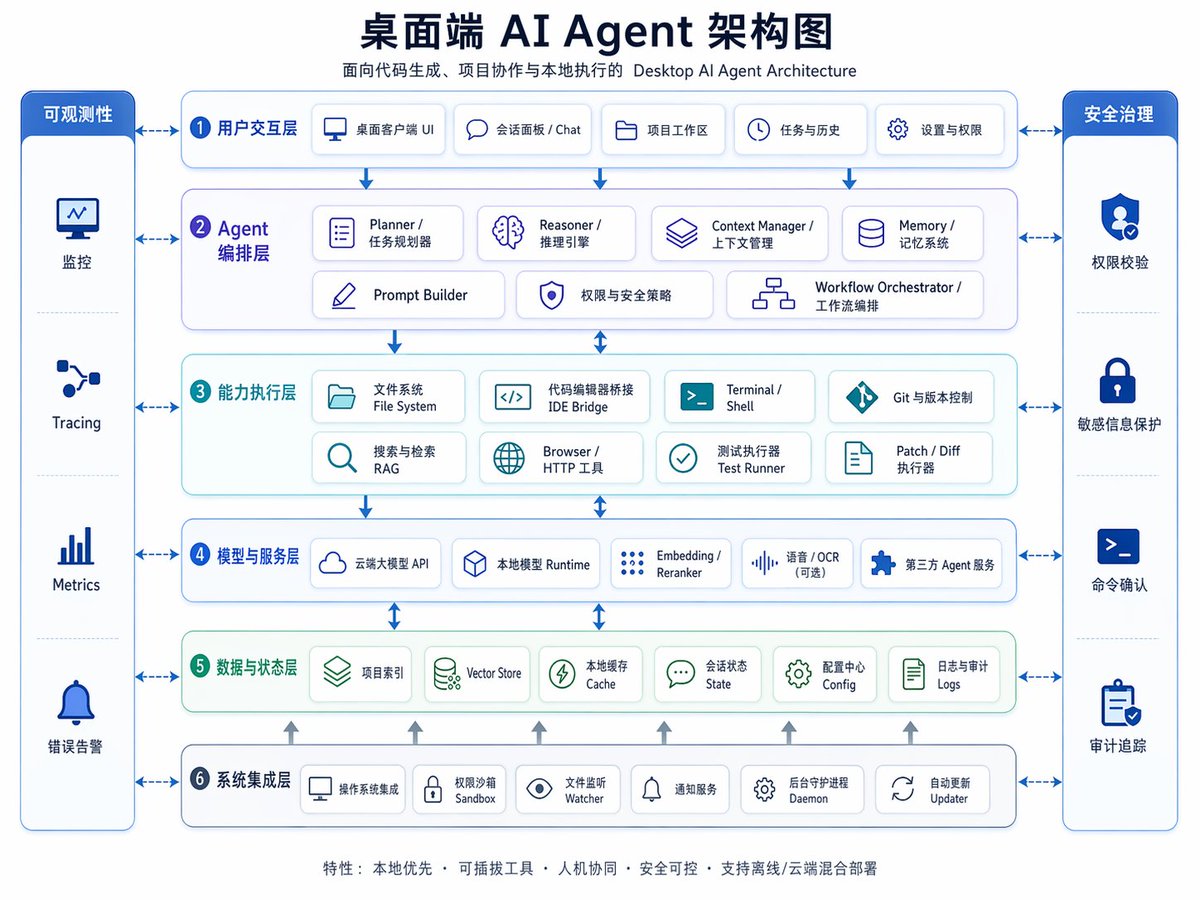
Схема архитектуры настольного ИИ-агента
Продуманная двуязычная (китайский и английский) инфографика по корпоративной архитектуре для презентаций, планирования продукта или объяснения многоуровневой структуры системы настольных агентов искусственного интеллекта.
Это пример использования шаблона GPT Image 2 для Графика и плакаты . Используйте приведенный ниже шаблон, готовый к копированию, чтобы создать аналогичные визуальные элементы, и перед повторным использованием проверьте указание авторства Awesome GPT Image 2 Prompts и права на коммерческое использование.
Free 1K preview
Generate one preview image instantly, no sign-up required.
Промпт
Подсказка для копирования
{
  "type": "bilingual enterprise architecture infographic",
  "topic": "{argument name=\"headline text\" default=\"Desktop AI Agent Architecture Diagram\"}",
  "subtitle": "Desktop AI Agent Architecture for Code Generation, Project Collaboration, and Local Execution",
  "style": {
    "look": "clean modern SaaS diagram, corporate presentation slide, vector infographic",
    "background": "very light gray-white",
    "palette": {
      "primary": "deep navy blue",
      "secondary": "medium blue",
      "accent": "teal green",
      "support": "soft gray",
      "security": "bright royal blue"
    },
    "typography": "bold Chinese headline with smaller bilingual labels, crisp sans-serif, high legibility",
    "icons": "minimal line icons inside rounded white cards with subtle shadows and blue outlines",
    "geometry": "symmetrical grid, rounded rectangles, thin connector arrows, evenly spaced modules"
  },
  "layout": {
    "orientation": "landscape 4:3 presentation slide",
    "header": {
      "title_centered": true,
      "title_size": "large",
      "subtitle_below": true
    },
    "sections": [
      {
        "title": "Observability",
        "position": "far left vertical sidebar",
        "count": 4,
        "labels": [
          "Monitoring",
          "Tracing",
          "Metrics",
          "Error Alerting"
        ],
        "container": "tall rounded blue panel with four stacked cells and icons"
      },
      {
        "title": "Security Governance",
        "position": "far right vertical sidebar",
        "count": 4,
        "labels": [
          "Permission Verification",
          "Sensitive Information Protection",
          "Command Confirmation",
          "Audit Trail"
        ],
        "container": "tall rounded blue panel with four stacked cells and icons"
      },
      {
        "title": "1 User Interaction Layer",
        "position": "top horizontal layer",
        "count": 5,
        "labels": [
          "Desktop Client UI",
          "Session Panel / Chat",
          "Project Workspace",
          "Tasks & History",
          "Settings & Permissions"
        ],
        "container": "wide rounded white panel with blue border"
      },
      {
        "title": "2 Agent Orchestration Layer",
        "position": "second horizontal layer",
        "count": 7,
        "labels": [
          "Planner / Task Planner",
          "Reasoner / Inference Engine",
          "Context Manager / Context Management",
          "Memory / Memory System",
          "Prompt Builder",
          "Permissions & Security Policies",
          "Workflow Orchestrator / Workflow Orchestration"
        ],
        "container": "wide rounded white panel with faint purple-blue tint"
      },
      {
        "title": "3 Capability Execution Layer",
        "position": "third horizontal layer",
        "count": 8,
        "labels": [
          "File System",
          "IDE Bridge",
          "Terminal / Shell",
          "Git & Version Control",
          "Search & Retrieval RAG",
          "Browser / HTTP Tool",
          "Test Runner",
          "Patch / Diff Runner"
        ],
        "container": "wide rounded white panel with faint teal tint"
      },
      {
        "title": "4 Models and Service Layer",
        "position": "fourth horizontal layer",
        "count": 5,
        "labels": [
          "Cloud-based Large Model API",
          "Local Model Runtime",
          "Embedding / Reranker",
          "Speech / OCR (optional)",
          "Third-party Agent Service"
        ],
        "container": "wide rounded white panel with blue border"
      },
      {
        "title": "5 Data and State Layer",
        "position": "fifth horizontal layer",
        "count": 6,
        "labels": [
          "Project Index",
          "Vector Store",
          "Local Cache",
          "Session State",
          "Configuration Center Config",
          "Logs and Audit Logs"
        ],
        "container": "wide rounded white panel with faint green tint"
      },
      {
        "title": "6 System Integration Layer",
        "position": "bottom horizontal layer",
        "count": 6,
        "labels": [
          "Operating System Integration",
          "Permission Sandbox",
          "File Watcher",
          "Notification Service",
          "Background Daemon",
          "Auto Updater"
        ],
        "container": "wide rounded white panel with blue border"
      }
    ],
    "centerpiece": "six stacked architecture layers in the middle with side governance columns",
    "connectors": "dashed double-headed arrows connect each central layer to both sidebars; vertical blue arrows flow downward between central layers; small upward gray arrows rise from the bottom integration layer into the data layer",
    "footer": {
      "count": 1,
      "text": "Features: Local First · Pluggable Tools · Human-Machine Collaboration · Secure and Controllable · Supports Offline/Cloud Hybrid Deployment",
      "position": "bottom center"
    }
  },
  "rendering": {
    "flat_vector": true,
    "high_resolution": true,
    "sharp_lines": true,
    "balanced_whitespace": true,
    "professional_pitch_deck_quality": true
  }
}
Переменные подсказки
Редактируемые заполнители аргументов, найденные в подсказке, с их значениями по умолчанию.
Best for
- - Графика и плакаты visual exploration
- - Image generation and reference-image edits
- - Reusable briefs that keep source attribution visible
Change these parts
- - Subject, product, character, or scene
- - Aspect ratio, camera, lighting, and background
- - Brand, text, color, and output constraints
Recommended model and settings
- - Model: gpt-image-2
- - Input mode: Текст в изображение
- - Aspect ratio: source
- - Commercial status: review original source
How to use this prompt
- 1. Copy the prompt and preserve its structure for the first test.
- 2. Replace the subject, context, and publishing channel.
- 3. Change one camera, lighting, or style variable per iteration.
- 4. Inspect the output, source, text, and rights before reuse.
Limitations, source, and reuse cautions
- - Generated output is an editable draft, not factual, legal, or rights evidence.
- - Review the linked source, people, brands, logos, text, and third-party media before commercial use.
Больше случаев в этой категории
Приоритет отдается категориям, совместимости с режимами ввода, качеству и низкому уровню риска.






Примечания по повторному использованию и источникам
Используйте это подсказку безопасно после предварительного просмотра дела.
- 1.Скопируйте подсказку или откройте ее непосредственно в Dovoo с помощью кнопки генерации.
- 2.Настройте переменные, соотношение сторон и эталонные изображения в соответствии с вашими потребностями.
- 3.Перед публикацией или платным использованием проверьте права на источник, требования к указанию авторства, а также риски, связанные с использованием товарного знака или изображения.