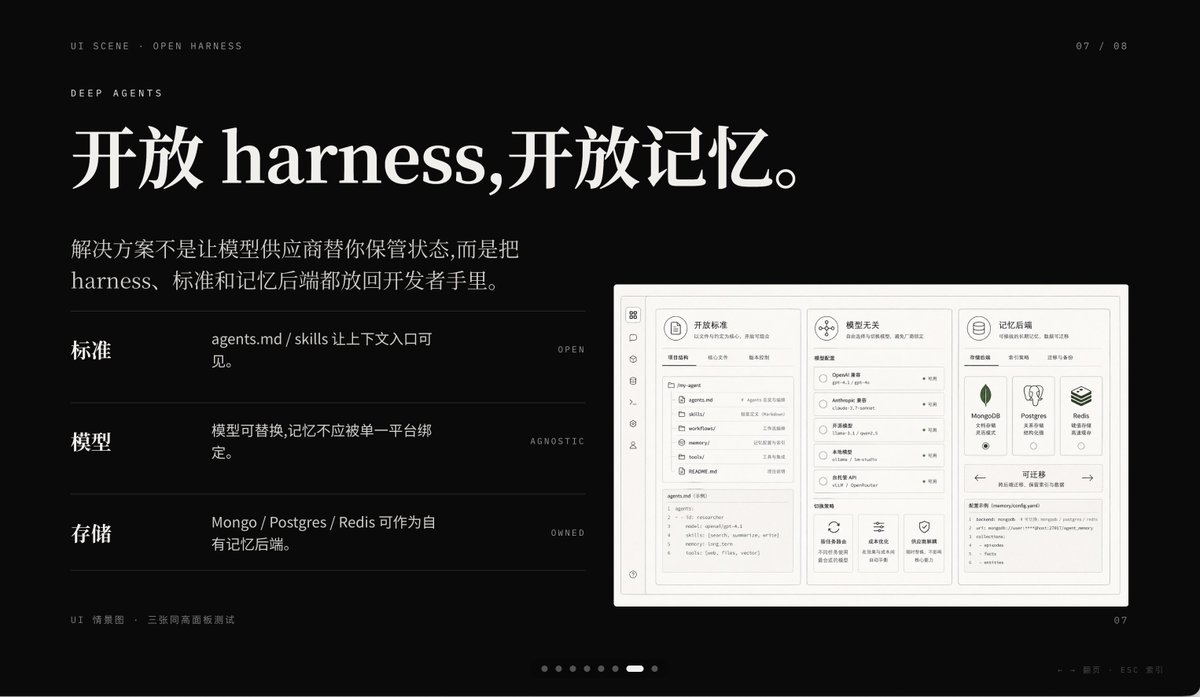
Слайд с презентации продукта Dark AI
Этот запрос генерирует стильный черный слайд для презентации продукта, созданного с использованием искусственного интеллекта, идеально подходящий для визуальных материалов на конференциях Keynote, рассказов о стартапах и эффектных обложек PPT.
Это пример использования шаблона GPT Image 2 для Графика и плакаты . Используйте приведенный ниже шаблон, готовый к копированию, чтобы создать аналогичные визуальные элементы, и перед повторным использованием проверьте указание авторства Awesome GPT Image 2 Prompts и права на коммерческое использование.
Free 1K preview
Generate one preview image instantly, no sign-up required.
Промпт
Подсказка для копирования
A sophisticated dark-mode presentation slide employing a minimalist tech aesthetic, 16:9 widescreen layout, matte black background, complemented by refined gray-white typography and subtle gray dividers. The overall atmosphere is fashionable, cinematic, and high-end, reminiscent of a product launch or a design-forward AI startup pitch deck. Position two lines of small navigation text in the upper left corner: “UI SCENE · OPEN HARNESS”, followed by “DEEP AGENTS”, using a slender, uppercase sans-serif font with generous letter-spacing. Add a small page indicator in the upper right corner displaying “07 / 08”. The main title occupies the upper left, employing an elegant, large serif font with a Chinese-English mix: {argument name="headline text" default="Open harness, open memory."}. Below it, add a 2-line Chinese body text, using a smaller serif font: {argument name="body text" default="The solution isn't to have model vendors manage your state for you, but to put the harness, standards, and memory backends in the hands of developers."}. In the left-center area, create 3 horizontal feature rows separated by thin gray lines, each with a bold Chinese label on the left, a brief Chinese description in the middle, and a tiny uppercase English keyword aligned to the right. Row 1 label: “Standards”, description: “agents.md / skills make context entry visible.”, keyword: “OPEN”. Row 2 label: “Models”, description: “Models are replaceable, memory should not be tied to a single platform.”, keyword: “AGNOSTIC”. Row 3 label: “Storage”, description: “Mongo / Postgres / Redis can serve as proprietary memory backends.”, keyword: “OWNED”. On the right side, place a large embedded UI model within a light gray rounded rectangle with a subtle shadow, resembling a screenshot of a product project dashboard. The model should be monochromatic in pale beige and gray, structurally rigorous, divided into 3 main columns. Left column: a narrow vertical icon sidebar, plus a panel listing “agents.md”, “skills”, “workflows”, “memories”, “tools”, etc. items/files, with a code editor block at the bottom. Middle column: a section titled “Model Agnostic”, containing 4 selectable models and small controls, with 3 feature cards at the bottom. Right column: a section titled “Memory Backends”, containing 3 database cards for MongoDB, Postgres, and Redis, plus a panel at the bottom titled “Migratable”, displaying a code snippet. Include another top card within the model, titled “Open Standards”, with tab-like controls. Add a line of tiny Chinese-English explanatory text in the lower left outside the model: “UI Scenario · Three equal-height panel test”. Include a carousel indicator at the bottom center consisting of 8 small dots, with the 7th dot highlighted as a short white capsule, and the rest as dark gray circles. Place a small page number “07” in the lower right corner. Additionally, add a faint line of tiny footnote text (Chinese-English) near the right bottom edge, very discreetly, such as presentation metadata. Use precise grid alignment, ample whitespace, understated luxury, Swiss-style composition, and refined YouMind AI product theme presentation aesthetics.Переменные подсказки
Редактируемые заполнители аргументов, найденные в подсказке, с их значениями по умолчанию.
Best for
- - Графика и плакаты visual exploration
- - Image generation and reference-image edits
- - Reusable briefs that keep source attribution visible
Change these parts
- - Subject, product, character, or scene
- - Aspect ratio, camera, lighting, and background
- - Brand, text, color, and output constraints
Recommended model and settings
- - Model: gpt-image-2
- - Input mode: Текст в изображение
- - Aspect ratio: source
- - Commercial status: review original source
How to use this prompt
- 1. Copy the prompt and preserve its structure for the first test.
- 2. Replace the subject, context, and publishing channel.
- 3. Change one camera, lighting, or style variable per iteration.
- 4. Inspect the output, source, text, and rights before reuse.
Limitations, source, and reuse cautions
- - Generated output is an editable draft, not factual, legal, or rights evidence.
- - Review the linked source, people, brands, logos, text, and third-party media before commercial use.
Больше случаев в этой категории
Приоритет отдается категориям, совместимости с режимами ввода, качеству и низкому уровню риска.






Примечания по повторному использованию и источникам
Используйте это подсказку безопасно после предварительного просмотра дела.
- 1.Скопируйте подсказку или откройте ее непосредственно в Dovoo с помощью кнопки генерации.
- 2.Настройте переменные, соотношение сторон и эталонные изображения в соответствии с вашими потребностями.
- 3.Перед публикацией или платным использованием проверьте права на источник, требования к указанию авторства, а также риски, связанные с использованием товарного знака или изображения.