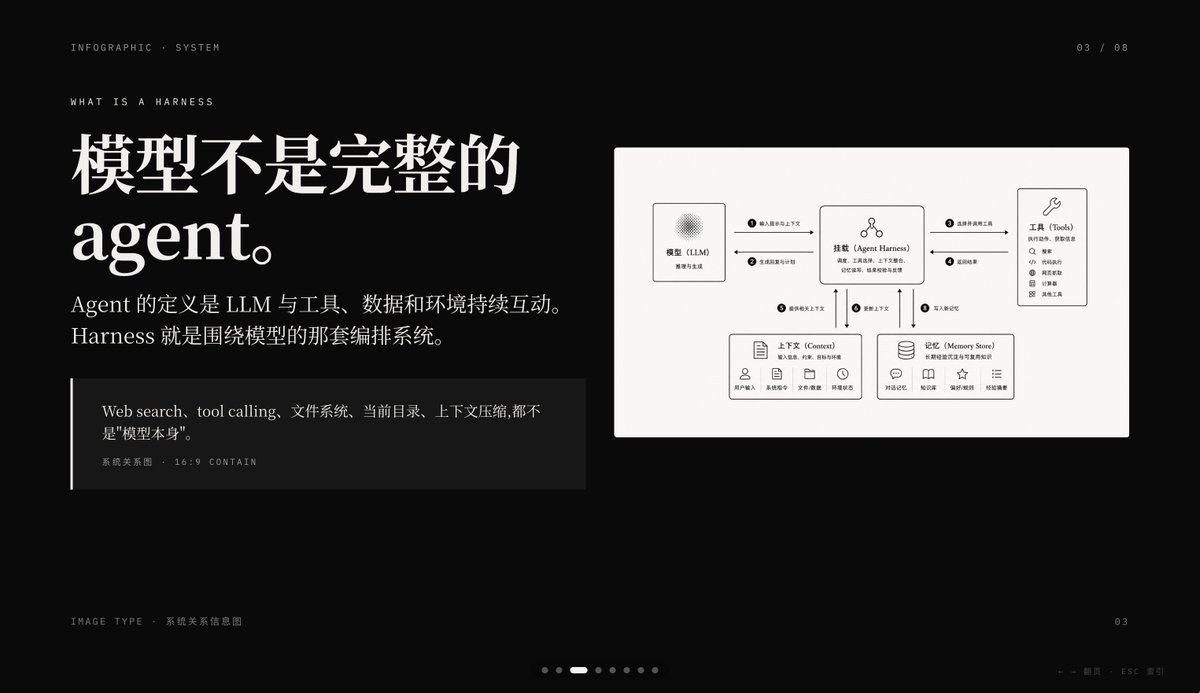
Инфографический слайд «Использование скрытого ИИ»
Премиальный слайд презентации на черном фоне, демонстрирующий работу системы искусственного интеллекта с использованием крупного китайского шрифта и четкой диаграммы взаимосвязей системы. Идеально подходит для обложек презентаций PowerPoint или страниц с объяснением концепции.
Это пример использования шаблона GPT Image 2 для Графика и плакаты . Используйте приведенный ниже шаблон, готовый к копированию, чтобы создать аналогичные визуальные элементы, и перед повторным использованием проверьте указание авторства Awesome GPT Image 2 Prompts и права на коммерческое использование.
Free 1K preview
Generate one preview image instantly, no sign-up required.
Промпт
Подсказка для копирования
{
  "type": "dark editorial infographic slide",
  "style": "premium keynote-style presentation page with minimalist Swiss-inspired layout, strong contrast, elegant serif headline paired with small uppercase sans-serif metadata, lots of negative space, cinematic black background, subtle grain, refined white typography, monochrome diagram card",
  "aspect_ratio": "16:9",
  "background": {
    "color": "deep black"
  },
  "layout": {
    "sections": [
      {
        "title": "top metadata",
        "position": "top edge",
        "count": 3,
        "labels": [
          "INFOGRAPHIC · SYSTEM",
          "03 / 08",
          "WHAT IS A HARNESS"
        ]
      },
      {
        "title": "main text block",
        "position": "left side",
        "count": 3,
        "labels": [
          "The model is not a complete Agent.",
          "The definition of an Agent is the continuous interaction of an LLM with tools, data, and the environment. Harness is the orchestration system around the model.",
          "Web search, tool calling, file system, current directory, and context compression are not the \"model itself\"."
        ]
      },
      {
        "title": "diagram card",
        "position": "right side",
        "count": 5,
        "labels": [
          "Model (LLM)",
          "Mount (Agent Harness)",
          "Tools",
          "Context",
          "Memory Store"
        ]
      },
      {
        "title": "footer",
        "position": "bottom edge",
        "count": 4,
        "labels": [
          "Image Type · System Relationship Diagram",
          "03",
          "← → Page   ESC Close",
          "7 pagination dots with the 3rd highlighted"
        ]
      }
    ],
    "centerpiece": "a large off-white rectangular card on the right containing a clean systems diagram"
  },
  "typography": {
    "headline_font": "high-contrast editorial serif, oversized, bold",
    "body_font": "modern serif for Chinese body copy",
    "meta_font": "thin uppercase sans-serif with generous tracking"
  },
  "diagram": {
    "card_color": "warm light gray",
    "border": "none or extremely subtle",
    "line_style": "thin black connector arrows",
    "icon_style": "simple outline icons",
    "nodes": [
      {
        "name": "Model (LLM)",
        "position": "upper left inside card",
        "details": "small box with subtle radial texture behind the heading, subtitle suggests reasoning and generation"
      },
      {
        "name": "Mount (Agent Harness)",
        "position": "upper center inside card",
        "details": "central orchestration box with small person-like icon above title and short descriptive text below"
      },
      {
        "name": "Tools",
        "position": "upper right inside card",
        "details": "tall box with wrench icon and a vertical list of 8 tool items"
      },
      {
        "name": "Context",
        "position": "lower left inside card",
        "details": "wide box with document icon, description line, and 5 small labeled icons along the bottom"
      },
      {
        "name": "Memory Store",
        "position": "lower right inside card",
        "details": "wide box with database icon, description line, and 5 small labeled icons along the bottom"
      }
    ],
    "connections": {
      "count": 8,
      "description": "numbered circular markers on the connector arrows show the orchestration flow between the 5 nodes, including bidirectional links from the central harness to tools, context, and memory, plus one link from the model to the harness"
    }
  },
  "color_palette": {
    "count": 4,
    "colors": [
      "black background",
      "white headline text",
      "soft gray body text",
      "warm light-gray diagram panel"
    ]
  },
  "customization": {
    "headline": "{argument name=\"headline text\" default=\"The model is not a complete Agent.\"}",
    "page_index": "{argument name=\"page number\" default=\"03 / 08\"}",
    "section_kicker": "{argument name=\"section label\" default=\"WHAT IS A HARNESS\"}",
    "diagram_topic": "{argument name=\"diagram topic\" default=\"System Relationship Diagram\"}",
    "quote": "{argument name=\"quote\" default=\"Web search, tool calling, file system, current directory, and context compression are not the "model itself".\"}"
  }
}
Переменные подсказки
Редактируемые заполнители аргументов, найденные в подсказке, с их значениями по умолчанию.
Best for
- - Графика и плакаты visual exploration
- - Image generation and reference-image edits
- - Reusable briefs that keep source attribution visible
Change these parts
- - Subject, product, character, or scene
- - Aspect ratio, camera, lighting, and background
- - Brand, text, color, and output constraints
Recommended model and settings
- - Model: gpt-image-2
- - Input mode: Текст в изображение
- - Aspect ratio: source
- - Commercial status: review original source
How to use this prompt
- 1. Copy the prompt and preserve its structure for the first test.
- 2. Replace the subject, context, and publishing channel.
- 3. Change one camera, lighting, or style variable per iteration.
- 4. Inspect the output, source, text, and rights before reuse.
Limitations, source, and reuse cautions
- - Generated output is an editable draft, not factual, legal, or rights evidence.
- - Review the linked source, people, brands, logos, text, and third-party media before commercial use.
Больше случаев в этой категории
Приоритет отдается категориям, совместимости с режимами ввода, качеству и низкому уровню риска.






Примечания по повторному использованию и источникам
Используйте это подсказку безопасно после предварительного просмотра дела.
- 1.Скопируйте подсказку или откройте ее непосредственно в Dovoo с помощью кнопки генерации.
- 2.Настройте переменные, соотношение сторон и эталонные изображения в соответствии с вашими потребностями.
- 3.Перед публикацией или платным использованием проверьте права на источник, требования к указанию авторства, а также риски, связанные с использованием товарного знака или изображения.