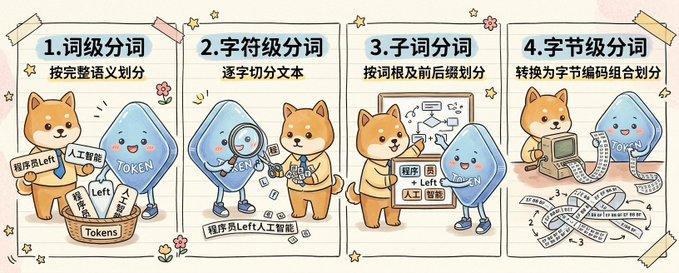
Симпатичная инфографика токенизации из четырех панелей
Этот запрос генерирует большую нарисованную от руки инфографику с двумя персонажами-талисманами, объясняющими четыре метода токенизации, идеально подходящую для образовательных постов в социальных сетях об искусственном интеллекте и обработке естественного языка.
Это пример использования шаблона GPT Image 2 для Графика и плакаты . Используйте приведенный ниже шаблон, готовый к копированию, чтобы создать аналогичные визуальные элементы, и перед повторным использованием проверьте указание авторства Awesome GPT Image 2 Prompts и права на коммерческое использование.
Free 1K preview
Generate one preview image instantly, no sign-up required.
Free text preview doesn’t preserve reference-image consistency.
Промпт
Подсказка для копирования
{
  "type": "hand-drawn educational infographic illustration",
  "style": "cute notebook doodle style, hand-painted handbook aesthetic, warm beige paper background with faint texture, playful sketchy outlines, soft pastel colors, small flower and star doodles, taped paper-card layout",
  "aspect_ratio": "wide horizontal",
  "subject": {
    "characters": [
      {
        "name": "{argument name=\"dog character name\" default=\"Chai Xiaoqi\"}",
        "species": "Shiba Inu mascot",
        "appearance": "cute orange-brown Shiba Inu with cream muzzle and belly, round face, upright ears, friendly expression, simplified cartoon anatomy"
      },
      {
        "name": "{argument name=\"blue character name\" default=\"Token\"}",
        "species": "blue token mascot",
        "appearance": "rounded triangular blue droplet-shaped character with glossy gradient body, tiny arms and legs, rosy cheeks, smiling face, the word \"{argument name=\"token label\" default=\"TOKEN\"}\" written across the body in white"
      }
    ],
    "theme": "compare four levels of text segmentation in a friendly science-explainer format"
  },
  "layout": {
    "sections": [
      {
        "title": "1. Word-level Segmentation",
        "position": "far left panel",
        "count": 1,
        "subtitle": "Divided according to complete semantics",
        "scene": "A Shiba Inu and a blue Token character stand next to a basket labeled \"Tokens\", which is filled with slips of paper. Visible slips and labels are written with \"Programmer\", \"Left\", \"Artificial Intelligence\", and a small sign next to it reads \"ProgrammerLeft\". The Token character points to the basket, while the Shiba Inu displays sorted fragments."
      },
      {
        "title": "2. Character-level tokenization",
        "position": "left-center panel",
        "count": 1,
        "subtitle": "Splitting the text character by character",
        "scene": "A blue Token character uses a magnifying glass to examine small character blocks scattered on the floor, while a Shiba Inu organizes them nearby. A label strip at the bottom reads \"ProgrammerLeftArtificialIntelligence\", serving as a continuous text sample broken down into individual characters."
      },
      {
        "title": "3. Subword tokenization",
        "position": "right-center panel",
        "count": 1,
        "subtitle": "Divide by root words and prefixes",
        "scene": "The Shiba Inu points to a project demonstrating root word splitting and arrows, with a blue Token mascot standing next to it. Small paper labels contain mixed fragments such as \"program\", \"member\", \"Left\", \"artificial\", \"intelligence\", emphasizing morpheme or subword groupings."
      },
      {
        "title": "4. Byte-level tokenization",
        "position": "far right panel",
        "count": 1,
        "subtitle": "Convert to byte encoding combinations for division",
        "scene": "the Shiba Inu uses a retro computer with a long printed strip emerging from it, and the blue token character stands to the side. Across the lower half are ribbon-like strips filled with repeated byte numbers and symbols, especially \"1\", \"2\", \"3\", \"4\", and \"-3\", illustrating byte encoding combinations."
      }
    ],
    "decorations": {
      "count": 10,
      "items": [
        "4 pieces of taped corners in pale yellow and pink",
        "small five-point stars scattered around panels",
        "tiny flower doodles between panels",
        "curved motion lines near character gestures",
        "notebook-style vertical panel dividers",
        "rounded rectangular panel frames",
        "light shadows behind paper panels",
        "faint horizontal paper grain",
        "small spark icons",
        "hand-drawn accent marks"
      ]
    }
  },
  "composition": "four equal vertical panels arranged left to right across one canvas, each panel with a bold numbered Chinese heading and a smaller subtitle beneath it, each panel showing the two mascots acting out a different tokenization concept",
  "text": {
    "headings": [
      "1. Word-level Segmentation",
      "2. Character-level tokenization",
      "3. Subword tokenization",
      "4. Byte-level tokenization"
    ],
    "subtitles": [
      "Divided according to complete semantics",
      "Splitting the text character by character",
      "Divide by root words and prefixes",
      "Convert to byte encoding combinations for division"
    ]
  },
  "quality": "clean, polished, adorable, presentation-ready educational visual",
  "use_case": "social media science explainer comparing tokenization methods for AI and NLP"
}
Переменные подсказки
Редактируемые заполнители аргументов, найденные в подсказке, с их значениями по умолчанию.
Best for
- - Графика и плакаты visual exploration
- - Image generation and reference-image edits
- - Reusable briefs that keep source attribution visible
Change these parts
- - Subject, product, character, or scene
- - Aspect ratio, camera, lighting, and background
- - Brand, text, color, and output constraints
Recommended model and settings
- - Model: gpt-image-2
- - Input mode: Изображение в изображение
- - Aspect ratio: source
- - Commercial status: review original source
How to use this prompt
- 1. Copy the prompt and preserve its structure for the first test.
- 2. Replace the subject, context, and publishing channel.
- 3. Change one camera, lighting, or style variable per iteration.
- 4. Inspect the output, source, text, and rights before reuse.
Limitations, source, and reuse cautions
- - Generated output is an editable draft, not factual, legal, or rights evidence.
- - Review the linked source, people, brands, logos, text, and third-party media before commercial use.
Больше случаев в этой категории
Приоритет отдается категориям, совместимости с режимами ввода, качеству и низкому уровню риска.






Примечания по повторному использованию и источникам
Используйте это подсказку безопасно после предварительного просмотра дела.
- 1.Скопируйте подсказку или откройте ее непосредственно в Dovoo с помощью кнопки генерации.
- 2.Настройте переменные, соотношение сторон и эталонные изображения в соответствии с вашими потребностями.
- 3.Перед публикацией или платным использованием проверьте права на источник, требования к указанию авторства, а также риски, связанные с использованием товарного знака или изображения.