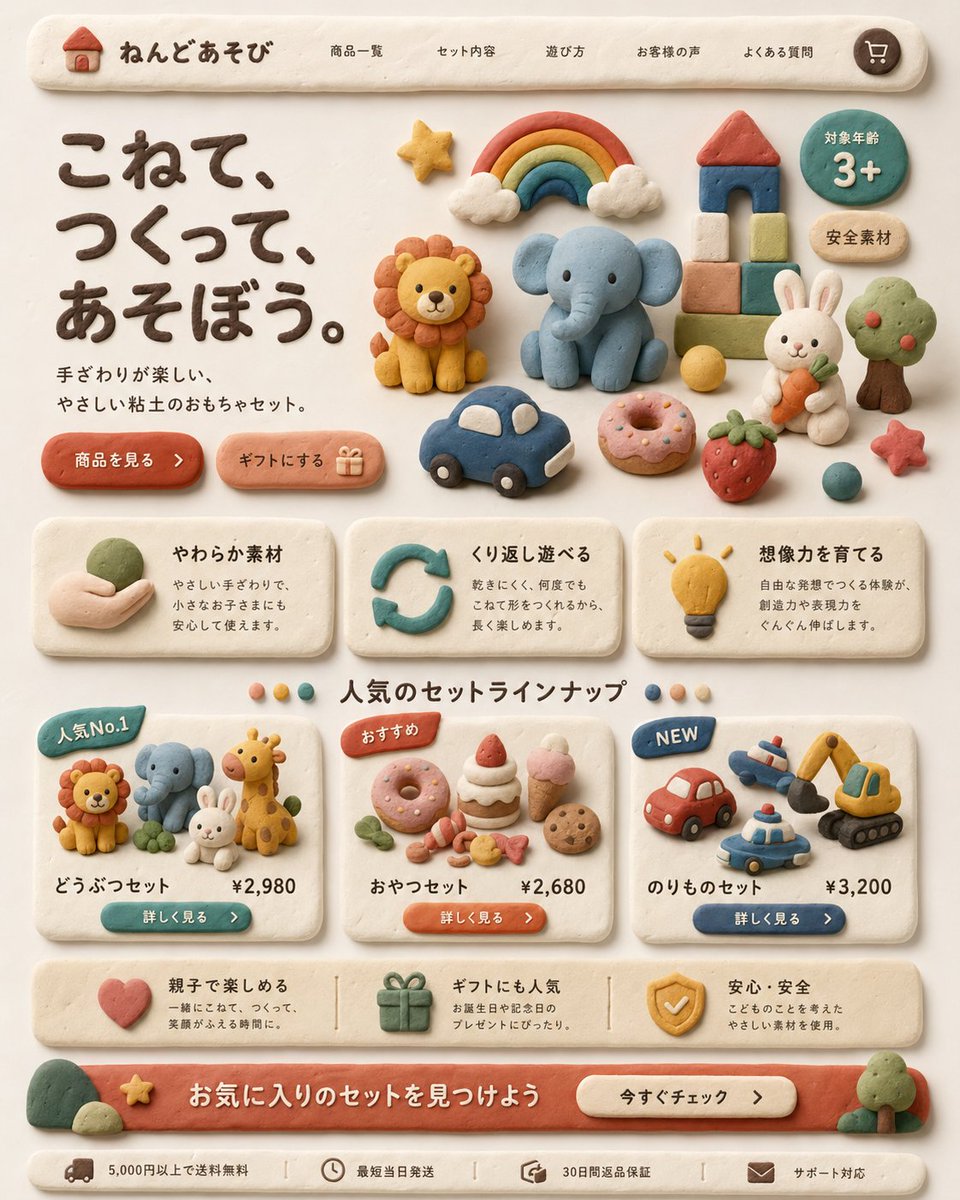
Пользовательский интерфейс целевой страницы «Глиняные игрушки»
Созданный вручную макет целевой страницы интернет-магазина детских игрушек в японском стиле, выполненный в глиняной технике. Идеально подходит для концептуального дизайна, игривого исследования пользовательского интерфейса и презентации товаров в рекламном стиле.
Это пример использования шаблона GPT Image 2 для Продукт и коммерция . Используйте приведенный ниже шаблон, готовый к копированию, чтобы создать аналогичные визуальные элементы, и перед повторным использованием проверьте указание авторства Awesome GPT Image 2 Prompts и права на коммерческое использование.
Free 1K preview
Generate one preview image instantly, no sign-up required.
Промпт
Подсказка для копирования
Create a warm, playful Japanese landing page for a children's clay toy brand, designed entirely in a handmade soft clay diorama style. The whole interface should look sculpted from pastel modeling clay with rounded edges, slight finger-pressed imperfections, matte texture, soft shadows, and a cozy cream background. At the top, show a pill-shaped navigation bar with a small clay house logo and the brand name "ねんどあそび", followed by 5 navigation items: "商品一覧", "セット内容", "遊び方", "お客様の声", "よくある質問", plus a round cart icon on the far right. In the hero section, place a large dark-brown clay headline on the left reading "こねて、つくって、あそぼう。" and a smaller supporting sentence beneath it reading "手ざわりが楽しい、やさしい粘土のおもちゃセット。" Add 2 rounded clay call-to-action buttons below: "商品を見る" and "ギフトにする" with a small gift icon. On the right side of the hero area, arrange 12 clay toy illustrations: a rainbow with clouds, a lion, an elephant, a block tower with red roof, a green circular badge reading "対象年齢 3+", a beige oval badge reading "安全素材", a white rabbit holding a carrot, a tree, a yellow ball, a blue toy car, a pink donut, and a strawberry, plus a small red star near the lower right. Below, create a 3-card benefits row, each card made from off-white clay with icon, title, and short Japanese description. Card 1 title: "やわらか素材" with a hand holding clay icon. Card 2 title: "くり返し遊べる" with a circular arrow icon. Card 3 title: "想像力を育てる" with a lightbulb icon. Under that, add a centered section title "人気のセットラインナップ" with 4 small colored dots around it. Then show 3 product cards. Card 1 has a blue badge "人気No.1", shows 4 animal figures: lion, elephant, rabbit, giraffe, and includes the title "どうぶつセット" and price "¥2,980" with a teal button "詳しく見る". Card 2 has an orange badge "おすすめ", shows 7 snack items: donut, cake slice, strawberry shortcake, pink ice cream cone, cookie, candy pieces, and small leaves, and includes the title "おやつセット" and price "¥2,680" with an orange button "詳しく見る". Card 3 has a blue badge "NEW", shows 4 vehicle toys: red car, airplane, police car, excavator, and includes the title "のりものセット" and price "¥3,200" with a navy button "詳しく見る". Add a horizontal reassurance strip with 3 items: a heart icon with text about parent-child fun, a gift icon with text about gift popularity, and a shield icon with text about safety and安心・安全. At the bottom, create a large coral clay banner with the headline "お気に入りのセットを見つけよう" and a cream button reading "今すぐチェック". Finally add a slim footer bar with 4 compact items and icons: "5,000円以上で送料無料", "最短当日発送", "30日間返品保証", and "サポート対応". Use a balanced, grid-based web layout, front-facing view, soft natural lighting, subtle shadows, highly polished product-design mockup quality, charming handcrafted claymation aesthetic, and a premium yet child-friendly feel.
Best for
- - Продукт и коммерция visual exploration
- - Image generation and reference-image edits
- - Reusable briefs that keep source attribution visible
Change these parts
- - Subject, product, character, or scene
- - Aspect ratio, camera, lighting, and background
- - Brand, text, color, and output constraints
Recommended model and settings
- - Model: gpt-image-2
- - Input mode: Текст в изображение
- - Aspect ratio: source
- - Commercial status: review original source
How to use this prompt
- 1. Copy the prompt and preserve its structure for the first test.
- 2. Replace the subject, context, and publishing channel.
- 3. Change one camera, lighting, or style variable per iteration.
- 4. Inspect the output, source, text, and rights before reuse.
Limitations, source, and reuse cautions
- - Generated output is an editable draft, not factual, legal, or rights evidence.
- - Review the linked source, people, brands, logos, text, and third-party media before commercial use.
Больше случаев в этой категории
Приоритет отдается категориям, совместимости с режимами ввода, качеству и низкому уровню риска.






Примечания по повторному использованию и источникам
Используйте это подсказку безопасно после предварительного просмотра дела.
- 1.Скопируйте подсказку или откройте ее непосредственно в Dovoo с помощью кнопки генерации.
- 2.Настройте переменные, соотношение сторон и эталонные изображения в соответствии с вашими потребностями.
- 3.Перед публикацией или платным использованием проверьте права на источник, требования к указанию авторства, а также риски, связанные с использованием товарного знака или изображения.