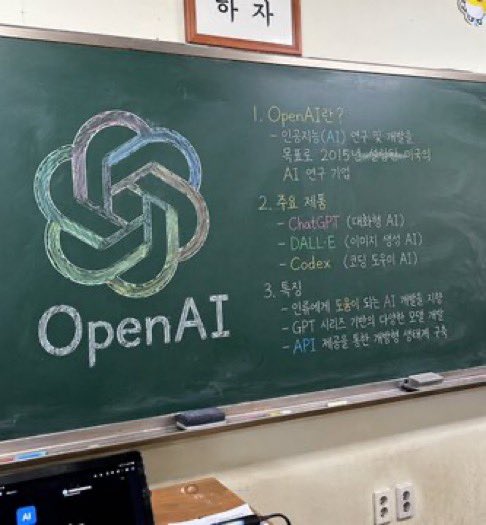
Урок с использованием классной доски
Создает фотореалистичное изображение классной доски с красочным логотипом и структурированными рукописными заметками к уроку.
Это пример использования шаблона GPT Image 2 для Интерьер и архитектура . Используйте приведенный ниже шаблон, готовый к копированию, чтобы создать аналогичные визуальные элементы, и перед повторным использованием проверьте указание авторства Awesome GPT Image 2 Prompts и права на коммерческое использование.
Нужен полный набор подсказок? Воспользуйтесь Интерьер и архитектура Для получения дополнительных примеров по теме, или откройте раздел "Обзор тем" GPT Image 2 быстрый каталог Полный список примеров, многократно используемых структур и указание источников см. здесь.
Free 1K preview
Generate one preview image instantly, no sign-up required.
1232/4000
Промпт
Подсказка для копирования
A photorealistic, slightly angled snapshot of a green classroom chalkboard. On the left side of the board is a large, meticulously drawn chalk illustration of the {argument name="company name" default="OpenAI"} logo, rendered in blended pastel colors like green, blue, and purple, with the word "{argument name="logo text" default="OpenAI"}" written in neat white chalk beneath it. The right side of the board features handwritten text organized into exactly 3 numbered sections. Section 1 is titled "{argument name="section one title" default="1. OpenAI란?"}" followed by a brief explanatory paragraph. Section 2 is titled "{argument name="section two title" default="2. 주요 제품"}" and lists 3 bullet points including ChatGPT, DALL-E, and Codex. Section 3 is titled "{argument name="section three title" default="3. 특징"}" and contains 3 bullet points describing features. The chalkboard has a silver metal frame and a chalk ledge holding 2 rectangular erasers and scattered pieces of chalk. Below the board is an off-white wall with a double electrical outlet. In the bottom left foreground, the top edge of a dark laptop screen is partially visible, and above the chalkboard, the bottom edge of a framed sign is cut off by the frame.Переменные подсказки
Редактируемые заполнители аргументов, найденные в подсказке, с их значениями по умолчанию.
Переменная
company name
По умолчанию
OpenAI
Переменная
logo text
По умолчанию
OpenAI
Переменная
section one title
По умолчанию
1. OpenAI란?
Переменная
section two title
По умолчанию
2. 주요 제품
Переменная
section three title
По умолчанию
3. 특징
Best for
- - Интерьер и архитектура visual exploration
- - Image generation and reference-image edits
- - Reusable briefs that keep source attribution visible
Change these parts
- - Subject, product, character, or scene
- - Aspect ratio, camera, lighting, and background
- - Brand, text, color, and output constraints
Recommended model and settings
- - Model: gpt-image-2
- - Input mode: Текст в изображение
- - Aspect ratio: source
- - Commercial status: review original source
How to use this prompt
- 1. Copy the prompt and preserve its structure for the first test.
- 2. Replace the subject, context, and publishing channel.
- 3. Change one camera, lighting, or style variable per iteration.
- 4. Inspect the output, source, text, and rights before reuse.
Limitations, source, and reuse cautions
- - Generated output is an editable draft, not factual, legal, or rights evidence.
- - Review the linked source, people, brands, logos, text, and third-party media before commercial use.
Импортировано из Awesome GPT Image 2 Prompts . Требуется указание авторства. Статус коммерческого использования: allowed ; перед платным использованием ознакомьтесь с правами на источник.
Больше случаев в этой категории
Приоритет отдается категориям, совместимости с режимами ввода, качеству и низкому уровню риска.

GPT Image 2 Real-Life Character Street Snap
Текст в изображение

Matte Black B.AI Keyboard Keycap
Текст в изображение

MotoGP POV Cornering Shot
Текст в изображение

Orange Rooftop Fashion Photo Prompt
Текст в изображение

Luxury Travel Fashion Portrait Prompt
Текст в изображение

Cute Focus Desk Flat Lay and Kawaii Illustration
Текст в изображение
Примечания по повторному использованию и источникам
Используйте это подсказку безопасно после предварительного просмотра дела.
- 1.Скопируйте подсказку или откройте ее непосредственно в Dovoo с помощью кнопки генерации.
- 2.Настройте переменные, соотношение сторон и эталонные изображения в соответствии с вашими потребностями.
- 3.Перед публикацией или платным использованием проверьте права на источник, требования к указанию авторства, а также риски, связанные с использованием товарного знака или изображения.