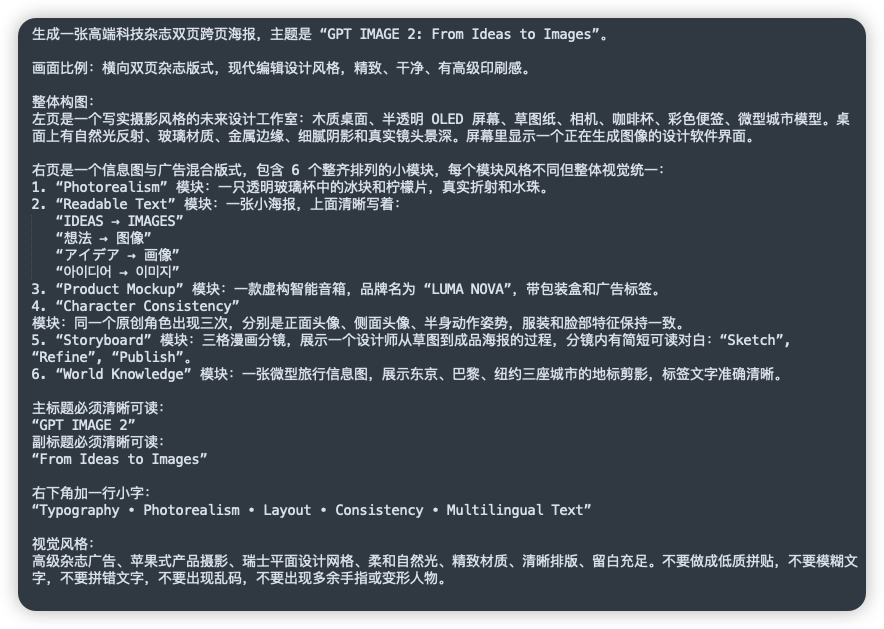
Китайский шаблон для GPT, изображение 2
Это позволяет создать аккуратный скриншот в темном стиле пользовательского интерфейса с подробным текстом подсказки на китайском языке, полезный для публикаций в социальных сетях или демонстраций сложных инструкций по созданию изображений.
Это пример использования шаблона GPT Image 2 для Другие источники вдохновения . Используйте приведенный ниже шаблон, готовый к копированию, чтобы создать аналогичные визуальные элементы, и перед повторным использованием проверьте указание авторства Awesome GPT Image 2 Prompts и права на коммерческое использование.
Free 1K preview
Generate one preview image instantly, no sign-up required.
Промпт
Подсказка для копирования
A clean screenshot-like image showing a dark charcoal rounded-rectangle panel filled with dense simplified Chinese prompt text in white sans-serif font, presented as a text document or note on a flat dark background. The composition is a single full-frame panel with generous padding and subtle shadow, like a modern UI card. At the top is a sentence describing the creation of a high-end technology magazine double-page spread poster, with the English title in quotation marks: “GPT IMAGE 2: From Ideas to Images”. Below it are multiple left-aligned paragraphs of Chinese text with consistent line spacing, describing layout ratio, modern editorial design style, and a detailed two-page composition. In the middle section, there is a numbered list with exactly 6 items labeled 1 through 6, each item naming a module in English inside quotation marks followed by Chinese explanations. The 6 module names are exactly: “Photorealism”, “Readable Text”, “Product Mockup”, “Character Consistency”, “Storyboard”, and “World Knowledge”. Under item 2, include 5 separate quoted multilingual text lines as subitems, exactly these: “IDEAS → IMAGES”, “想法 → 图像”, “アイデア → 画像”, “아이디어 → 이미지”, and “فكرة → صورة”. Later in the text, add a section specifying the main title and subtitle as clearly readable quoted English lines: “GPT IMAGE 2” and “From Ideas to Images”. Near the lower portion, add another Chinese line introducing a small caption at the bottom right, followed by the exact quoted English caption: “Typography • Photorealism • Layout • Consistency • Multilingual Text”. At the bottom, include a final Chinese paragraph about visual style requirements such as premium ad feel, Apple-style product photography, Swiss graphic design, soft natural light, refined materials, clear layout, ample whitespace, and avoiding low-quality textures, blurry text, gibberish, or deformed fingers. The text should appear crisp and fully legible, with realistic screen-capture fidelity, high contrast, subtle anti-aliased edges, no illustrations, no icons, no photos, no extra interface chrome beyond the single dark card, and an overall polished editorial-tech presentation.
Best for
- - Другие источники вдохновения visual exploration
- - Image generation and reference-image edits
- - Reusable briefs that keep source attribution visible
Change these parts
- - Subject, product, character, or scene
- - Aspect ratio, camera, lighting, and background
- - Brand, text, color, and output constraints
Recommended model and settings
- - Model: gpt-image-2
- - Input mode: Текст в изображение
- - Aspect ratio: source
- - Commercial status: review original source
How to use this prompt
- 1. Copy the prompt and preserve its structure for the first test.
- 2. Replace the subject, context, and publishing channel.
- 3. Change one camera, lighting, or style variable per iteration.
- 4. Inspect the output, source, text, and rights before reuse.
Limitations, source, and reuse cautions
- - Generated output is an editable draft, not factual, legal, or rights evidence.
- - Review the linked source, people, brands, logos, text, and third-party media before commercial use.
Больше случаев в этой категории
Приоритет отдается категориям, совместимости с режимами ввода, качеству и низкому уровню риска.






Примечания по повторному использованию и источникам
Используйте это подсказку безопасно после предварительного просмотра дела.
- 1.Скопируйте подсказку или откройте ее непосредственно в Dovoo с помощью кнопки генерации.
- 2.Настройте переменные, соотношение сторон и эталонные изображения в соответствии с вашими потребностями.
- 3.Перед публикацией или платным использованием проверьте права на источник, требования к указанию авторства, а также риски, связанные с использованием товарного знака или изображения.