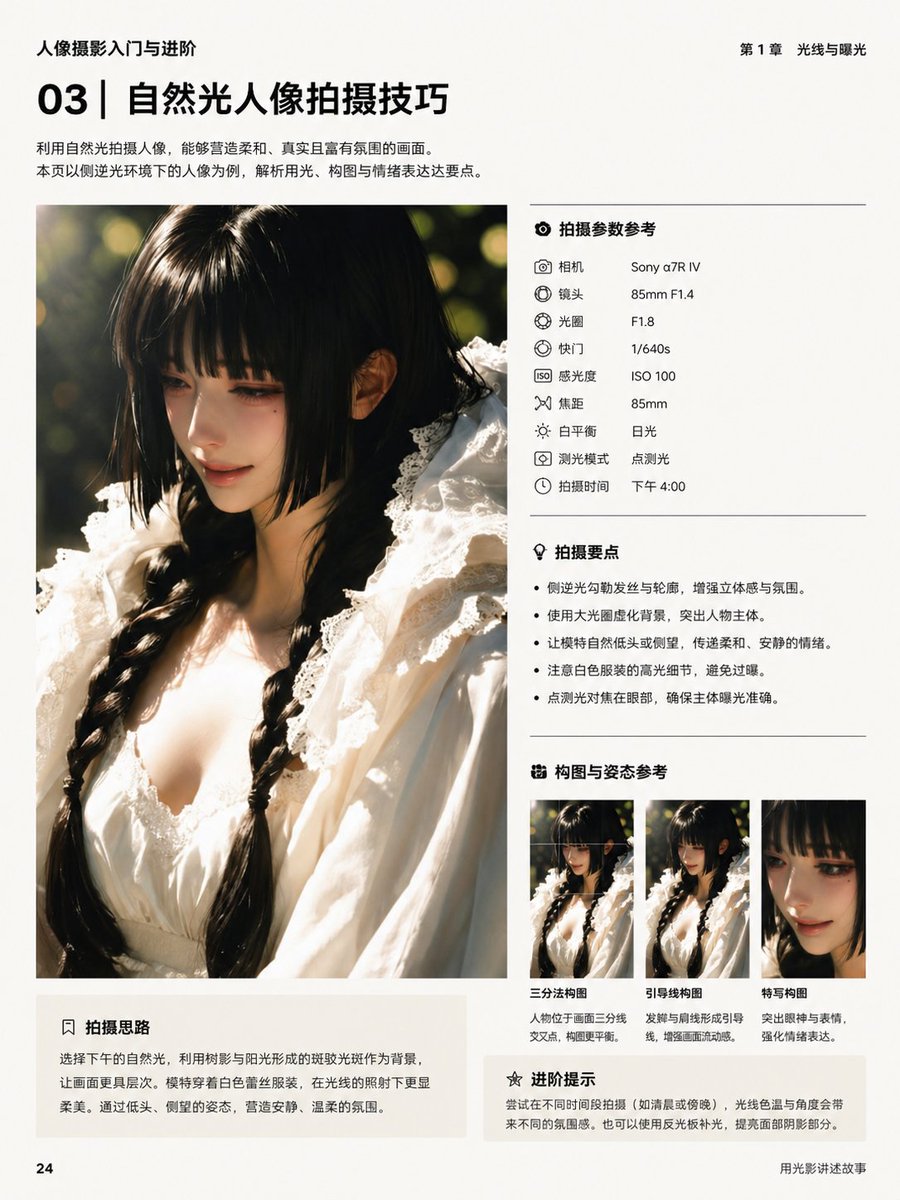
Макет китайской фотокниги
Аккуратно оформленная страница китайского редакционного издания для учебного пособия по портретной фотографии, полезная для создания макетов в журнальном стиле или учебных пособий.
Это пример использования шаблона GPT Image 2 для Графика и плакаты . Используйте приведенный ниже шаблон, готовый к копированию, чтобы создать аналогичные визуальные элементы, и перед повторным использованием проверьте указание авторства Awesome GPT Image 2 Prompts и права на коммерческое использование.
Нужен полный набор подсказок? Воспользуйтесь Графика и плакаты Для получения дополнительных примеров по теме, или откройте раздел "Обзор тем" GPT Image 2 быстрый каталог Полный список примеров, многократно используемых структур и указание источников см. здесь.
Free 1K preview
Generate one preview image instantly, no sign-up required.
4000/4000
Промпт
Подсказка для копирования
{
  "bottom_left_box": {
    "body": "Choose afternoon natural light, utilizing the dappled light created by tree shadows and sunlight as a background to add more layers to the image. The model wears a white lace outfit, appearing even softer and more delicate under the light. Through poses like looking down and glancing sideways, create a quiet and gentle atmosphere.",
    "position": "bottom left under main image",
    "title": "Shooting Ideas"
  },
  "genre": "photography tutorial layout",
  "language": "Chinese",
  "main_image": {
    "background": "dark green outdoor foliage with sunlit bokeh",
    "face": "Show every face clearly with natural, detailed facial features",
    "framing": "vertical crop from chest to top of head",
    "lighting": "strong side backlight with golden rim light on hair and shoulders, soft warm highlights, shallow depth of field, circular bokeh background",
    "position": "left column",
    "subject": "close-up portrait of a young woman with long black twin braids, wearing a white lace dress with ruffled collar and delicate trim, shot in warm late-afternoon natural light"
  },
  "page": {
    "background": "off-white matte paper",
    "footer_right": "Telling Stories with Light and Shadow",
    "header_left": "Introduction to and advancement in portrait photography.",
    "header_right": "Chapter 1: Light and Exposure",
    "page_number": "24",
    "size": "portrait book page"
  },
  "right_column": {
    "sections": [
      {
        "count": 9,
        "items": [
          {
            "label": "Camera",
            "value": "Sony α7R IV"
          },
          {
            "label": "Lens",
            "value": "85mm F1.4"
          },
          {
            "label": "Aperture",
            "value": "F1.8"
          },
          {
            "label": "Shutter",
            "value": "1/640s"
          },
          {
            "label": "ISO",
            "value": "ISO 100"
          },
          {
            "label": "Focal Length",
            "value": "85mm"
          },
          {
            "label": "White balance",
            "value": "Daylight"
          },
          {
            "label": "Metering mode",
            "value": "Spot metering"
          },
          {
            "label": "Shooting time",
            "value": "4:00 PM"
          }
        ],
        "position": "upper right",
        "title": "Shooting Parameter Reference"
      },
      {
        "count": 4,
        "items": [
          "Use backlighting to outline hair and contours, enhancing three-dimensionality and atmosphere.",
          "Use a large aperture to blur the background and highlight the subject.",
          "Have the model naturally lower their head or look to the side to convey a soft and quiet mood.",
          "Spot metering and focusing on the face ensures accurate subject exposure."
        ],
        "position": "mid right",
        "title": "Shooting Points"
      },
      {
        "count": 3,
        "items": [
          {
            "description": "Positioning the subject at the intersection of the rule of thirds lines creates a more balanced composition.",
            "label": "Rule of thirds composition"
          },
          {
            "description": "The braid and shoulder line create guiding lines, enhancing the flow of the image.",
            "label": "Leading lines composition"
          },
          {
            "description": "Emphasize the eyes and expression to strengthen emotional expression.",
            "label": "Close-up composition"
          }
        ],
        "position": "lower right",
        "title": "Composition and pose reference"
      },
      {
        "count": 1,
        "items": [
          "Try shooting at different times of day (such as morning or evening). The color temperature and angle of the light will create different atmospheres. You can also use a reflector to fill in the light and improve the highlights and shadows on the face."
        ],
        "position": "bottom right",
        "title": "Advanced Tips"
      }
    ]
  },
  "style": {
    "color_palette": "warm cream, black, soft gray, golden sunlight, deep green, white fabric",
    "grid": "large image on left, structured information panels on right, subtle divider lines between sections",
    "overall": "clean premium editorial book design, minimalist Chinese typography, modern photography education layout",
    "typography": "bold sans-serif chapter number and headline, smaller regular body text, neat aligned labels and values, monochrome black text"
  },
  "title_block": {
    "headline": "Natural Light Portrait Photography Techniques",
    "position": "top left",
    "section_number": "03",
    "subtext": "Using natural light to photograph portraits can create soft, realistic, and atmospheric images. This page takes portraits shot in sidelight as an example to analyze three key points: lighting, composition, and emotional expression."
  },
  "type": "book interior editorial page"
}
Best for
- - Графика и плакаты visual exploration
- - Image generation and reference-image edits
- - Reusable briefs that keep source attribution visible
Change these parts
- - Subject, product, character, or scene
- - Aspect ratio, camera, lighting, and background
- - Brand, text, color, and output constraints
Recommended model and settings
- - Model: gpt-image-2
- - Input mode: Текст в изображение
- - Aspect ratio: source
- - Commercial status: review original source
How to use this prompt
- 1. Copy the prompt and preserve its structure for the first test.
- 2. Replace the subject, context, and publishing channel.
- 3. Change one camera, lighting, or style variable per iteration.
- 4. Inspect the output, source, text, and rights before reuse.
Limitations, source, and reuse cautions
- - Generated output is an editable draft, not factual, legal, or rights evidence.
- - Review the linked source, people, brands, logos, text, and third-party media before commercial use.
Импортировано из Awesome GPT Image 2 Prompts . Требуется указание авторства. Статус коммерческого использования: allowed ; перед платным использованием ознакомьтесь с правами на источник.
Больше случаев в этой категории
Приоритет отдается категориям, совместимости с режимами ввода, качеству и низкому уровню риска.

Transparent Earbuds on Stone Pedestal
Текст в изображение

Manga Desert Radio Telescope Road Trip
Текст в изображение

Female Clown Cyborg Portrait
Текст в изображение

Imperial Research Bunker on Volcanic Planet
Текст в изображение

Greyscale Puzzle Portrait with Color Accent
Текст в изображение

Pink Hijab Mirror Selfie Portrait
Текст в изображение
Примечания по повторному использованию и источникам
Используйте это подсказку безопасно после предварительного просмотра дела.
- 1.Скопируйте подсказку или откройте ее непосредственно в Dovoo с помощью кнопки генерации.
- 2.Настройте переменные, соотношение сторон и эталонные изображения в соответствии с вашими потребностями.
- 3.Перед публикацией или платным использованием проверьте права на источник, требования к указанию авторства, а также риски, связанные с использованием товарного знака или изображения.