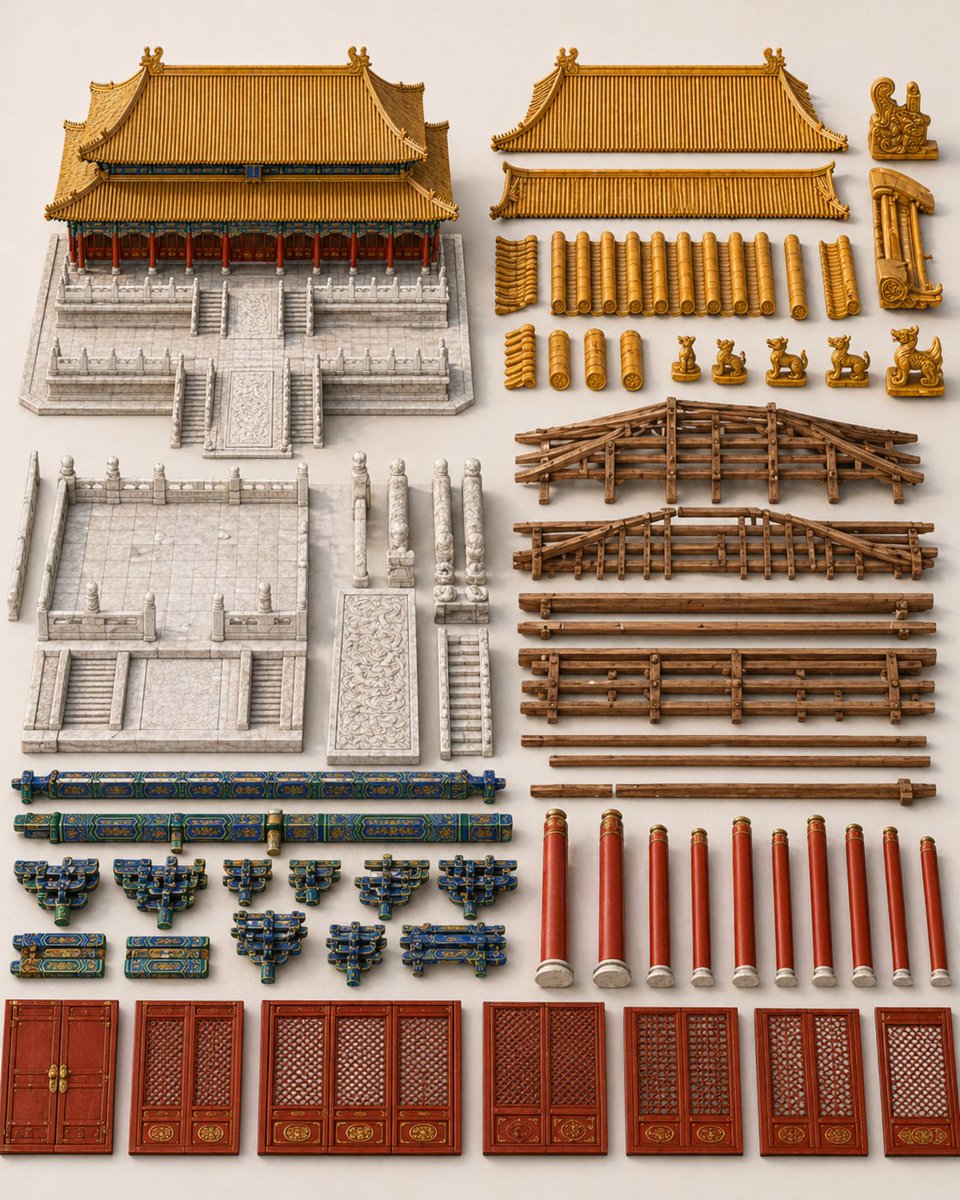
Плата компонентов китайского дворца
Эта команда генерирует аккуратно структурированный лист с архитектурными элементами для традиционного китайского дворцового здания, полезный для визуализации процесса строительства, исторических исследований дизайна или планирования последовательности строительства с помощью ИИ.
Это пример использования шаблона GPT Image 2 для Интерьер и архитектура . Используйте приведенный ниже шаблон, готовый к копированию, чтобы создать аналогичные визуальные элементы, и перед повторным использованием проверьте указание авторства Awesome GPT Image 2 Prompts и права на коммерческое использование.
Free 1K preview
Generate one preview image instantly, no sign-up required.
Промпт
Подсказка для копирования
A clean architectural materials and components display board for a traditional Chinese imperial palace hall, shown from a straight-on orthographic presentation on a light warm neutral background. Arrange all parts neatly in separated groups like a high-end construction inventory sheet, with realistic miniature model rendering, crisp edges, natural shadows, and museum-quality detail. The composition features exactly 7 grouped areas: 1 complete assembled building model in the upper left, 2 large roof assemblies at the upper right, 23 golden roof component pieces beneath them, 4 small roof-corner ornament pieces at the far upper right, 2 wooden roof truss frame assemblies in the mid-right, 6 long wooden beam layers plus 2 thin poles below the trusses, and a lower section containing architectural base and facade parts. The complete assembled building is a symmetrical Chinese palace hall with a golden double-eaved hip roof, red columns, blue-green painted bracket details, and a carved white stone terrace platform with central stairs and side stairs. In the lower-left component area, show 1 detached white stone base platform, 4 upright carved balustrade posts, 1 carved stone ramp panel, and 1 narrow stone stair segment. In the painted woodwork area near the bottom left, show 2 long blue-green-gold crossbeams and 10 blue-green-gold dougong bracket sets arranged in two rows. In the lower middle-right, show exactly 9 red cylindrical columns with pale stone bases. Along the bottom row, show exactly 6 red lacquered door and window units: 1 double palace door, 1 narrow lattice window, 1 wide three-panel lattice window, and 3 additional paired lattice window panels, all with ornate gold medallion details at the base. Use highly detailed carved stone textures, lacquered wood, glazed ceramic roof tiles, and aged timber structure. The overall image should feel like a precise palace construction kit sheet, elegant, symmetrical, isolated, and free of people, labels, text, city background, scaffolding, machinery, or unrelated objects.
Best for
- - Интерьер и архитектура visual exploration
- - Image generation and reference-image edits
- - Reusable briefs that keep source attribution visible
Change these parts
- - Subject, product, character, or scene
- - Aspect ratio, camera, lighting, and background
- - Brand, text, color, and output constraints
Recommended model and settings
- - Model: gpt-image-2
- - Input mode: Текст в изображение
- - Aspect ratio: source
- - Commercial status: review original source
How to use this prompt
- 1. Copy the prompt and preserve its structure for the first test.
- 2. Replace the subject, context, and publishing channel.
- 3. Change one camera, lighting, or style variable per iteration.
- 4. Inspect the output, source, text, and rights before reuse.
Limitations, source, and reuse cautions
- - Generated output is an editable draft, not factual, legal, or rights evidence.
- - Review the linked source, people, brands, logos, text, and third-party media before commercial use.
Больше случаев в этой категории
Приоритет отдается категориям, совместимости с режимами ввода, качеству и низкому уровню риска.






Примечания по повторному использованию и источникам
Используйте это подсказку безопасно после предварительного просмотра дела.
- 1.Скопируйте подсказку или откройте ее непосредственно в Dovoo с помощью кнопки генерации.
- 2.Настройте переменные, соотношение сторон и эталонные изображения в соответствии с вашими потребностями.
- 3.Перед публикацией или платным использованием проверьте права на источник, требования к указанию авторства, а также риски, связанные с использованием товарного знака или изображения.