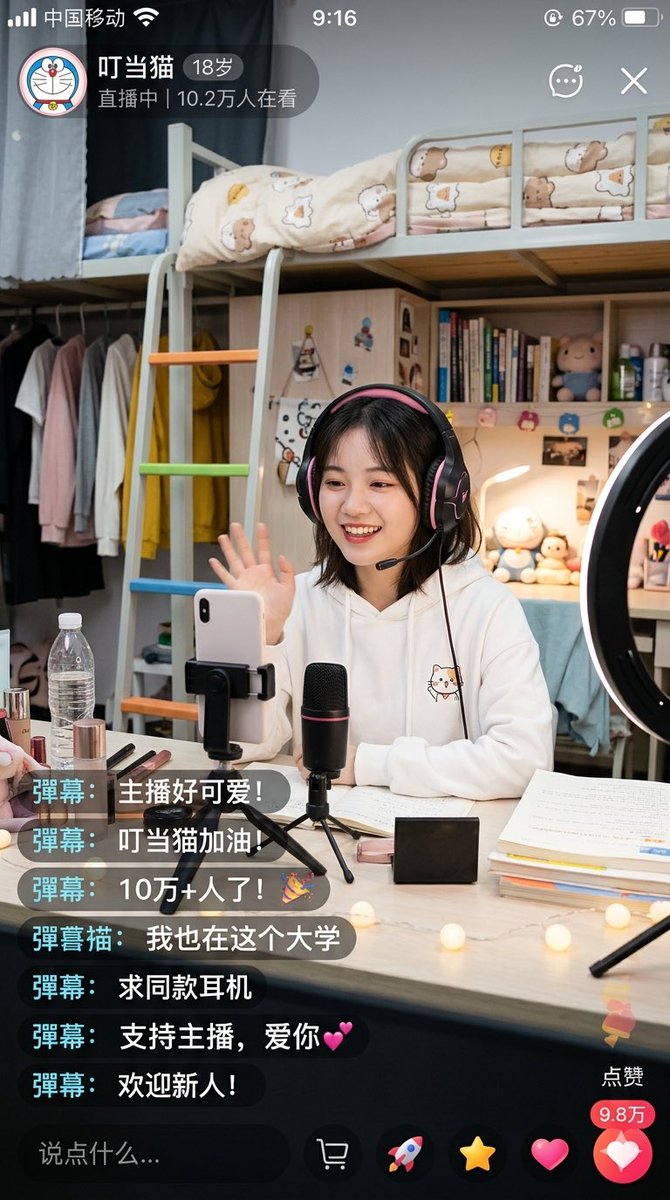
Скриншот прямой трансляции из китайского общежития
Это позволяет создать фотореалистичный скриншот мобильного приложения для прямой трансляции, на котором изображена студентка, ведущая трансляцию из своей комнаты в общежитии. Такой скриншот полезен для создания макетов пользовательского интерфейса в социальных сетях и реалистичных сцен, имитирующих образ жизни с использованием искусственного интеллекта.
Это пример использования шаблона GPT Image 2 для Портрет и характер . Используйте приведенный ниже шаблон, готовый к копированию, чтобы создать аналогичные визуальные элементы, и перед повторным использованием проверьте указание авторства Awesome GPT Image 2 Prompts и права на коммерческое использование.
Free 1K preview
Generate one preview image instantly, no sign-up required.
Промпт
Подсказка для копирования
A highly realistic vertical smartphone screenshot showcasing a warm university dorm livestream scene within a Chinese livestreaming app. The interface should resemble a genuine iPhone screenshot, including a status bar displaying Chinese carrier text, time 9:16, and approximately 67% battery. The upper left corner features a circular cartoon avatar and a livestream badge displaying the streamer's name “Dingdang Cat”, age “18 years old”, and the text “LIVE | 102k viewers”. Add small icons for chat, menu, and close in the upper right corner. The main scene depicts a young female college student sitting at a desk, waving towards the phone camera. Show every face clearly with natural, detailed facial features. She has shoulder-length dark short hair, wears large black and pink over-ear gaming headphones, and is dressed in a white hooded sweatshirt with a cute cat illustration on the chest. She is livestreaming in a tidy, warmly lit dorm bedroom. Behind her is a light-colored loft bed with safety rails and cream-colored bedding featuring bear and star patterns, along with a ladder with orange, green, and blue rungs. Below and to the side of the loft bed are shelves and a wardrobe area with light-colored clothes and a bright yellow hooded sweatshirt hanging. The shelves display vertically stacked books, small plush toys, bottles, and personal items. A ring light is visible on the right edge of the frame. On the desk in front of her are: a smartphone clamped in a holder, a black desktop microphone with a faint red accent mounted on a mini tripod, an open laptop and papers, stacked textbooks, cosmetics including lipstick and makeup brushes, a transparent water bottle, a small black rectangular box, and warm-toned string lights scattered on the desktop. The lighting should feel soft, homely, and inviting, with realistic indoor shadows and a slight smartphone shooting texture. Overlay 7 floating real-time chat comments in the lower left corner, using dark semi-transparent rounded rectangles with cyan name tags. The comments, from top to bottom, are: “Bullet comment: The streamer is so cute!”, “Bullet comment: Go Dingdang Cat!”, “Bullet comment: 100k+ viewers!🎉”, “Bullet comment Cat: I'm at this university too”, “Bullet comment: Where can I buy the same headphones?”, “Bullet comment: Support the streamer, love you💕”, “Bullet comment: Welcome newcomers!”. Include a dark comment input field at the bottom with the placeholder text “Say something…”, and a row of livestream operation icons. Add a vertical like area in the lower right corner with a “Like” label, a red count bubble displaying “98k”, and a large pink heart button. Overall style: Photo-realistic Chinese social media livestream screenshot, credible App UI, detailed dorm environment, cute young campus streamer aesthetic, natural composition, clear text rendering, no extra panels.
Best for
- - Портрет и характер visual exploration
- - Image generation and reference-image edits
- - Reusable briefs that keep source attribution visible
Change these parts
- - Subject, product, character, or scene
- - Aspect ratio, camera, lighting, and background
- - Brand, text, color, and output constraints
Recommended model and settings
- - Model: gpt-image-2
- - Input mode: Текст в изображение
- - Aspect ratio: source
- - Commercial status: review original source
How to use this prompt
- 1. Copy the prompt and preserve its structure for the first test.
- 2. Replace the subject, context, and publishing channel.
- 3. Change one camera, lighting, or style variable per iteration.
- 4. Inspect the output, source, text, and rights before reuse.
Limitations, source, and reuse cautions
- - Generated output is an editable draft, not factual, legal, or rights evidence.
- - Review the linked source, people, brands, logos, text, and third-party media before commercial use.
Больше случаев в этой категории
Приоритет отдается категориям, совместимости с режимами ввода, качеству и низкому уровню риска.






Примечания по повторному использованию и источникам
Используйте это подсказку безопасно после предварительного просмотра дела.
- 1.Скопируйте подсказку или откройте ее непосредственно в Dovoo с помощью кнопки генерации.
- 2.Настройте переменные, соотношение сторон и эталонные изображения в соответствии с вашими потребностями.
- 3.Перед публикацией или платным использованием проверьте права на источник, требования к указанию авторства, а также риски, связанные с использованием товарного знака или изображения.