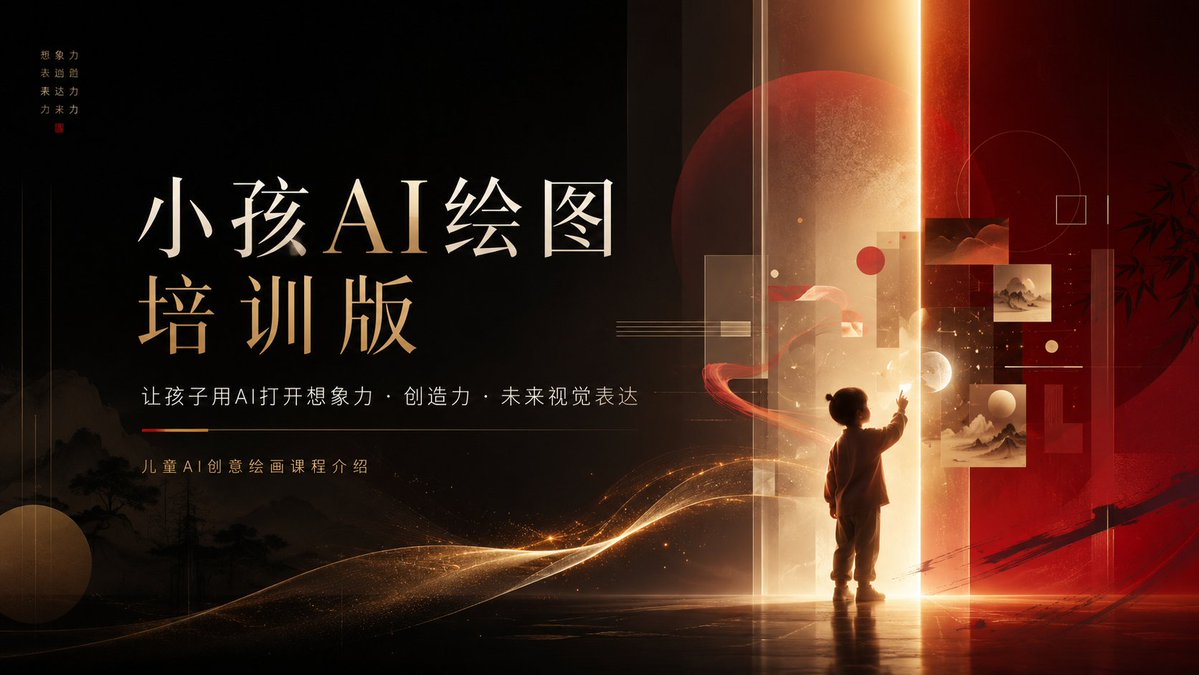
Children’s AI Art Course PPT Cover
A premium cinematic presentation cover for a children’s AI drawing course using Chinese typography, glowing portals, and futuristic education aesthetics.
Это пример использования шаблона GPT Image 2 для Графика и плакаты . Используйте приведенный ниже шаблон, готовый к копированию, чтобы создать аналогичные визуальные элементы, и перед повторным использованием проверьте указание авторства Awesome GPT Image 2 Prompts и права на коммерческое использование.
Free 1K preview
Generate one preview image instantly, no sign-up required.
Промпт
Подсказка для копирования
Objective: To create a 16:9 cinematic-quality demo cover for children's AI image creation education/training courses, adopting an elegant Chinese style with luxurious aesthetics, a deep ink-black background, and accented with warm golden highlights and dramatic red elements.

Canvas: A widescreen PowerPoint-style title page, 16:9 aspect ratio, high resolution. The composition is visually divided into two parts: the left side is a large blank space for layout; the right side is a glowing future art gate scene.

Layout: Place two lines of exquisite serif calligraphy-style Chinese large titles in the center-left position: {argument name="main title" default="Child AI Drawing
Training Version"}. Add a line of slender white Chinese subtitles below: {argument name="subtitle" default="Let children use AI to open up imagination · creativity · future visual expression"}. Then add a thin horizontal dividing line, with a short red-orange emphasis segment on the left, followed by a short course description: {argument name="course description" default="Introduction to Children's AI Creative Painting Course"}. In the upper-left corner, add a line of tiny four-character vertical golden motto, covered with a small red seal: {argument name="vertical motto" default="Imagination
Expressiveness
Creativity
Future Power"}.

Right-side Scene: A child silhouette stands in the lower-center right, facing a golden-white glowing vertical light gate, with one hand reaching upwards as if touching the future. The light gate should emit a strong glow, forming a reflection on the bright floor, with radial horizontal halos at the bottom edge. Behind and around the light gate, include translucent red and amber panels, slender vertical glass rectangles, faint grid lines, a huge dark red circular planet/moon behind the light gate, and a deep red background area on the far right.

Floating Visual Elements: Place 3 small framed art thumbnails near the right side of the light gate: a deep red cloud/landscape image in the upper-center, a light-colored ink wash landscape image to its right/lower-right, and a larger pale landscape image below. Add abstract circles and squares: a small solid red circle, a light cream-colored circle, a huge blurred outline circle, and several thin-line squares. Add a glowing golden particle belt sweeping from the lower-left corner towards the child, like flowing stardust or silk.

Visual Style: High-end Chinese modern design, cinematic lighting, gold foil and lacquer red tones, faint ink wash landscapes and pine tree silhouettes visible in the dark background on the lower-left, soft fog, dust particles, lens flares, high contrast, elegant spacing, museum poster-level quality. The font should be clear, exquisite, and easy to read, with the main title using an ivory white to gold gradient, and auxiliary text using soft white/gold.

Constraints: Keep the slide concise and suitable for presentation, no Logo, no watermark, no extra text other than the specified 4 sets of text, non-cartoon style, no cluttered elements. Maintain a strong sense of blank space on the left side and create a magical educational technology atmosphere on the right.
Переменные подсказки
Редактируемые заполнители аргументов, найденные в подсказке, с их значениями по умолчанию.
Best for
- - Графика и плакаты visual exploration
- - Image generation and reference-image edits
- - Reusable briefs that keep source attribution visible
Change these parts
- - Subject, product, character, or scene
- - Aspect ratio, camera, lighting, and background
- - Brand, text, color, and output constraints
Recommended model and settings
- - Model: gpt-image-2
- - Input mode: Текст в изображение
- - Aspect ratio: source
- - Commercial status: review original source
How to use this prompt
- 1. Copy the prompt and preserve its structure for the first test.
- 2. Replace the subject, context, and publishing channel.
- 3. Change one camera, lighting, or style variable per iteration.
- 4. Inspect the output, source, text, and rights before reuse.
Limitations, source, and reuse cautions
- - Generated output is an editable draft, not factual, legal, or rights evidence.
- - Review the linked source, people, brands, logos, text, and third-party media before commercial use.
Больше случаев в этой категории
Приоритет отдается категориям, совместимости с режимами ввода, качеству и низкому уровню риска.






Примечания по повторному использованию и источникам
Используйте это подсказку безопасно после предварительного просмотра дела.
- 1.Скопируйте подсказку или откройте ее непосредственно в Dovoo с помощью кнопки генерации.
- 2.Настройте переменные, соотношение сторон и эталонные изображения в соответствии с вашими потребностями.
- 3.Перед публикацией или платным использованием проверьте права на источник, требования к указанию авторства, а также риски, связанные с использованием товарного знака или изображения.