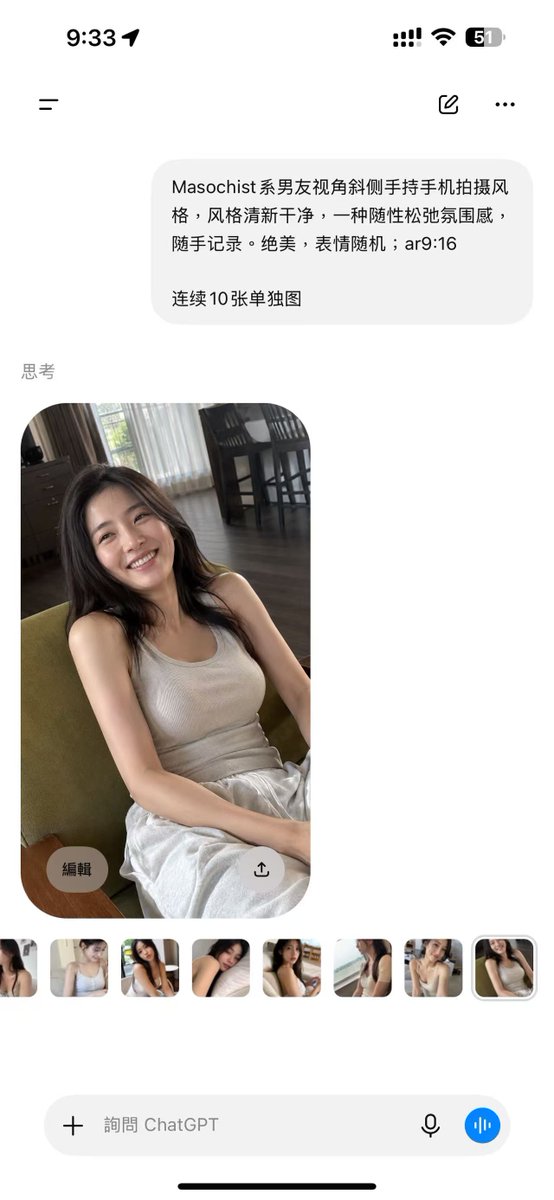
ChatGPT Mobile Photo Carousel Screenshot
Generates a realistic ChatGPT iPhone screenshot featuring a Chinese image prompt and a candid portrait result with thumbnail variations.
Это пример использования шаблона GPT Image 2 для Продукт и коммерция . Используйте приведенный ниже шаблон, готовый к копированию, чтобы создать аналогичные визуальные элементы, и перед повторным использованием проверьте указание авторства Awesome GPT Image 2 Prompts и права на коммерческое использование.
Free 1K preview
Generate one preview image instantly, no sign-up required.
Free text preview doesn’t preserve reference-image consistency.
Промпт
Подсказка для копирования
Goal: Create a realistic vertical smartphone screenshot of the ChatGPT mobile app showing an image-generation result, in a clean iOS interface.

Canvas: Tall 9:16 phone screenshot, white background, rounded iPhone safe-area edges, black iOS home indicator at the bottom. Status bar at the top shows 9:33 on the left and exactly 4 right-side status items: cellular signal bars, Wi-Fi icon, battery percentage reading 51, and a battery shape.

Layout: Top navigation row contains exactly 3 controls: a hamburger menu icon on the left, a small compose/edit icon near the upper right, and a three-dot more menu at the far right. Below it, place one light-gray rounded user message bubble aligned slightly right. Under the bubble, add a small gray section label reading “Thinking”. Below the label, show one large generated photo card with rounded corners, then a horizontal strip of exactly 8 small thumbnail images. At the bottom, show one rounded input bar with a plus icon, placeholder text, microphone icon, and a blue circular voice button.

Text content: The user message bubble contains Chinese text: “{argument name="prompt text" default="Masochist-style boyfriend's perspective, shooting with a phone held diagonally, a fresh and clean style, a casual and relaxed atmosphere, casually recorded. Stunning, with random expressions; ar9:16

10 separate images in a row"}”. The bottom input placeholder reads “Ask ChatGPT”.

Main photo subject: The large generated image is a casual handheld portrait of {argument name="character description" default="a young East Asian woman with long dark hair"} sitting indoors on a green upholstered chair, smiling warmly at the camera. She wears {argument name="outfit" default="a beige ribbed tank top and loose white pants"}. The pose feels relaxed and candid, shot from a slightly high, tilted boyfriend-perspective phone angle. Her hands rest casually near her lap, her expression is bright and natural, and the lighting is soft daytime window light.

Environment inside the photo: A cozy apartment living/dining room with dark wood floor, sheer white curtains, darker side curtains, a window with greenery outside, and a dining table with tall dark chairs in the background. Keep the photo realistic, slightly imperfect, and spontaneous rather than studio-polished.

Overlay controls: On the large photo card, include exactly 2 translucent circular overlay buttons near the bottom: one left button labeled “Edit” and one right button with an upload/share arrow icon. The thumbnail strip contains exactly 8 small rounded previews showing alternate similar portraits of the same woman; the final thumbnail is selected with a subtle light outline.

Visual style: Photorealistic iOS screenshot, clean white margins, soft gray interface elements, accurate mobile app spacing, natural Chinese UI typography, no extra watermarks, no additional panels, no extra generated images beyond the 1 main image and 8 thumbnails.
Переменные подсказки
Редактируемые заполнители аргументов, найденные в подсказке, с их значениями по умолчанию.
Best for
- - Продукт и коммерция visual exploration
- - Image generation and reference-image edits
- - Reusable briefs that keep source attribution visible
Change these parts
- - Subject, product, character, or scene
- - Aspect ratio, camera, lighting, and background
- - Brand, text, color, and output constraints
Recommended model and settings
- - Model: gpt-image-2
- - Input mode: Изображение в изображение
- - Aspect ratio: source
- - Commercial status: review original source
How to use this prompt
- 1. Copy the prompt and preserve its structure for the first test.
- 2. Replace the subject, context, and publishing channel.
- 3. Change one camera, lighting, or style variable per iteration.
- 4. Inspect the output, source, text, and rights before reuse.
Limitations, source, and reuse cautions
- - Generated output is an editable draft, not factual, legal, or rights evidence.
- - Review the linked source, people, brands, logos, text, and third-party media before commercial use.
Больше случаев в этой категории
Приоритет отдается категориям, совместимости с режимами ввода, качеству и низкому уровню риска.






Примечания по повторному использованию и источникам
Используйте это подсказку безопасно после предварительного просмотра дела.
- 1.Скопируйте подсказку или откройте ее непосредственно в Dovoo с помощью кнопки генерации.
- 2.Настройте переменные, соотношение сторон и эталонные изображения в соответствии с вашими потребностями.
- 3.Перед публикацией или платным использованием проверьте права на источник, требования к указанию авторства, а также риски, связанные с использованием товарного знака или изображения.