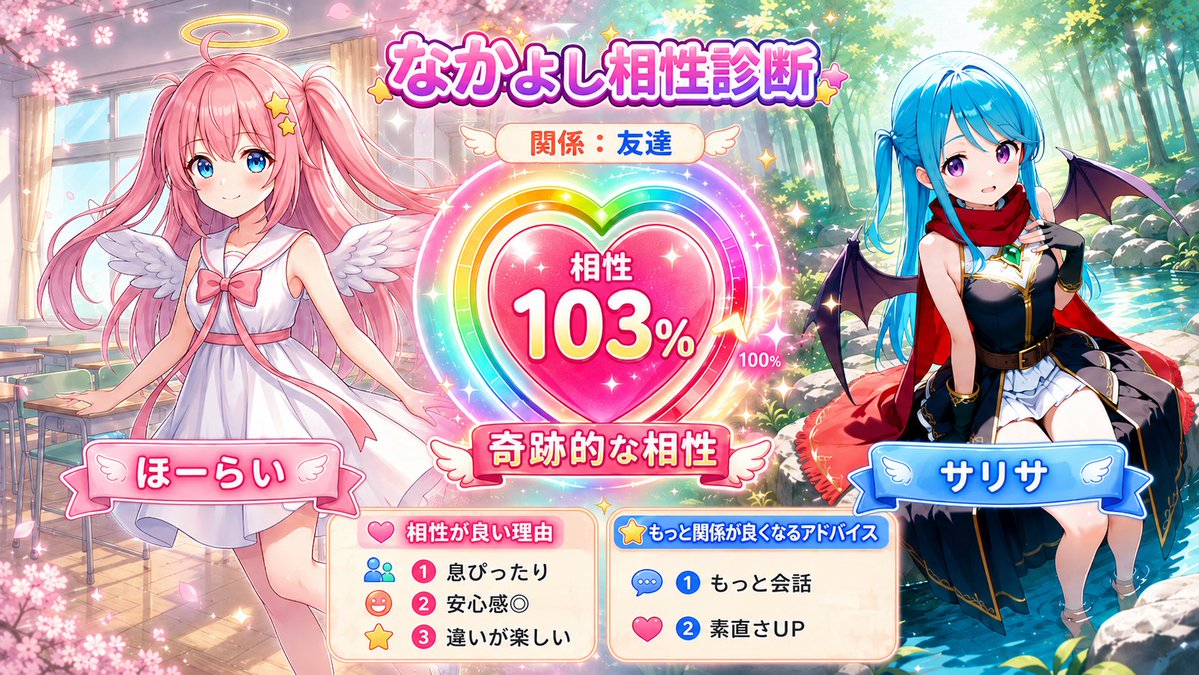
Character Compatibility Result UI Generator
A prompt for generating a game-style compatibility result screen featuring two characters with a UI meter and personalized diagnosis text.
Это пример использования шаблона GPT Image 2 для Аниме и игры . Используйте приведенный ниже шаблон, готовый к копированию, чтобы создать аналогичные визуальные элементы, и перед повторным использованием проверьте указание авторства Awesome GPT Image 2 Prompts и права на коммерческое использование.
Нужен полный набор подсказок? Воспользуйтесь Аниме и игры Для получения дополнительных примеров по теме, или откройте раздел "Обзор тем" GPT Image 2 быстрый каталог Полный список примеров, многократно используемых структур и указание источников см. здесь.
Free 1K preview
Generate one preview image instantly, no sign-up required.
3240/4000
Промпт
Подсказка для копирования
Referencing the two attached character images, generate a 16:9 horizontal illustration with the theme of 'Character Compatibility Diagnosis' for the two characters. Do not return the diagnosis results or prompts in text; instead, draw it as a single finished illustration. [Input Fields] Character A's Name: {argument name="Character A name" default="Character A"} Character B's Name: {argument name="Character B name" default="Character B"} Their Relationship: {argument name="relationship" default="Best Friends"} Free Memo: *Optional. Personality or typical relationship. If left blank, judge from the facial expressions, clothing, colors, and atmosphere of the attached images. [Content] A 16:9 game-style UI illustration. Place the two characters on the left and right, and place a large compatibility gauge, heart-shaped meter, or favorability result-style UI in the center. Faithfully reproduce Character A and B's hairstyles, hair colors, eyes, clothing, decorations, and atmosphere without mixing them. Match the art style, color usage, background, and UI design to the atmosphere of the two attached images. [Compatibility Diagnosis] Automatically diagnose compatibility from 0 to 120% based on the relationship, free memo, and personalities felt from the images, and display it within the image. Values over 100% should be expressed as 'Limit Break,' 'Miraculous Compatibility,' or 'Destined Compatibility,' using gauge-breaking, rainbow aura, or LIMIT BREAK style effects. Do not use low numbers for good relationships. Guidelines: Best friends 85-120%, friends 70-105%, partners 80-115%, childhood friends 75-110%, seniors/juniors 55-100%, rivals 45-105%, like cats and dogs 25-85%, more than friends 70-115%. Important: Do not fix the compatibility % every time. Even for the same relationship, do not use the same number; let it vary naturally according to the character's atmosphere. Do not use 112% every time for best friends. [Text in Screen] Text should be short and easy to read. Long sentences are prohibited. Mandatory: A's name, B's name, relationship, compatibility XX%, short diagnosis title. Optional: 3 reasons for good compatibility, 2 pieces of advice for improving the relationship. Display reasons or advice as short UI labels or mini panels with icons like 'Perfectly in sync,' 'Sense of security,' 'Matching vibes,' 'More conversation,' 'Improved honesty,' etc. [Composition] Characters should not touch each other. No holding hands, crossing arms, hugging, being in close contact, or overlapping bodies. Sandwich the central UI between the two people and leave an appropriate distance. Express closeness through facial expressions, gazes, poses, body direction, background icons, and UI effects rather than physical contact. [Finishing] A high-quality single picture for SNS that is bright and easy to see. Give both people equal presence. [To Avoid] Mixing faces or hairstyles, swapping clothes, changing eye color, adding people, one person disappearing, contact, hand-holding, close contact, body overlapping, broken hands/feet/fingers, extra arms, long text, garbled characters, unreadable text, cluttered UI, excessive background, low resolution, blurring, distortion, becoming a different character.Переменные подсказки
Редактируемые заполнители аргументов, найденные в подсказке, с их значениями по умолчанию.
Переменная
Character A name
По умолчанию
Character A
Переменная
Character B name
По умолчанию
Character B
Переменная
relationship
По умолчанию
Best Friends
Best for
- - Аниме и игры visual exploration
- - Image generation and reference-image edits
- - Reusable briefs that keep source attribution visible
Change these parts
- - Subject, product, character, or scene
- - Aspect ratio, camera, lighting, and background
- - Brand, text, color, and output constraints
Recommended model and settings
- - Model: gpt-image-2
- - Input mode: Текст в изображение
- - Aspect ratio: source
- - Commercial status: review original source
How to use this prompt
- 1. Copy the prompt and preserve its structure for the first test.
- 2. Replace the subject, context, and publishing channel.
- 3. Change one camera, lighting, or style variable per iteration.
- 4. Inspect the output, source, text, and rights before reuse.
Limitations, source, and reuse cautions
- - Generated output is an editable draft, not factual, legal, or rights evidence.
- - Review the linked source, people, brands, logos, text, and third-party media before commercial use.
Импортировано из Awesome GPT Image 2 Prompts . Требуется указание авторства. Статус коммерческого использования: allowed ; перед платным использованием ознакомьтесь с правами на источник.
Больше случаев в этой категории
Приоритет отдается категориям, совместимости с режимами ввода, качеству и низкому уровню риска.

GPT Image 2 Real-Life Character Street Snap
Текст в изображение

Matte Black B.AI Keyboard Keycap
Текст в изображение

MotoGP POV Cornering Shot
Текст в изображение

Orange Rooftop Fashion Photo Prompt
Текст в изображение

Luxury Travel Fashion Portrait Prompt
Текст в изображение

Cute Focus Desk Flat Lay and Kawaii Illustration
Текст в изображение
Примечания по повторному использованию и источникам
Используйте это подсказку безопасно после предварительного просмотра дела.
- 1.Скопируйте подсказку или откройте ее непосредственно в Dovoo с помощью кнопки генерации.
- 2.Настройте переменные, соотношение сторон и эталонные изображения в соответствии с вашими потребностями.
- 3.Перед публикацией или платным использованием проверьте права на источник, требования к указанию авторства, а также риски, связанные с использованием товарного знака или изображения.