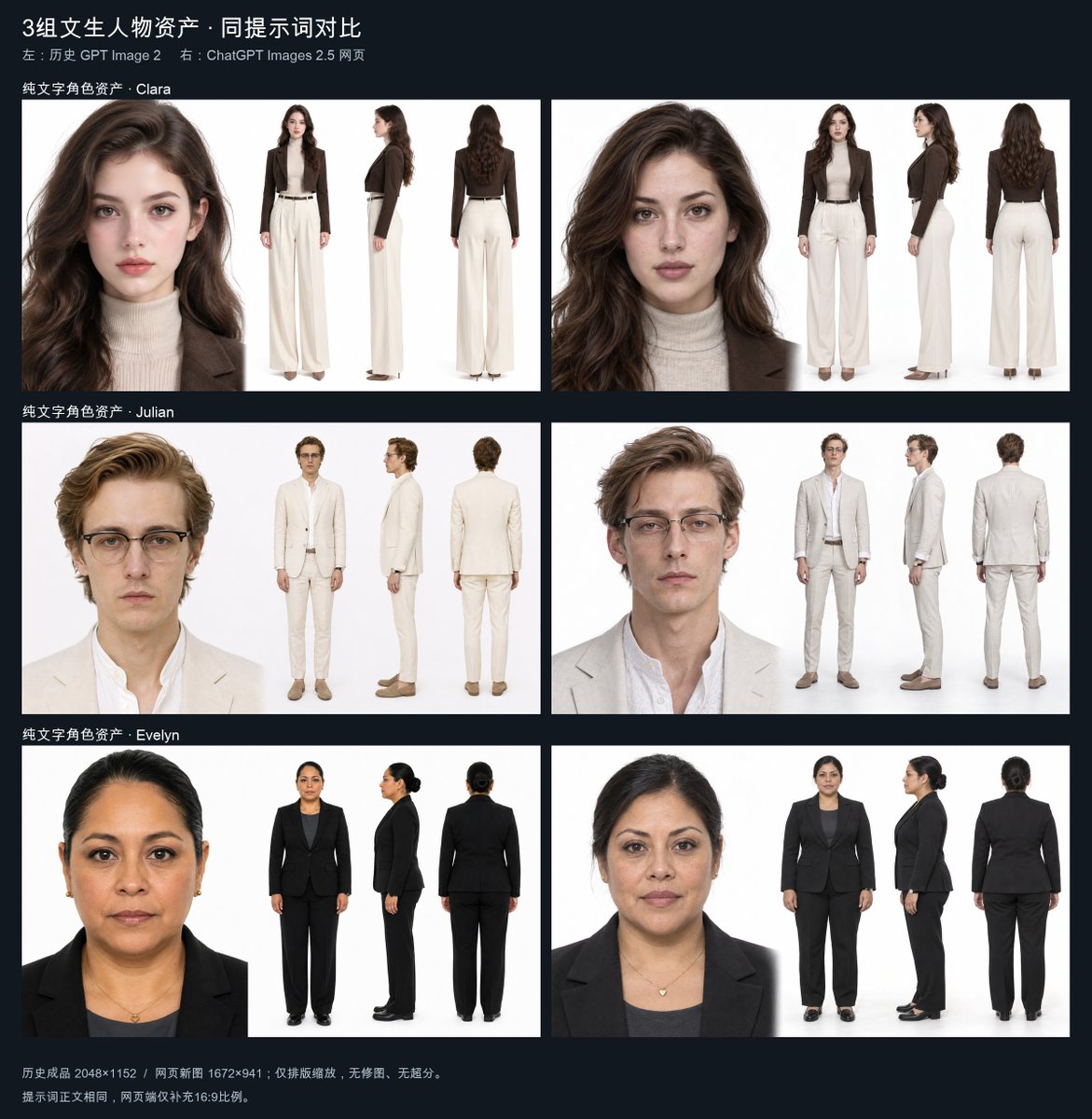
Three Character Asset Comparison Board
Generates a 16:9 comparison board of three realistic character asset sheets across two model columns, useful for visual AI output comparisons.
Это пример использования шаблона GPT Image 2 для Портрет и характер . Используйте приведенный ниже шаблон, готовый к копированию, чтобы создать аналогичные визуальные элементы, и перед повторным использованием проверьте указание авторства Awesome GPT Image 2 Prompts и права на коммерческое использование.
Этот запрос предназначен для использования нескольких эталонных изображений. Мы откроем Dovoo с запросом и доступным изображением предварительного просмотра; добавим оставшиеся эталонные изображения в Dovoo перед генерацией.
Free 1K preview
Generate one preview image instantly, no sign-up required.
Free text preview doesn’t preserve reference-image consistency.
Промпт
Подсказка для копирования
Objective: Create a dark-background comparison project showcasing character asset sheets of three professionally dressed individuals, side-by-side comparison of two image generation systems.

Canvas: 16:9 landscape demonstration image, resolution approximately 2048×1152, using a dark navy-black background, simple white text, and 6 large white image panels arranged in a 3-row, 2-column grid.

Title Text: Place a large Chinese title {argument name="headline text" default="3 sets of female character assets · Comparison with the same prompt"} in the upper left corner. Add a smaller subtitle line below it: {argument name="comparison subtitle" default="Left: Historical GPT Image 2    Right: ChatGPT Images 2.5 Web"}.

Layout: Use 6 rectangular white panels with narrow spacing: the left column represents the old model, and the right column represents the new model. There are 3 rows of characters: Clara, Julian, and Evelyn. Each row has a small Chinese row label above the left panel: “Pure Text Character Asset - Clara”, “Pure Text Character Asset - Julian”, and “Pure Text Character Asset - Evelyn”. Each of the 6 panels contains 4 character depictions on a white studio background: 1 large head and shoulder close-up on the left, and 3 smaller full-body turnarounds on the right: front view, side view, and back view. The total number of visible character depictions: exactly 24.

Row 1 Subject Details: Clara, a young, fair-skinned woman with long wavy dark brown hair, subtle natural makeup, a neutral and serious expression, wearing a cream-colored ribbed turtleneck sweater, a brown short blazer, high-waisted wide-leg cream-colored trousers, a black belt, and low heels. Show 4 views in each Clara panel: head close-up, full body front, full body side, full body back.

Row 2 Subject Details: Julian, a young, slender, fair-skinned man with light brown/golden side-parted hair, wearing rectangular glasses, a calm and serious expression, wearing a beige linen suit, a white open-collar shirt, slim-fit trousers, a brown belt, and brown loafers. Show 4 views in each Julian panel: head close-up, full body front, full body side, full body back.

Row 3 Subject Details: Evelyn, a middle-aged woman, medium skin tone, dark hair styled in a low bun, a steady and neutral expression, wearing a black business suit, a dark gray shirt, a small gold necklace, small earrings, black trousers, and black flats. Show 4 views in each Evelyn panel: head close-up, full body front, full body side, full body back.

Visual Style: Realistic photographic style character asset sheet, clean studio lighting, white seamless background within each panel, consistent professional clothing styling, neutral expressions, no decorative graphics except for the dark project background and labels. The left and right columns should look similar but not identical, as if comparing the outputs of two systems.

Footer Text: Add two Chinese annotations in the lower left corner: {argument name="footer note one" default="Historical finished product 2048×1152 / Web new image 1672×941 · Only layout scaling, no retouching, no upscaling."} and {argument name="footer note two" default="The prompt body is the same, with only 16:9 aspect ratio added to both pages."}.

Constraints: Maintain the precise 3-row, 2-column comparison layout, exactly 3 named characters, exactly 6 panels, exactly 4 depictions per panel, no watermarks, no extra logos, and no other characters.
Переменные подсказки
Редактируемые заполнители аргументов, найденные в подсказке, с их значениями по умолчанию.
Best for
- - Портрет и характер visual exploration
- - Image generation and reference-image edits
- - Reusable briefs that keep source attribution visible
Change these parts
- - Subject, product, character, or scene
- - Aspect ratio, camera, lighting, and background
- - Brand, text, color, and output constraints
Recommended model and settings
- - Model: gpt-image-2
- - Input mode: Много изображений в изображение
- - Aspect ratio: source
- - Commercial status: review original source
How to use this prompt
- 1. Copy the prompt and preserve its structure for the first test.
- 2. Replace the subject, context, and publishing channel.
- 3. Change one camera, lighting, or style variable per iteration.
- 4. Inspect the output, source, text, and rights before reuse.
Limitations, source, and reuse cautions
- - Generated output is an editable draft, not factual, legal, or rights evidence.
- - Review the linked source, people, brands, logos, text, and third-party media before commercial use.
Больше случаев в этой категории
Приоритет отдается категориям, совместимости с режимами ввода, качеству и низкому уровню риска.






Примечания по повторному использованию и источникам
Используйте это подсказку безопасно после предварительного просмотра дела.
- 1.Скопируйте подсказку или откройте ее непосредственно в Dovoo с помощью кнопки генерации.
- 2.Настройте переменные, соотношение сторон и эталонные изображения в соответствии с вашими потребностями.
- 3.Перед публикацией или платным использованием проверьте права на источник, требования к указанию авторства, а также риски, связанные с использованием товарного знака или изображения.