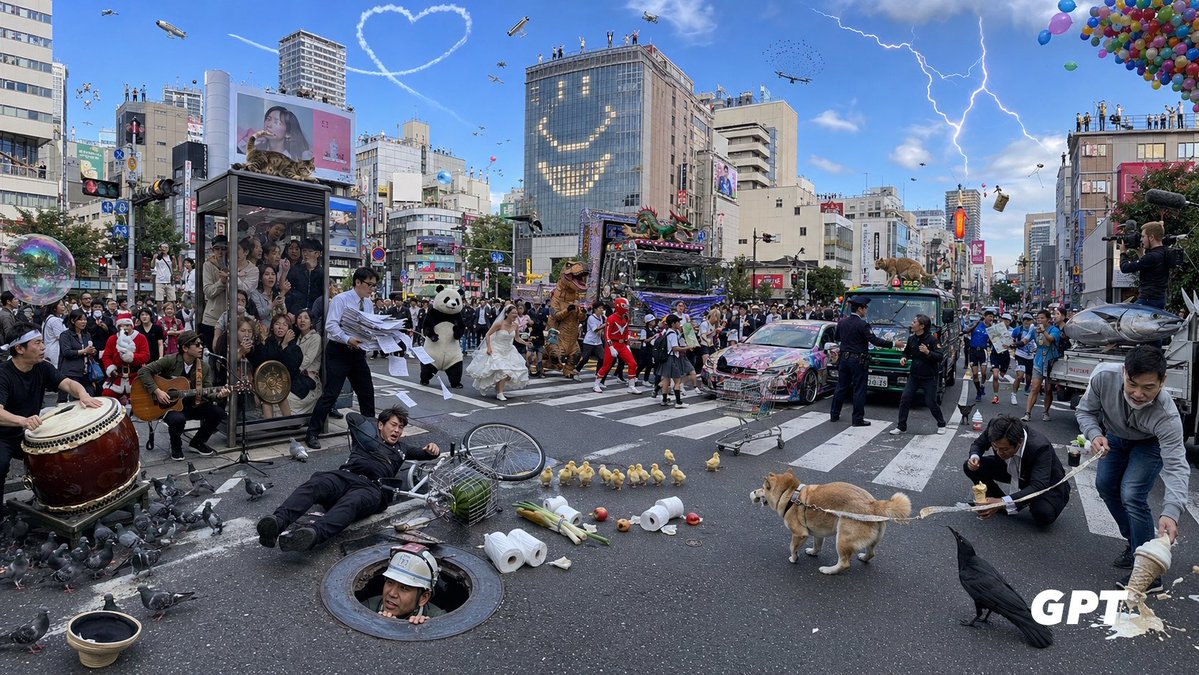
Chaotic Shibuya Scramble Crossing
A highly detailed photorealistic prompt for generating an absurdly crowded Tokyo scramble crossing full of surreal events and countable visual details.
Это пример использования шаблона GPT Image 2 для Ландшафт и природа . Используйте приведенный ниже шаблон, готовый к копированию, чтобы создать аналогичные визуальные элементы, и перед повторным использованием проверьте указание авторства Awesome GPT Image 2 Prompts и права на коммерческое использование.
Free 1K preview
Generate one preview image instantly, no sign-up required.
Промпт
Подсказка для копирования
Goal: Create an ultra-dense, chaotic photorealistic wide-angle street scene at a huge Japanese scramble crossing, like Shibuya in Tokyo, packed with absurd events happening simultaneously. The image should feel like a single candid news photograph with extreme information density, realistic lighting, and many tiny details.

Canvas: Wide horizontal 16:9 image, street-level perspective, slightly fisheye wide-angle lens, daytime under a bright blue sky. Dense city buildings, billboards, traffic lights, crosswalk stripes, signs, and crowds fill the background. Add a small white “GPT” watermark in the bottom-right corner.

Setting and background: Use {argument name="location" default="a busy Shibuya-style Tokyo scramble crossing"}. Surround the crossing with mid-rise commercial buildings, digital billboards, rooftop spectators, traffic signals, and urban signage. In the sky include exactly 8 aerial features: 1 heart-shaped skywriting trail, 1 blimp, 1 small helicopter, 1 airplane, 1 drone, 1 flock of tiny birds, 1 lightning bolt striking from clouds on the right, and 1 large cluster of colorful balloons in the upper-right corner. On one tall glass building, make lit windows form a large smiling face.

Main crowd and vehicles: Fill the intersection with a dense crowd of pedestrians and performers. Include exactly 5 main vehicles: 1 elaborately decorated neon parade truck with a dragon on top, 1 colorful graffiti-covered sports car, 1 green taxi, 1 small bus or van, and 1 silver fish-shaped parade float or vehicle at the far right. Add photographers and camera operators on the right edge documenting the chaos.

Foreground incidents and objects: Show exactly 12 prominent foreground details: 1 large taiko drum player on the far left, 1 seated guitarist near the drum, 1 transparent phone-booth-like glass box packed with people, 1 businessman dropping loose papers, 1 man in a black suit fallen beside a bicycle, 1 construction worker emerging from a round manhole, 1 overturned birdcage with green contents, 1 scattered group of pigeons, 1 row of ducklings crossing the road, 1 tan Shiba Inu dog on a leash, 1 large black crow in the lower-right foreground, and 1 man spilling noodles or creamy food from a bowl on the far right.

Costumed characters and performers: Include exactly 7 standout characters among the crowd: 1 Santa Claus, 1 panda mascot, 1 bride in a white wedding dress running through the crossing, 1 brown dinosaur mascot, 1 red superhero or sentai character, 1 schoolgirl in uniform, and 1 police officer trying to manage the scene.

Additional surreal details: Add exactly 7 extra chaotic props or actions: 1 giant soap bubble floating on the left, 1 shopping cart abandoned in the middle road, 1 microphone stand and speakers for street performance, 1 traffic cone near the vehicles, 1 airborne suitcase or box on the right, 1 small animal or mascot peeking from a vehicle roof, and scattered toilet paper rolls, apples, bottles, and debris across the crosswalk.

Visual style: Photorealistic, high-resolution documentary photography, crisp detail everywhere, natural shadows, realistic Japanese city atmosphere, no anime styling. Use {argument name="time of day" default="bright afternoon"}, {argument name="weather mood" default="sunny blue sky with dramatic lightning"}, {argument name="crowd density" default="extremely crowded"}, and {argument name="chaos level" default="maximum but still readable"}. Keep the composition balanced so every counted object is visible.
Переменные подсказки
Редактируемые заполнители аргументов, найденные в подсказке, с их значениями по умолчанию.
Best for
- - Ландшафт и природа visual exploration
- - Image generation and reference-image edits
- - Reusable briefs that keep source attribution visible
Change these parts
- - Subject, product, character, or scene
- - Aspect ratio, camera, lighting, and background
- - Brand, text, color, and output constraints
Recommended model and settings
- - Model: gpt-image-2
- - Input mode: Текст в изображение
- - Aspect ratio: source
- - Commercial status: review original source
How to use this prompt
- 1. Copy the prompt and preserve its structure for the first test.
- 2. Replace the subject, context, and publishing channel.
- 3. Change one camera, lighting, or style variable per iteration.
- 4. Inspect the output, source, text, and rights before reuse.
Limitations, source, and reuse cautions
- - Generated output is an editable draft, not factual, legal, or rights evidence.
- - Review the linked source, people, brands, logos, text, and third-party media before commercial use.
Больше случаев в этой категории
Приоритет отдается категориям, совместимости с режимами ввода, качеству и низкому уровню риска.






Примечания по повторному использованию и источникам
Используйте это подсказку безопасно после предварительного просмотра дела.
- 1.Скопируйте подсказку или откройте ее непосредственно в Dovoo с помощью кнопки генерации.
- 2.Настройте переменные, соотношение сторон и эталонные изображения в соответствии с вашими потребностями.
- 3.Перед публикацией или платным использованием проверьте права на источник, требования к указанию авторства, а также риски, связанные с использованием товарного знака или изображения.