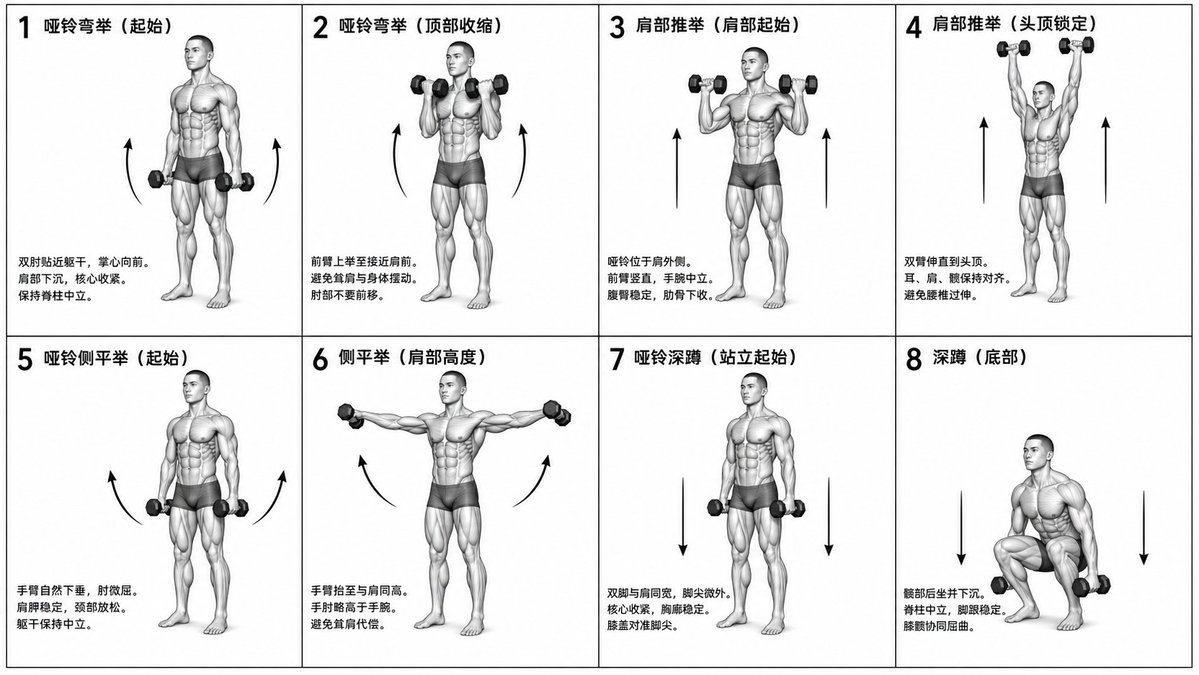
Инструкция по биомеханической подготовке
Сложная задача: создать монохромную, научно точную фитнес-диаграмму в сетке 2x4, отображающую конкретные упражнения с подписями и анатомическими изображениями.
Это пример использования шаблона GPT Image 2 для Графика и плакаты . Используйте приведенный ниже шаблон, готовый к копированию, чтобы создать аналогичные визуальные элементы, и перед повторным использованием проверьте указание авторства Awesome GPT Image 2 Prompts и права на коммерческое использование.
Free 1K preview
Generate one preview image instantly, no sign-up required.
Free text preview doesn’t preserve reference-image consistency.
Промпт
Подсказка для копирования
Generate a monochrome grayscale technical illustration, a biomechanically accurate fitness instruction sheet, clean 3D anatomical figures, scientific diagram aesthetics, minimalist style, no artistic exaggeration.

2x4 grid layout (total of 8 panels), perfectly aligned cells, equal spacing, thin black border, numbered 1 to 8.

Neutral athletic human body (gender-neutral), proportional anatomy, consistent figure across all panels.

{argument name="training sequence" default="Dumbbell training"} sequence (key positions only):
1. Dumbbell Curl (starting position)
2. Dumbbell Curl (top contraction)
3. Shoulder Press (start at shoulder height)
4. Shoulder Press (overhead lockout)
5. Lateral Raise (arms down)
6. Lateral Raise (arms to shoulder height)
7. Dumbbell Squat (standing start)
8. Squat (bottom position).

Top left corner: bold number + movement name (Chinese).
Center: full-body pose (clear joint positioning).
Bottom left corner: brief technical description (2–3 lines, correct posture cues).
Overlay: directional arrows showing the path of motion (up/down/arc).

Correct joint alignment, neutral spine, proper elbow and knee positioning, realistic weight distribution, no exaggerated movements.

Highly detailed grayscale shading, soft studio lighting, subtle shadows, clean lines, medical/sports science diagram quality.

Solid white background.

No color, no background environment, no extra elements, no stylization, no blur.
Переменные подсказки
Редактируемые заполнители аргументов, найденные в подсказке, с их значениями по умолчанию.
Best for
- - Графика и плакаты visual exploration
- - Image generation and reference-image edits
- - Reusable briefs that keep source attribution visible
Change these parts
- - Subject, product, character, or scene
- - Aspect ratio, camera, lighting, and background
- - Brand, text, color, and output constraints
Recommended model and settings
- - Model: gpt-image-2
- - Input mode: Изображение в изображение
- - Aspect ratio: source
- - Commercial status: review original source
How to use this prompt
- 1. Copy the prompt and preserve its structure for the first test.
- 2. Replace the subject, context, and publishing channel.
- 3. Change one camera, lighting, or style variable per iteration.
- 4. Inspect the output, source, text, and rights before reuse.
Limitations, source, and reuse cautions
- - Generated output is an editable draft, not factual, legal, or rights evidence.
- - Review the linked source, people, brands, logos, text, and third-party media before commercial use.
Больше случаев в этой категории
Приоритет отдается категориям, совместимости с режимами ввода, качеству и низкому уровню риска.






Примечания по повторному использованию и источникам
Используйте это подсказку безопасно после предварительного просмотра дела.
- 1.Скопируйте подсказку или откройте ее непосредственно в Dovoo с помощью кнопки генерации.
- 2.Настройте переменные, соотношение сторон и эталонные изображения в соответствии с вашими потребностями.
- 3.Перед публикацией или платным использованием проверьте права на источник, требования к указанию авторства, а также риски, связанные с использованием товарного знака или изображения.