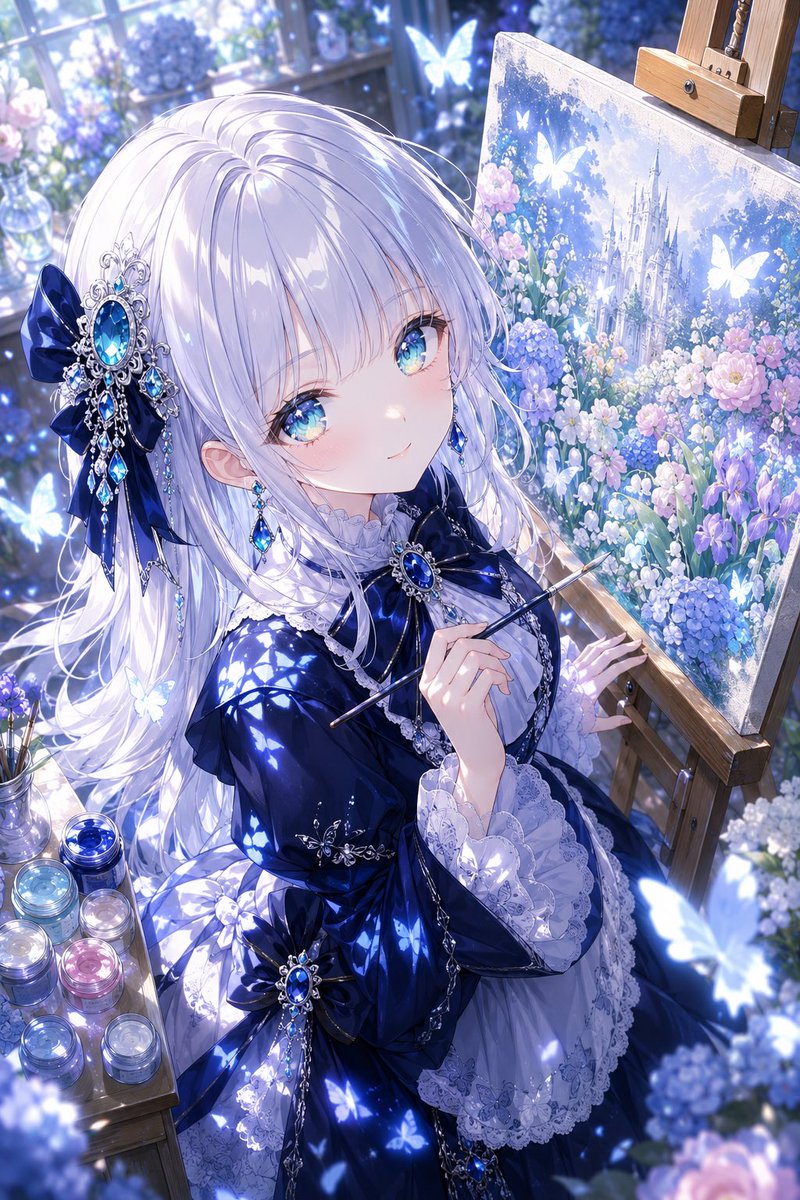
Художник в стиле аниме и фэнтези в синей мастерской
Задание для создания качественной вертикальной аниме-иллюстрации: художник в стиле готической лолиты, украшенный драгоценностями, в светлых тонах цветочной оранжереи.
Это пример использования шаблона GPT Image 2 для Аниме и игры . Используйте приведенный ниже шаблон, готовый к копированию, чтобы создать аналогичные визуальные элементы, и перед повторным использованием проверьте указание авторства Awesome GPT Image 2 Prompts и права на коммерческое использование.
Free 1K preview
Generate one preview image instantly, no sign-up required.
Промпт
Подсказка для копирования
Create a highly detailed vertical anime-style fantasy illustration of {argument name="character name" default="a young noble painter girl"} seated in a sunlit glass conservatory studio, shown from a high three-quarter angle while painting at an easel. She has very long flowing {argument name="hair color" default="silvery white"} hair with soft lavender-blue shadows, partly covering her shoulders, Show every face clearly with natural, detailed facial features. She wears an elegant deep {argument name="dress color" default="midnight blue"} gothic-lolita dress with glossy satin folds, white lace cuffs, layered ruffles, silver chains, and large sapphire jewel ornaments. Add two prominent hair accessories: one large navy ribbon with an ornate silver filigree sapphire brooch and dangling blue gems on the left side of her hair, and one matching sapphire brooch bow at her chest. She holds a thin paintbrush in her right hand near the canvas, with her left hand touching the wooden easel. The easel holds a square canvas painting of a luminous fairytale castle surrounded by hydrangeas, roses, irises, and glowing butterflies, in the same blue-purple floral palette. Surround her with a dreamy atelier environment: tall window panes behind her, soft morning light, bokeh, glass vases of flowers, scattered hydrangeas, and a small wooden side table holding exactly 8 glass paint jars in blue, cyan, silver, pink, lavender, and clear tones. Include exactly 12 glowing butterflies: 3 inside the painted canvas, 4 around the window and background, 3 around the girl's dress and hair, and 2 large blurred foreground butterflies near the lower right and lower left edges. Use a rich {argument name="color palette" default="cool sapphire blue, lavender, white, and pale pink"} palette, sparkling highlights, smooth polished fabric rendering, delicate linework, ornate jewelry, luminous particles, shallow depth of field, and a magical ethereal atmosphere. No text, no watermark, no extra characters, keep the composition portrait-oriented with the girl occupying the left and center and the easel canvas on the right.Переменные подсказки
Редактируемые заполнители аргументов, найденные в подсказке, с их значениями по умолчанию.
Best for
- - Аниме и игры visual exploration
- - Image generation and reference-image edits
- - Reusable briefs that keep source attribution visible
Change these parts
- - Subject, product, character, or scene
- - Aspect ratio, camera, lighting, and background
- - Brand, text, color, and output constraints
Recommended model and settings
- - Model: gpt-image-2
- - Input mode: Текст в изображение
- - Aspect ratio: source
- - Commercial status: review original source
How to use this prompt
- 1. Copy the prompt and preserve its structure for the first test.
- 2. Replace the subject, context, and publishing channel.
- 3. Change one camera, lighting, or style variable per iteration.
- 4. Inspect the output, source, text, and rights before reuse.
Limitations, source, and reuse cautions
- - Generated output is an editable draft, not factual, legal, or rights evidence.
- - Review the linked source, people, brands, logos, text, and third-party media before commercial use.
Больше случаев в этой категории
Приоритет отдается категориям, совместимости с режимами ввода, качеству и низкому уровню риска.






Примечания по повторному использованию и источникам
Используйте это подсказку безопасно после предварительного просмотра дела.
- 1.Скопируйте подсказку или откройте ее непосредственно в Dovoo с помощью кнопки генерации.
- 2.Настройте переменные, соотношение сторон и эталонные изображения в соответствии с вашими потребностями.
- 3.Перед публикацией или платным использованием проверьте права на источник, требования к указанию авторства, а также риски, связанные с использованием товарного знака или изображения.