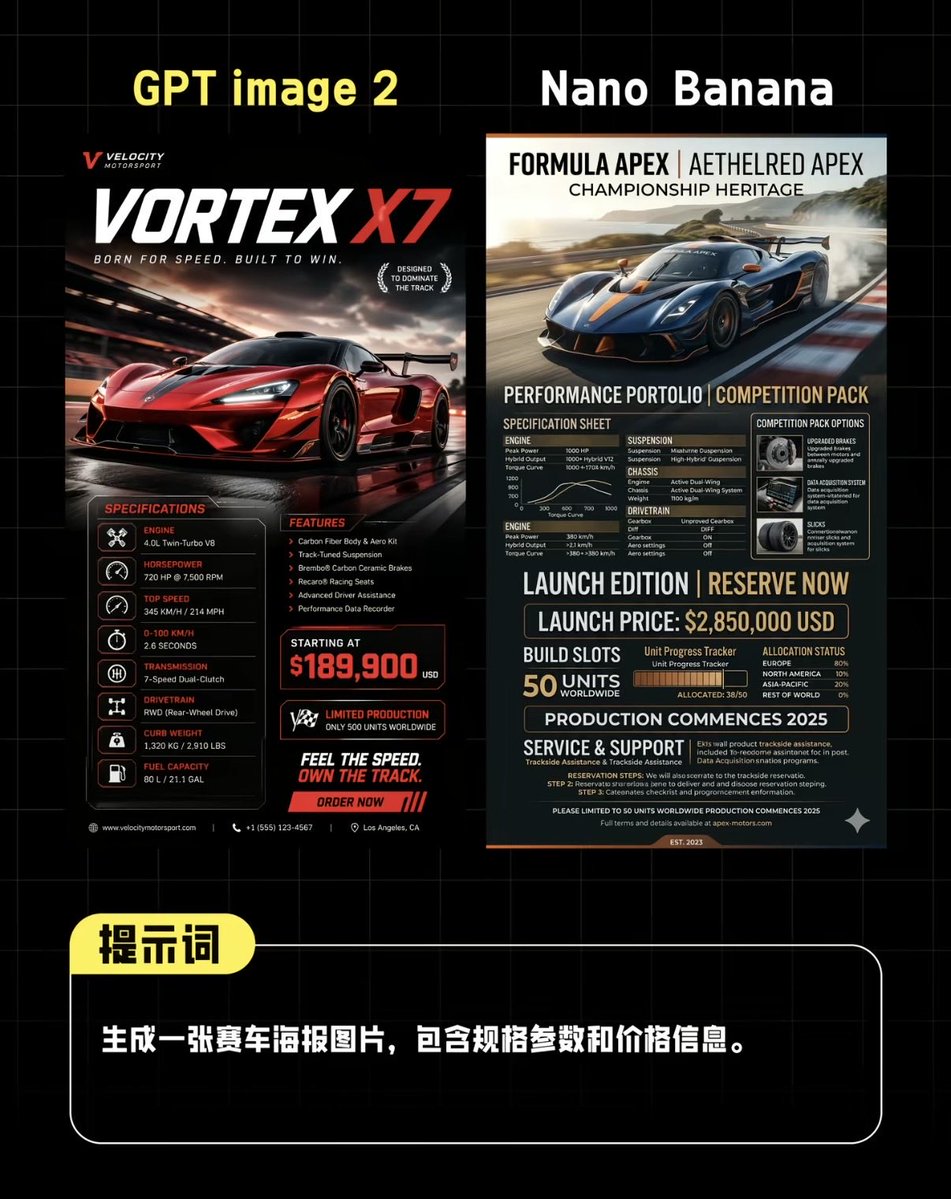
Сравнение постеров суперкаров с использованием ИИ
Изображение в стиле социальных сетей, демонстрирующее два разных дизайна гоночных плакатов, сгенерированных ИИ, над подсказкой на китайском языке, полезно для сравнения моделей изображений.
Это пример использования шаблона GPT Image 2 для Графика и плакаты . Используйте приведенный ниже шаблон, готовый к копированию, чтобы создать аналогичные визуальные элементы, и перед повторным использованием проверьте указание авторства Awesome GPT Image 2 Prompts и права на коммерческое использование.
Free 1K preview
Generate one preview image instantly, no sign-up required.
Промпт
Подсказка для копирования
Create a side-by-side comparison image on a black background with a light gray grid, in a style similar to benchmark posts on Chinese social media, for comparing two AI-generated supercar posters. Place 2 large headings at the top: “GPT image 2” in bold yellow text on the left, and “Nano Banana” in bold white text on the right. Below them, centered, display 2 different vertical racing car poster designs side-by-side with a narrow gap in between. The left poster should be presented in a high-end racing car advertisement style, using a black, red, and white color scheme, depicting a bright red supercar speeding on a wet track at dusk, with cinematic reflections, motion blur, and strong lighting effects. Add a small brand logo in the upper left corner, a large title “VORTEX X7” with “X7” in bright red, and subtitles such as “BORN FOR SPEED. BUILT TO WIN.” Add 2 laurel leaf-like badges to the right of the title area. In the lower half, include 3 content blocks: on the left, a “SPECIFICATIONS” column with 7 lines of lists containing icon symbols and labels, covering engine, horsepower, top speed, acceleration, transmission, drive system, curb weight, and compactly listing fuel capacity (if applicable) on the last line; in the middle, a “FEATURES” column with 5 key points; and a bold “PRICE” block displaying “STARTING AT” and a prominent red price displayed as {argument name="price" default="$189,900"}. Add 1 limited edition badge, 1 slogan block reading “FEEL THE SPEED. OWN THE TRACK.”, and 1 red call-to-action bar reading “ORDER NOW”. Use tiny footer details and micro-text in a contact information style along the bottom edge. The right poster should look more editorial and technical, using navy blue, charcoal gray, beige, and orange accents, depicting a deep blue supercar drifting on a track with smoke and landscape in the background. At the top, use a high-end magazine-style header with 3 stacked titles: “FORMULA APEX | AETHELRED APEX”, “CHAMPIONSHIP HERITAGE”, and a performance subtitle. In the lower half, create a dense specification sheet layout with 8 main sections: “SPECIFICATION SHEET”, “COMPETITION PACK OPTIONS”, “ENGINE”, “SUSPENSION”, “CHASSIS”, “DRIVETRAIN”, “LAUNCH EDITION | RESERVE NOW”, and “SERVICE & SUPPORT”. Include a small performance chart, a boxed options panel with 3 icon cards, a line displaying the launch price as {argument name="launch price" default="$2,850,000 USD"}, an area displaying a production quota of 50 units globally, a segmented bar for allocation or progress tracking, a line stating that production begins on {argument name="production year" default="2025"}, and dense, detailed technical specifications text. Below the two posters, add a rounded black prompt box with a white border spanning most of the width. Overlay a yellow rounded label in the upper left corner containing the Chinese characters “Prompt”. Inside the box, place a line of bold white Chinese text: {argument name="prompt text" default="Generate a racing car poster image, including specifications and pricing information."}. The overall composition should be a sophisticated social media AI image comparison screenshot, with sharp typography, high contrast, neat alignment, and realistic poster mock-up proportions.Переменные подсказки
Редактируемые заполнители аргументов, найденные в подсказке, с их значениями по умолчанию.
Best for
- - Графика и плакаты visual exploration
- - Image generation and reference-image edits
- - Reusable briefs that keep source attribution visible
Change these parts
- - Subject, product, character, or scene
- - Aspect ratio, camera, lighting, and background
- - Brand, text, color, and output constraints
Recommended model and settings
- - Model: gpt-image-2
- - Input mode: Текст в изображение
- - Aspect ratio: source
- - Commercial status: review original source
How to use this prompt
- 1. Copy the prompt and preserve its structure for the first test.
- 2. Replace the subject, context, and publishing channel.
- 3. Change one camera, lighting, or style variable per iteration.
- 4. Inspect the output, source, text, and rights before reuse.
Limitations, source, and reuse cautions
- - Generated output is an editable draft, not factual, legal, or rights evidence.
- - Review the linked source, people, brands, logos, text, and third-party media before commercial use.
Больше случаев в этой категории
Приоритет отдается категориям, совместимости с режимами ввода, качеству и низкому уровню риска.






Примечания по повторному использованию и источникам
Используйте это подсказку безопасно после предварительного просмотра дела.
- 1.Скопируйте подсказку или откройте ее непосредственно в Dovoo с помощью кнопки генерации.
- 2.Настройте переменные, соотношение сторон и эталонные изображения в соответствии с вашими потребностями.
- 3.Перед публикацией или платным использованием проверьте права на источник, требования к указанию авторства, а также риски, связанные с использованием товарного знака или изображения.