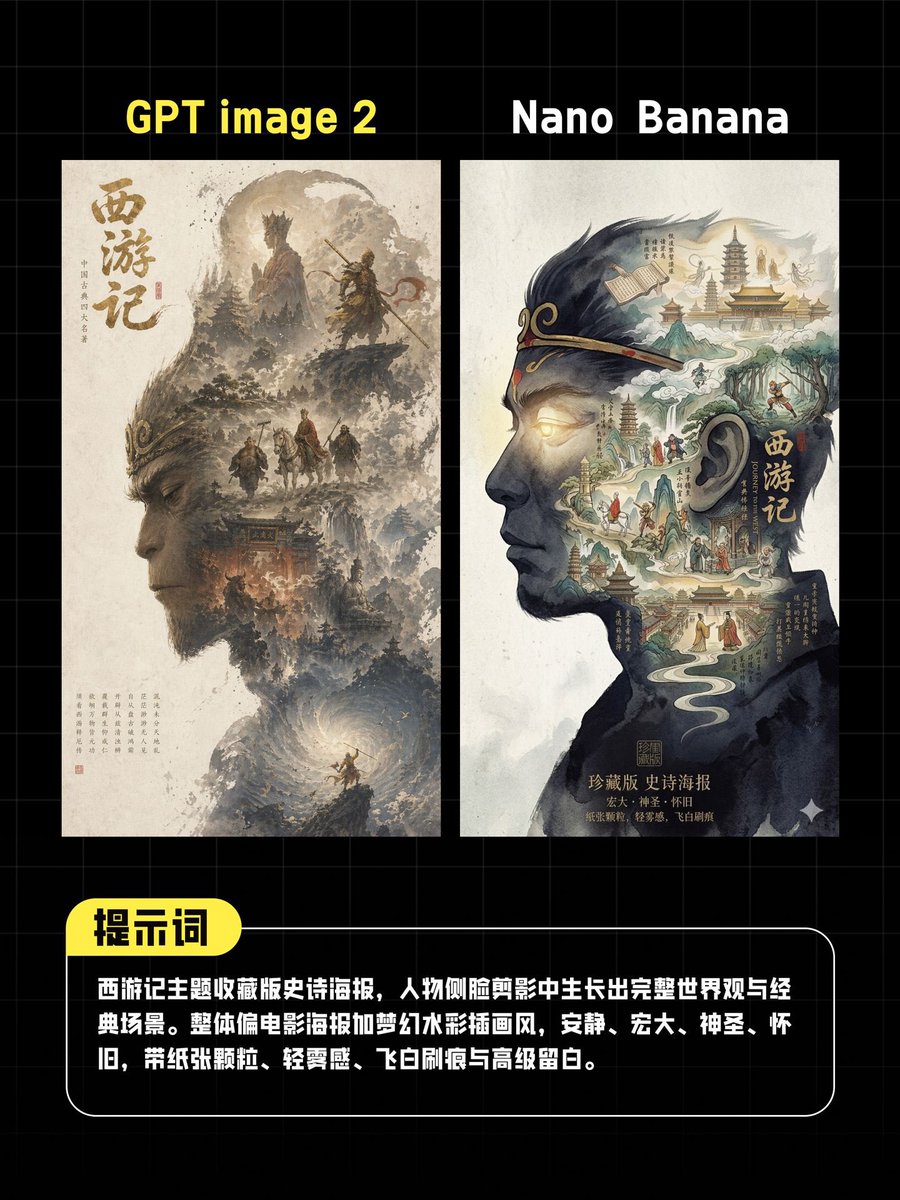
Миниатюра для сравнения постеров, созданных с помощью ИИ.
Продуманное графическое сравнение двух вариантов постеров фильма «Путешествие на Запад» для социальных сетей, дополненное китайскими подписями. Полезно для сравнительных постов с использованием моделей изображений, созданных с помощью ИИ, или для создания миниатюр для обзоров.
Это пример использования шаблона GPT Image 2 для Графика и плакаты . Используйте приведенный ниже шаблон, готовый к копированию, чтобы создать аналогичные визуальные элементы, и перед повторным использованием проверьте указание авторства Awesome GPT Image 2 Prompts и права на коммерческое использование.
Free 1K preview
Generate one preview image instantly, no sign-up required.
Промпт
Подсказка для копирования
A vertical social media comparison poster with a black background and subtle gray grid, designed in the style of a concise tech review chart. At the top are two large, side-by-side titles: bright yellow text “GPT image 2” on the left and white text “Nano Banana” on the right. Below the titles are two closely spaced, side-by-side high-fidelity poster mockups, both in an off-white paper style. The left mockup displays a traditional Chinese ink fantasy poster inspired by “Journey to the West,” with a large vertical Chinese calligraphy “Journey to the West” on the left side. The image includes soft brown and gray ink mountains, cliffs, clouds, temple architecture, and 4 miniature character silhouettes: 2 heroic figures on a rock ledge in the upper center, and 2 travelers at the bottom of the scene. A rotating, glowing cloud vortex appears at the bottom of the image. The right mockup displays a more graphic, surreal poster built within a left-facing head silhouette, filled with a Chinese fantasy landscape containing pagodas, streams, paths, and figures. The silhouette features a vertical title “Journey to the West” and is rendered in deep navy blue and black ink against a cream-colored paper background. A centered vertical rectangular blur block with soft edges and a gray-beige tone covers the middle area of both posters. At the bottom is a rounded-corner black description panel with a thin white border. A bright yellow capsule-shaped label with bold black Chinese characters “Prompt” is attached to the upper left corner. The bottom panel contains multiple lines of bold white Chinese text. The text should read: “Journey to the West themed collector’s edition epic poster, with a complete worldview and classic scenes growing out of a character profile silhouette. Overall style leans towards movie posters and dreamy watercolor illustrations, quiet, grand, sacred, nostalgic, with paper texture, light fog, flying white brushstrokes, and sophisticated negative space.” The overall style is a refined Chinese tech comparison thumbnail, high contrast, edited layout, centered composition, and a 4:5 vertical aspect ratio.
Best for
- - Графика и плакаты visual exploration
- - Image generation and reference-image edits
- - Reusable briefs that keep source attribution visible
Change these parts
- - Subject, product, character, or scene
- - Aspect ratio, camera, lighting, and background
- - Brand, text, color, and output constraints
Recommended model and settings
- - Model: gpt-image-2
- - Input mode: Текст в изображение
- - Aspect ratio: source
- - Commercial status: review original source
How to use this prompt
- 1. Copy the prompt and preserve its structure for the first test.
- 2. Replace the subject, context, and publishing channel.
- 3. Change one camera, lighting, or style variable per iteration.
- 4. Inspect the output, source, text, and rights before reuse.
Limitations, source, and reuse cautions
- - Generated output is an editable draft, not factual, legal, or rights evidence.
- - Review the linked source, people, brands, logos, text, and third-party media before commercial use.
Больше случаев в этой категории
Приоритет отдается категориям, совместимости с режимами ввода, качеству и низкому уровню риска.






Примечания по повторному использованию и источникам
Используйте это подсказку безопасно после предварительного просмотра дела.
- 1.Скопируйте подсказку или откройте ее непосредственно в Dovoo с помощью кнопки генерации.
- 2.Настройте переменные, соотношение сторон и эталонные изображения в соответствии с вашими потребностями.
- 3.Перед публикацией или платным использованием проверьте права на источник, требования к указанию авторства, а также риски, связанные с использованием товарного знака или изображения.