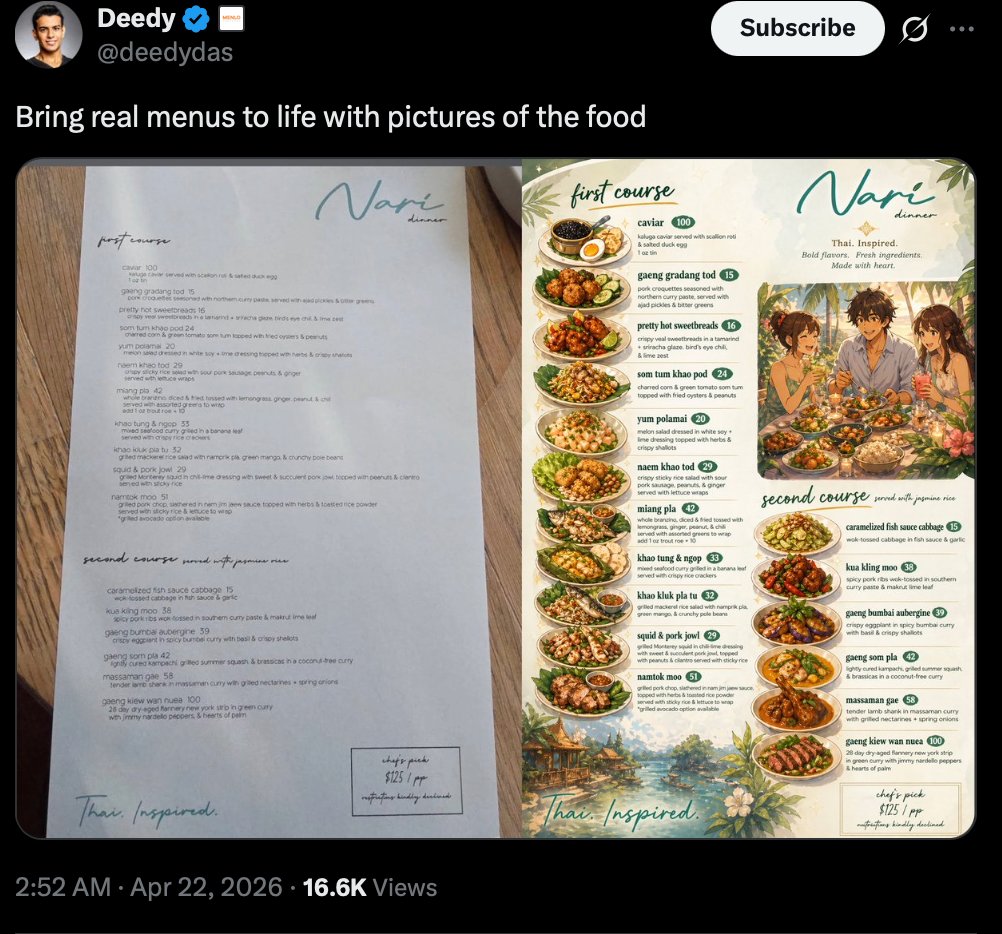
Menu de Tweets Virais: Antes e Depois
Uma captura de tela realista de uma rede social mostrando uma publicação verificada comparando um cardápio simples de restaurante com uma versão ricamente ilustrada com fotos de comida, ideal para apresentar reformulações de cardápios com tecnologia de inteligência artificial.
Este é um exemplo de prompt GPT Image 2 para Produto e Comercial . Use o prompt pronto para copiar abaixo para gerar visuais semelhantes e revise a atribuição Awesome GPT Image 2 Prompts e os direitos de uso comercial antes de reutilizá-los.
Free 1K preview
Generate one preview image instantly, no sign-up required.
Incitar
prompt pronto para copiar
A realistic dark-mode social media screenshot styled like an X/Twitter post on a black interface. At the top left is a profile avatar, the display name {argument name="profile name" default="Deedy"} with a blue verification badge, and the handle {argument name="handle" default="@deedydas"}. On the top right is a large white Subscribe button and small interface icons. The post text reads {argument name="post text" default="Bring real menus to life with pictures of the food"}. Below the caption is a side-by-side comparison image of 2 menu pages placed on a warm wooden tabletop. The left page is a minimalist fine-dining menu on white paper with sparse elegant typography, the restaurant name {argument name="restaurant name" default="Nari"} in teal handwritten script near the top right, small section headings for first course and second course, and a short list of dish names with prices in a clean editorial layout. The bottom left of the page says “Thai. Inspired.” in loose script, and a small boxed chef’s pick note appears at the lower right. The right page is a transformed illustrated menu version of the same restaurant, keeping the same restaurant name in teal script at the top and the subtitle “Thai Inspired. Bold flavors. Fresh ingredients. Made with heart.” This page is richly decorated with painted tropical leaves, flowers, and scenic borders in cream, green, and warm earth tones. It contains 2 labeled sections, “first course” at the upper left and “second course” near the middle-lower area. The first course section shows 8 plated dishes in a vertical arrangement with dish names, short descriptions, and green circular price badges: caviar, gaeng gradang tod, pretty hot sweetbreads, som tum khao po, yum polamai, naea khao tod, miang pla, and khao tung & ngor. The second course section shows 8 plated dishes with the same treatment: caramelized fish sauce cabbage, kua kling moo, giang bumbai aubergine, gaeng som pla, massaman ge, gaeng kiew wan nuea, grilled pork jowl, and naemtok moo. Near the upper right center of the illustrated page is a warm lifestyle painting of 3 diners sharing food at a table outdoors. Every dish is shown as an appetizing overhead or three-quarter plated food photo-illustration integrated into the menu layout. At the very bottom of the full screenshot, the post metadata line reads “2:52 AM · Apr 22, 2026 · 16.6K Views”. The overall image should feel like a polished viral demo screenshot showing before-and-after menu design enhancement, highly legible, photoreal UI framing with detailed editorial food-menu artwork.Variáveis de prompt
Marcadores de posição editáveis para argumentos encontrados no prompt, com seus valores padrão.
Best for
- - Produto e Comercial visual exploration
- - Image generation and reference-image edits
- - Reusable briefs that keep source attribution visible
Change these parts
- - Subject, product, character, or scene
- - Aspect ratio, camera, lighting, and background
- - Brand, text, color, and output constraints
Recommended model and settings
- - Model: gpt-image-2
- - Input mode: Texto para Imagem
- - Aspect ratio: source
- - Commercial status: review original source
How to use this prompt
- 1. Copy the prompt and preserve its structure for the first test.
- 2. Replace the subject, context, and publishing channel.
- 3. Change one camera, lighting, or style variable per iteration.
- 4. Inspect the output, source, text, and rights before reuse.
Limitations, source, and reuse cautions
- - Generated output is an editable draft, not factual, legal, or rights evidence.
- - Review the linked source, people, brands, logos, text, and third-party media before commercial use.
Mais casos nesta categoria
Priorizados por categoria, compatibilidade do modo de entrada, qualidade e menor risco.






Reutilização e notas de origem
Utilize esta instrução com segurança após visualizar o caso.
- 1.Copie o prompt ou abra-o diretamente no Dovoo com o botão de geração.
- 2.Ajuste as variáveis, a proporção e as imagens de referência de acordo com o seu caso específico.
- 3.Antes de publicar ou utilizar o conteúdo mediante pagamento, verifique os direitos da fonte, os requisitos de atribuição e os riscos relacionados à marca ou à imagem.