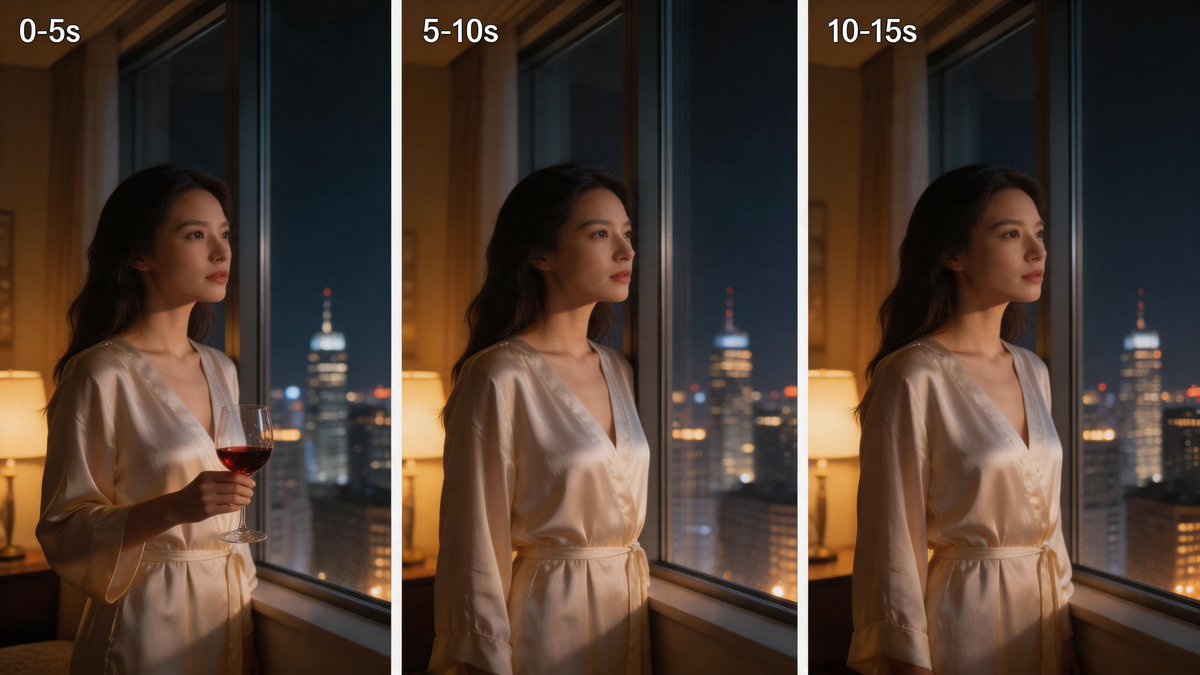
Comparação de Janela Noturna de Três Painéis
Este comando gera um tríptico cinematográfico de uma mulher de robe de cetim junto a uma janela à noite, útil para comparações visuais de tempo ou anúncios de estilo de vida baseados em humor.
Este é um exemplo de prompt GPT Image 2 para Retrato e Personagem . Use o prompt pronto para copiar abaixo para gerar visuais semelhantes e revise a atribuição Awesome GPT Image 2 Prompts e os direitos de uso comercial antes de reutilizá-los.
Precisa do conjunto completo de instruções? Use o Retrato e Personagem Para obter mais exemplos relacionados, acesse o hub de tópicos ou abra o GPT Image 2 catálogo de prompts Para obter o índice completo de exemplos, estruturas reutilizáveis e atribuição de fontes.
Free 1K preview
Generate one preview image instantly, no sign-up required.
2336/4000
Incitar
prompt pronto para copiar
{
  "type": "three-panel cinematic comparison image",
  "subject": {
    "count": 1,
    "description": "a woman standing indoors beside a tall hotel or apartment window at night, shown from mid-thigh up, face turned toward the city, long dark wavy hair, wearing a glossy ivory satin robe with a tied waist and deep V neckline",
    "prop": {
      "count": 1,
      "description": "a stemmed wine glass with red wine, held in her right hand only in the first panel"
    }
  },
  "scene": {
    "location": "warmly lit luxury interior with a table lamp glowing on the left and a nighttime city skyline outside the window",
    "background_elements": {
      "count": 3,
      "items": [
        "large floor-to-ceiling window with dark vertical frame",
        "soft warm bedside or table lamp on the left",
        "blurred high-rise buildings with bokeh lights and one prominent tower with a lit spire"
      ]
    },
    "lighting": "moody cinematic contrast, warm amber interior light on skin and robe, cool blue city light from outside, shallow depth of field"
  },
  "layout": {
    "orientation": "horizontal triptych with three equal vertical panels separated by white gutters",
    "sections": [
      {
        "title": "0-5s",
        "position": "left",
        "count": 1,
        "details": "woman by the window holding a glass of red wine"
      },
      {
        "title": "5-10s",
        "position": "center",
        "count": 1,
        "details": "same composition without the wine glass, woman gazing out the window"
      },
      {
        "title": "10-15s",
        "position": "right",
        "count": 1,
        "details": "same composition again without the wine glass, subtle pose continuity"
      }
    ],
    "text_style": "bold white sans-serif text in the top-left corner of each panel"
  },
  "style": "photorealistic, cinematic, intimate luxury lifestyle photography, soft focus background, polished skin tones, realistic satin fabric reflections",
  "camera": {
    "framing": "medium shot",
    "angle": "slightly side-on profile",
    "lens": "portrait lens around 50mm to 85mm",
    "composition": "subject placed left of center in each panel, city view visible through the glass"
  },
  "quality": "high detail, smooth natural skin, realistic glass and fabric, elegant editorial color grading"
}
Best for
- - Retrato e Personagem visual exploration
- - Image generation and reference-image edits
- - Reusable briefs that keep source attribution visible
Change these parts
- - Subject, product, character, or scene
- - Aspect ratio, camera, lighting, and background
- - Brand, text, color, and output constraints
Recommended model and settings
- - Model: gpt-image-2
- - Input mode: Texto para Imagem
- - Aspect ratio: source
- - Commercial status: review original source
How to use this prompt
- 1. Copy the prompt and preserve its structure for the first test.
- 2. Replace the subject, context, and publishing channel.
- 3. Change one camera, lighting, or style variable per iteration.
- 4. Inspect the output, source, text, and rights before reuse.
Limitations, source, and reuse cautions
- - Generated output is an editable draft, not factual, legal, or rights evidence.
- - Review the linked source, people, brands, logos, text, and third-party media before commercial use.
Importado de Awesome GPT Image 2 Prompts . É necessário dar crédito. O uso comercial é permitido allowed ; revise os direitos da fonte antes de utilizá-lo mediante pagamento.
Mais casos nesta categoria
Priorizados por categoria, compatibilidade do modo de entrada, qualidade e menor risco.

Pink Hijab Mirror Selfie Portrait
Texto para Imagem

Y2K Style Photo Booth Collage
Texto para Imagem

Female Clown Cyborg Portrait
Texto para Imagem

Natural Face Realism Modifier
Texto para Imagem

Greyscale Puzzle Portrait with Color Accent
Texto para Imagem

Fashion Studio Portrait with Blue Rim Lighting
Texto para Imagem
Reutilização e notas de origem
Utilize esta instrução com segurança após visualizar o caso.
- 1.Copie o prompt ou abra-o diretamente no Dovoo com o botão de geração.
- 2.Ajuste as variáveis, a proporção e as imagens de referência de acordo com o seu caso específico.
- 3.Antes de publicar ou utilizar o conteúdo mediante pagamento, verifique os direitos da fonte, os requisitos de atribuição e os riscos relacionados à marca ou à imagem.